
Published October 8, 2026
Your website can look fine while a contact form quietly stops sending inquiries. A broken customer path can leave people waiting, while outdated information or a failed update chips away at trust. When youâre busy running a business, maintenance can feel scattered, technical, and easy to postpone.
A practical website maintenance checklist for small business owners turns that work into a manageable routine. Youâll know what to check, how often to check it, what to document, and when to bring in technical help. The goal is a site that stays secure, functional, current, and ready to serve customers.
This guide organizes essential checks by frequency, from backups and form tests to periodic reviews of software, mobile usability, and key pages. It also helps you decide which tasks are reasonable to handle yourself and when managed hosting or technical support from Dulyfixed Small Business Solutions can help keep upkeep on track.
Key Takeaways
- Use a website maintenance checklist for small business to organize essential checks by frequency and keep routine upkeep manageable.
- Review software updates before applying them, and make sure you have a recovery plan if something goes wrong.
- Test key customer paths on mobile, including navigation, contact details, calls to action, and forms.
- Set monthly, quarterly, and event-triggered reviews based on your siteâs functions, update activity, and available time.
- Handle straightforward content and usability checks yourself; use managed support when technical changes or consistent follow-through need more attention.
Table of Contents
- Why Small Business Website Maintenance Protects More Than Your Site
- The Core Website Maintenance Checklist: Security, Backups, and Updates
- Check Website Performance, Content, and Customer Paths
- Set a Website Maintenance Schedule You Can Actually Keep
- DIY or Managed Website Maintenance: Choose a Practical Next Step
Why Small Business Website Maintenance Protects More Than Your Site
Website maintenance is the recurring work of checking and updating a site so it remains functional, secure, and useful to customers. It protects more than software. It helps preserve the paths people use to call your business, send an inquiry, or find accurate information before they visit.
Website maintenance keeps customer-facing features working through regular checks, updates, and recovery planning. It can help you catch issues early, but it canât guarantee that problems will never occur. The practical goal is to notice trouble before it goes unresolved and make recovery easier if something does go wrong.
What counts as website maintenance for a small business?
A useful website maintenance checklist groups recurring work into a few areas. For example, a site with a contact form needs more than a visual check: the form must function, the contact details around it must be accurate, and the software behind the site needs attention.
- Security: Review account access and security notifications.
- Backups: Confirm recent copies exist and know how restoration works.
- Software: Review updates for the site platform, themes, and plugins.
- Performance: Check that important pages load and behave as expected.
- Content: Verify service details, hours, contact information, and links.
- Customer actions: Test forms, phone links, and other ways visitors can get in touch or take the next step.
Routine upkeep is different from a redesign, new feature, or major content project. Those are planned changes to the site. Maintenance is the repeated inspection and care that helps existing pages and functions keep doing their job between larger projects.
What can go wrong when routine checks are skipped?
Small issues can interrupt a customerâs next step without making the whole site look broken. A visitor may find an outdated phone number, follow a link to a missing page, or submit a form that no longer reaches your business. These failures are easy to miss if you only check the homepage.
- A broken link can leave customers without the information they came to find.
- An outdated address or service description can create confusion before a call or visit.
- A failed form can prevent an inquiry from reaching the right person.
There are technical risks, too. Software that no longer receives updates may be harder to keep secure or compatible with other parts of the site. If a change causes an issue and thereâs no usable backup, restoring the site may take more time and effort. Neither problem is inevitable, but regular checks and a clear recovery plan make them easier to manage.
Start with the functions customers rely on most, then record what you checked and what needs follow-up. That simple habit turns maintenance from scattered tasks into ongoing risk management.
The Core Website Maintenance Checklist: Security, Backups, and Updates
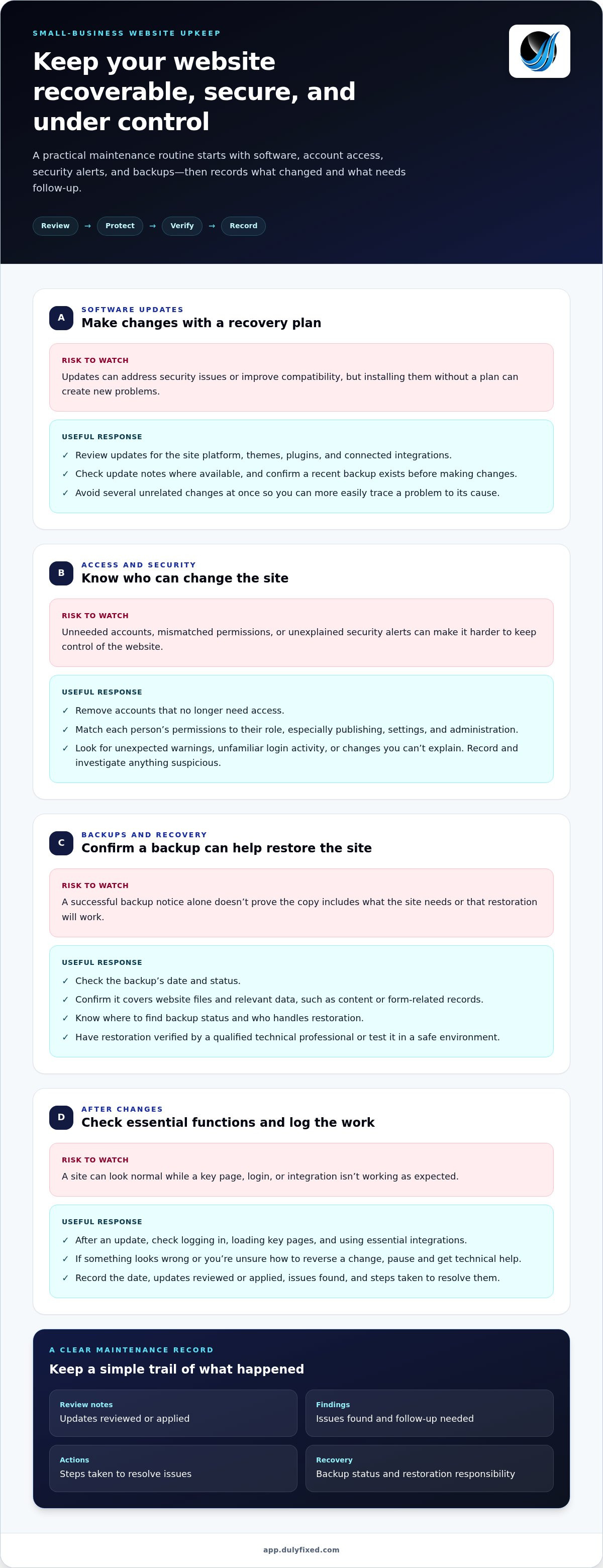
Start with the parts that help you keep control of the site and recover if a change causes trouble. Review software, access, security alerts, and backups in a consistent order. Keep a written record so you can spot recurring issues and give anyone assisting with the site a clear picture of what changed.
Use this part of your website maintenance checklist for small business to guide each review:
- Check for updates. Review your content management system, themes, plugins, and connected integrations. Note what needs updating and whether any components are no longer supported.
- Review access. Remove accounts that no longer need access. Confirm that each personâs permissions match their role, especially who can publish content, change settings, or administer the website.
- Review security notifications. Look for unexpected warnings, unfamiliar login activity, or changes you canât explain. Record what you saw and investigate anything suspicious rather than dismissing it.
- Confirm backup status. Check that backups are completing and cover the siteâs files and relevant data. Know where to find the backup status and who handles restoration.
- Log the work. Record the date, updates reviewed or applied, issues found, and steps taken to resolve them.
Check software updates, access, and security settings
Updates can address security issues or improve compatibility, but installing them without a plan can create new problems. Before making changes, confirm a recent backup is available and identify how you would restore the site. Review update notes where available, and avoid making several unrelated changes at once. That makes it easier to trace a problem to its cause.
After an update, check the siteâs main functions, including logging in, loading key pages, and using essential integrations. If something looks wrong or youâre unsure how to reverse a change, pause and get technical help rather than continuing to modify settings.
Confirm backups and know how recovery works
A backup is useful only if it contains what the site needs and can be restored. Check its date and status, and find out whether it includes the website files and relevant data, such as content or form-related records. Donât assume a successful backup notice proves the recovery process works. Test restoration in a safe environment or have a qualified technical professional verify the process.
A recent, recoverable backup makes restoration more manageable because it gives you a known point to return to. Keep your maintenance log alongside backup details, including where the backup status appears, who handles restoration, and what steps were followed during a test. Dulyfixed provides managed web hosting and technical support. Discuss website support with Dulyfixed.
Check Website Performance, Content, and Customer Paths
A page can look polished and still fail when a customer tries to act. Test the route from finding your business to calling, booking, or sending an inquiry on both a phone and a desktop browser. Test the actions customers rely on, not just the homepageâs appearance.
Use this section of your website maintenance checklist to track what to check, how often to review it, and what calls for follow-up. Adjust the schedule to match how often your site changes and which functions matter most.
Submit a controlled test through each important form; check phone and email links, booking paths, and calls to action.
Frequency: Monthly and after changes to a form or booking tool.
Escalate if: The expected confirmation doesnât arrive, or the action leads to an error.
Open key pages on a phone. Check that menus work, text is readable, buttons are easy to use, and contact details are visible.
Frequency: Monthly and after layout changes.
Escalate if: Content overlaps, controls are hard to use, or key information is hidden.
Review service descriptions, hours, contact details, calls to action, important links, and images on high-priority pages.
Frequency: Quarterly and whenever business details change.
Escalate if: A link is broken, an image is missing, or information conflicts across pages.
Watch for pages that feel unusually slow, missing content in search results, or alerts in available search and performance tools.
Frequency: Quarterly and after technical changes.
Escalate if: A key page stops loading, an important page disappears from search, or a tool reports a persistent issue.
Check headings, image descriptions, color contrast, and whether you can move through key actions using a keyboard.
Frequency: During quarterly reviews and after design changes.
Escalate if: Important content or controls are difficult to perceive or use.
Test the pages and actions customers rely on
For a form test, use an internal address or clearly label the message as a test, then confirm the expected notification or response arrives. Follow the whole path, including any confirmation screen. Repeat key actions on a phone and desktop browser. A phone link that works on a desktop may not behave the same way on mobile.
Review speed, search visibility, and accessibility basics
Look for slow-loading pages, broken images, layout shifts, and navigation that becomes awkward on a small screen. In available tools, review page titles, important page content, and indexing or performance alerts. These checks can reveal issues early, but they arenât a full accessibility or technical audit. Record what you find and escalate problems you canât safely resolve.
Set a Website Maintenance Schedule You Can Actually Keep
A maintenance routine works best when it fits your site and the time you can realistically give it. A brochure-style site with a few pages may need a lighter review than a site with booking tools, frequent updates, or several customer-facing forms. Use the schedule below as a starting point, then adjust it as your website and business change.
Which website checks belong on a monthly routine?
Set aside a recurring time to review the items most likely to affect security, recovery, or customer inquiries. A calendar reminder helps keep maintenance from getting lost among daily tasks.
- Review: Check backup status, software update notices, security alerts, and open technical issues.
- Test: Submit a controlled test through the main contact path and confirm the expected result.
- Scan: Review high-priority pages for broken links, outdated details, and obvious display problems.
- Record: Mark checks complete and turn unresolved issues into follow-up tasks.
These are practical prompts, not a guarantee that every site needs the same monthly workload. If your site changes often or depends on customer-facing tools, give those features more attention. For a simple site with few updates, prioritize the essentials and keep the routine manageable.
When should you schedule deeper or event-based reviews?
Use a quarterly review as a prompt for broader checks, not as a universal technical requirement. Review key page content, performance, mobile usability, and important customer journeys. After a redesign, software update, campaign launch, or change to business contact details, recheck the affected pages and actions promptly rather than waiting for the next scheduled review.
A maintenance log makes the schedule useful across a team. Keep it in a shared document or task tracker, with a clear owner for each check. A practical entry includes:
- Task and date: What was checked and when.
- Owner: Who completed the review or needs to act next.
- Finding: What worked, what failed, or what needs closer review.
- Follow-up: The next step, its status, and who is responsible.
Close the loop by revisiting open items during the next review. If a problem needs technical access or expertise, record what you observed and assign it for follow-up rather than leaving it as a vague reminder. A note such as âmobile contact form did not show a confirmation message after the updateâ is more useful than âcheck website.â
Build your website maintenance checklist around four factors: site complexity, how often updates happen, which functions customers rely on, and who has time to do the work. For businesses in Soap Lake, Ephrata, Moses Lake, Wenatchee, and Seattle, the same principle applies: keep accurate local business details and test the customer actions your site depends on.
Discuss ongoing website maintenance supportDIY or Managed Website Maintenance: Choose a Practical Next Step
The right maintenance approach depends on the work your site needs and who can reliably do it. A simple site with predictable updates may be manageable in-house. If technical tasks keep slipping, or a site issue could interrupt an important customer function, managed hosting and technical support can provide a clear path to troubleshooting.
Use these questions to compare the options:
- Time: Can someone consistently make room for checks and follow-up, or does maintenance compete with daily operations?
- Technical confidence: Is the owner comfortable reviewing routine notices, or do software changes and troubleshooting feel risky?
- Continuity: Is there a documented process another person can follow if the usual owner is unavailable?
- Escalation: Is it clear who handles an issue that affects the siteâs operation or customer-facing features?
You donât have to choose all DIY or all managed support. Keep simple content reviews and basic customer-path checks in-house while assigning technical work to someone with the right experience. A website maintenance checklist can make that handoff clearer by naming each task, its owner, and when it needs escalation.
When does a DIY maintenance routine make sense?
Self-managed upkeep can work for a straightforward site with few technical dependencies, predictable changes, and an owner who has time and confidence to follow a routine. Keep a secure record of who has access, where backup information is found, and who owns each task. If checks are repeatedly missed or technical issues remain unresolved, treat that as a sign to adjust the process, not simply add more reminders.
DIY can keep the routine close to the business, but it also depends on staff capacity and clear handoffs. If one person holds all the knowledge, a vacation or role change can leave important tasks without an owner. Document the process so someone else can understand whatâs been checked and what still needs attention.
What can managed hosting and technical support take off your plate?
Dulyfixed provides managed web hosting and technical support. Managed hosting can reduce the hands-on work involved in website hosting operations, while technical support gives you a path for troubleshooting issues that go beyond routine content checks. This can help maintain continuity when an update, integration, or site behavior needs experienced attention. It doesnât remove your responsibility for accurate business information or eliminate the possibility of incidents; it gives technical tasks a defined place to go.
Learn more about Dulyfixed website services, including managed hosting and technical support.
Make Your Next Maintenance Check Count
A checklist only helps if it becomes part of how you run the business. Choose one check that matters most to your customers, assign someone to own it, and put the next review on the calendar. A small, repeatable start is more useful than a long task list no one has time to complete.
Use your website maintenance checklist for small business as a working document. Update it when your site changes, when a task keeps getting missed, or when a technical issue needs a clearer escalation path. Over time, those notes can help you decide which tasks to keep in-house and where experienced support would make the routine easier to sustain.
Keep the process practical, review it regularly, and give your website the attention it needs to keep serving customers. To plan managed hosting or technical support for your site, contact Dulyfixed.
Frequently Asked Questions
How often should a small business website be maintained?
There isnât one schedule that fits every site. Keep automated alerts enabled where your hosting or website tools provide them, and review urgent notices when they arrive instead of waiting for a calendar reminder. For routine reviews, consider how often the site changes and how costly it would be for a key function to fail. A static information site and a site tied to active campaigns may need different levels of attention.
What should be on a website maintenance checklist?
A website maintenance checklist for small business owners can also track items that are easy to overlook, such as domain renewal dates, hosting account billing contacts, and the renewal status of paid integrations. Record where each service is managed and who can access its account. This makes it easier to spot a renewal notice, prevent an important service from lapsing unexpectedly, and find the right account without searching through old emails.
Can I maintain my small business website myself?
Yes, if you can manage the routine and protect access to the accounts involved. Use separate named logins rather than a shared password, store credentials in a secure password manager, and turn on multifactor authentication where itâs available. Keep account recovery details current, too. These steps help preserve control if a staff member leaves or loses access, even when day-to-day upkeep stays in-house.
What happens if I skip website maintenance?
A website can appear to work while a behind-the-scenes business tool stops collecting useful information. For example, analytics tracking may stop recording inquiries even though visitors can still submit a form. That can make it harder to tell which pages or campaigns are bringing in leads. If reporting suddenly changes, compare the siteâs tracking setup and recent changes before assuming customer interest has dropped.
Do small businesses need managed website maintenance?
Managed maintenance can be useful when responsibility is split across hosting, the website platform, and connected services. Map out who owns each system and who handles an issue that crosses between them. Clear ownership can prevent a support request from stalling while people determine where the problem belongs. If one person can coordinate those responsibilities reliably, a fully managed arrangement may be less necessary.
How do I know whether a website update worked?
Check whether the change produced the intended result in the tools that depend on it, not only whether the page looks different. For example, if an update affects conversion tracking, confirm that a test action appears in the reporting tool. Compare the result with your notes from before the change, and record the date and outcome. That creates a useful reference if a later report looks unusual.
Should website maintenance include SEO checks?
Yes, especially when you change or remove page URLs. Before publishing a URL change, note the old address, set a redirect to the most relevant replacement page, and update internal links that still point to the old address. Then test both addresses. This helps visitors and search engines reach the intended content instead of encountering a dead end or an unnecessary chain of redirects.
Talk With Dulyfixed
If this article connects with something you are trying to improve, send a note about your website, marketing, search visibility, or AI discovery goals.