

Published October 9, 2026
What if preventing website downtime depends less on finding a perfect host and more on putting the right safeguards in place? Learning how to prevent website downtime starts with a practical plan: maintain your site, monitor its essential functions, and know how youâll respond if an outage happens.
An interruption can block customers from reaching your business, disrupt lead generation, and leave you sorting through technical issues when youâd rather be serving customers. Reliability rarely comes from one setting or service. Backups, software updates, security, monitoring, and dependable hosting each play a part.
This guide covers which prevention tasks to prioritize, how to spot trouble before it affects important website functions, and what to do when your site goes offline. Youâll also learn how managed web hosting and technical support can help small businesses keep their websites usable. Whether your business serves Soap Lake, Ephrata, Moses Lake, Wenatchee, or Seattle, a repeatable plan can reduce avoidable outages and make recovery less uncertain.
Key Takeaways
- Learn how to prevent website downtime by identifying the pages and functions customers rely on most.
- Distinguish a full outage from slow pages or broken forms so you can spot problems that still disrupt customers.
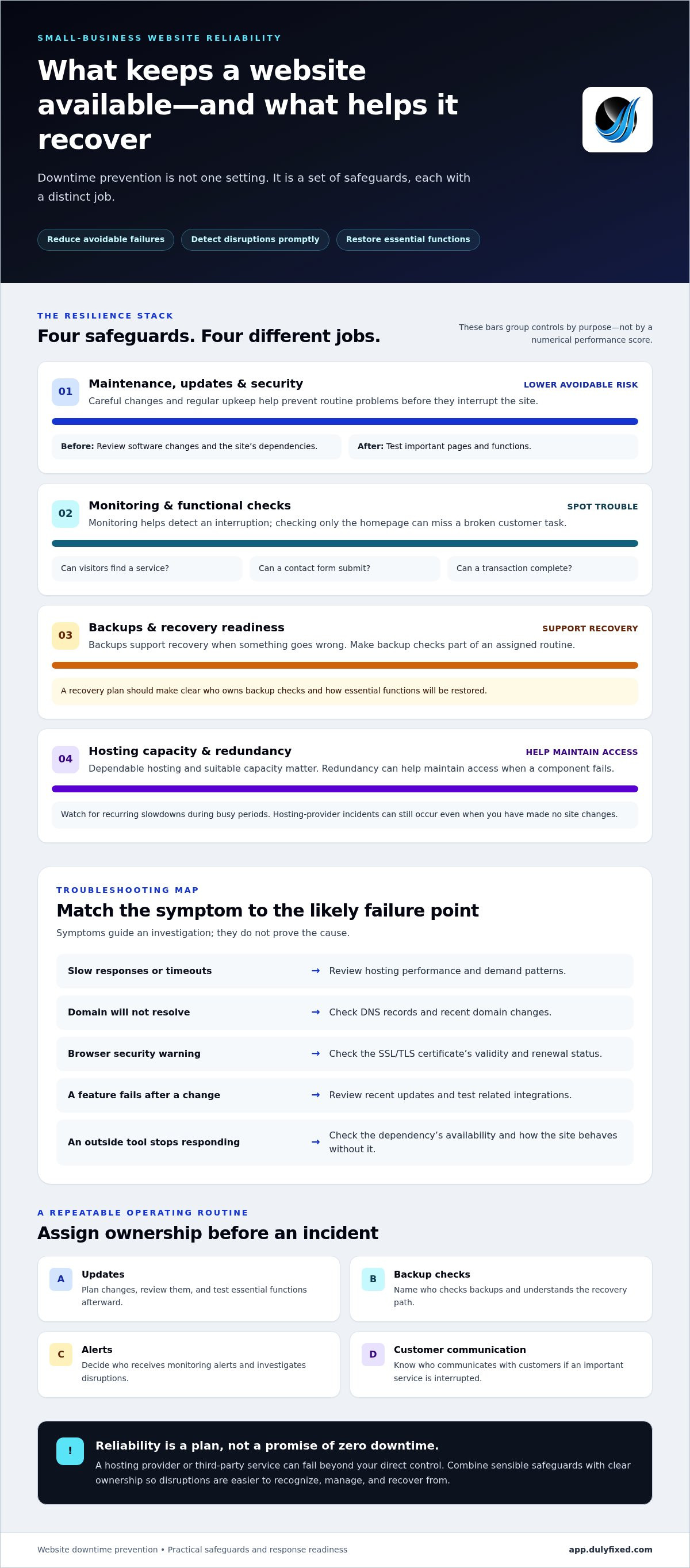
- Match each safeguard to its job: monitoring detects trouble, backups support recovery, and redundancy helps maintain access.
- Assign clear ownership for updates, backup checks, alerts, and customer communication before an incident occurs.
- Compare self-managed hosting with managed support based on your teamâs time, technical skills, and recovery needs.
Table of Contents
- How website downtime affects a small business, and what prevention can realistically do
- How websites go down: the technical failure points to address
- Website downtime prevention methods compared: monitoring, backups, and redundancy
- How to prevent website downtime with a practical small-business routine
- When managed hosting and technical support make sense for downtime prevention
How website downtime affects a small business, and what prevention can realistically do
Website downtime means visitors canât use some or all of the functions they need. Sometimes the entire site is unavailable. Other times, the homepage loads but a key task fails. For a small business, that distinction matters: a website can appear online while still blocking the action that brings in an inquiry, sale, or appointment.
What counts as website downtime?
A server outage prevents visitors from reaching the site at all. A partial failure is less obvious: pages may load, but a contact form wonât submit, checkout wonât complete, or an appointment request wonât go through. Slow pages can also make a site difficult to use, even if they eventually appear. These are practical disruptions, not just technical details.
Checking only the homepage gives you an incomplete picture. It doesnât confirm that the pages and tools customers rely on are working. Think of availability in terms of essential tasks: can a visitor find your service, send a message, and complete a transaction? The broader concept of Understanding Downtime also includes interruptions to systems people depend on, not just a completely blank screen.
Why small businesses need a realistic availability plan
Customers may discover a business through search, return to check details, or use its website to take the next step. If a key page or feature fails, they may leave without making contact. A broken checkout interrupts a transaction; a failed form can leave a customer unsure whether their request reached anyone. Repeated friction can also weaken confidence in the business.
- Missed opportunities: A visitor canât submit a question or request an appointment.
- Interrupted operations: A customer canât complete a purchase or another online task.
- Added uncertainty: A slow or unreliable site makes it harder for visitors to know what to do next.
Careful changes, regular upkeep, and clear ownership can reduce routine problems. Other interruptions, such as a hosting-provider incident or a failure in a third-party service, may be outside your direct control. A realistic plan accounts for both. It doesnât promise that an outage will never happen.
Instead, resilience has three practical aims: lower the chance of avoidable failures, detect disruptions promptly, and restore essential functions when something goes wrong. Thatâs the useful answer to how to prevent website downtime: combine sensible safeguards with a clear recovery approach. No host, tool, or maintenance routine can guarantee zero downtime, but preparation can make an incident easier to recognize and manage.
How websites go down: the technical failure points to address
A website depends on more than its visible pages. Hosting, domain settings, software, security certificates, and outside services all need to work together. A failure in one layer can make the site slow, block access, or interrupt a key task. Identifying the likely failure point helps you choose the right prevention step instead of making changes at random.
Hosting, capacity, and traffic-related failures
A hosting server uses computing resources to respond to visitor requests and deliver pages. If those resources reach their limits, visitors may see slow responses, repeated timeouts, or errors. An incident at the hosting provider can also interrupt access even if you havenât changed your site.
A sudden rise in visitors can increase demand, but a traffic surge doesnât automatically cause an outage. Capacity planning depends on the siteâs workload, how itâs built, and its usual traffic patterns. Watch for recurring slowdowns during busy periods, then use those observations to assess whether the hosting setup can handle the load.
DNS, certificates, updates, and third-party dependencies
DNS, or the Domain Name System, directs a domain name to the server where its website is hosted. Incorrect or outdated DNS records can send visitors to the wrong place or prevent the site from loading. An expired SSL/TLS certificate can trigger browser security warnings, discouraging visitors even when the server is running.
Software changes carry their own risks. A plugin, theme, or platform update can conflict with another component. Payment tools, booking services, and other integrations can also fail outside the website itself. Review changes before applying them, test important functions afterward, and keep track of which external services the site relies on.
Use symptoms to guide your investigation, not as proof of a cause. A timeout could point to hosting capacity or a provider incident. A browser warning may indicate a certificate problem. A failed checkout could involve an update or payment integration. Check the affected pages and tools, note what changed, and look for patterns before making corrective changes.
- Slow responses or timeouts: Review hosting performance and demand patterns.
- Domain wonât resolve: Check DNS records and recent domain changes.
- Browser security warning: Check the certificateâs validity and renewal status.
- A feature fails after a change: Review recent updates and test related integrations.
- An outside tool stops responding: Check whether the dependency is available and how the site behaves without it.
In short: Match each symptom to a likely failure point, reduce avoidable risk through maintenance and testing, and keep a recovery path ready. Thatâs a practical foundation for how to prevent website downtime without assuming every failure can be stopped. If hosting or technical troubleshooting needs a clearer owner, discuss your website support needs.
Website downtime prevention methods compared: monitoring, backups, and redundancy
Downtime controls solve different problems. Maintenance lowers the chance of a failure. Monitoring helps you notice one. Backups let you restore lost or damaged site components. Redundancy reduces reliance on a single component. Managed support can help keep these tasks organized and troubleshoot issues. None of these measures alone prevents every outage, so choose a mix based on the parts of your site that matter most.
Monitoring and maintenance catch different problems
Uptime monitoring checks whether a site responds from outside your hosting environment. It can alert you to an outage, but it doesnât stop one from happening. A basic homepage check may also miss an expired certificate, a broken form, or a failed checkout. Add checks for the functions customers use, along with certificate, DNS, and performance checks where your tools allow.
Maintenance works earlier in the process. Planned software updates, followed by tests of key pages and features, can reduce the chance that an avoidable conflict disrupts the site. Updates still carry some risk, so make changes deliberately and keep a recovery option ready.
Backups, redundancy, and managed hosting serve different needs
A backup is a recoverable copy of site files, data, or both. It supports restoration after accidental changes, damage, or loss, but it doesnât keep the live website available during a failure. Redundancy uses alternate components or paths to reduce dependence on a single point of failure. It can improve resilience, but it adds setup and oversight and doesnât eliminate every source of disruption.
Monitoring
Purpose: Detect an outage or a change in availability. Tradeoff: Someone must review alerts and act; monitoring doesnât repair the problem.
Maintenance
Purpose: Reduce avoidable failures through planned updates and checks. Tradeoff: Requires ongoing ownership and testing; it canât prevent provider or third-party incidents.
Backups
Purpose: Restore site components or data after a problem. Tradeoff: Copies need to be current and usable; backups donât provide live availability.
Redundancy
Purpose: Limit reliance on one component. Tradeoff: Adds complexity and still canât prevent every failure.
Managed support
Purpose: Help handle hosting maintenance and technical troubleshooting. Tradeoff: Responsibilities still need to be clear, including who receives alerts and communicates during an incident.
For a small team, the best starting point is often to assign ownership before adding tools. Decide who checks alerts, schedules updates, confirms backups can be restored, and tests critical features after changes. Dulyfixed provides managed web hosting and technical support to help businesses handle hosting tasks and troubleshoot issues. The practical answer to how to prevent website downtime is a layered plan: reduce risks where you can, detect failures promptly, and prepare to restore service.
How to prevent website downtime with a practical small-business routine
A useful routine doesnât need to be complicated. It needs clear priorities, an owner for each task, and a process people can follow when the site behaves unexpectedly. Start with the customer actions your website supports, then build maintenance and response steps around them.
Set a prevention cadence and assign ownership
Put routine checks on a calendar, and name a primary owner and backup contact. A task without an owner is easy to miss, especially when website work competes with daily operations.
- Map critical pages and dependencies. List the pages customers rely on, such as service information, contact forms, checkout, or appointment requests. Note the tools those tasks depend on, including payment, booking, or email services.
- Assign responsibility. Record who applies software updates, checks backups, receives monitoring alerts, and communicates with staff or customers during an incident. Name an alternate in case the primary contact is unavailable.
- Schedule maintenance. Add software updates, certificate renewal dates, and domain record reviews to a shared calendar. After an update, test the siteâs key pages and user journeys rather than assuming the change worked.
- Review customer paths. Periodically submit a test inquiry or walk through a booking or purchase flow. This can reveal a broken step that a homepage check would miss.
Prepare and respond when the site becomes unavailable
Keep an operational record in a secure, accessible place. Include hosting and domain account details, support contact information, the monitoring alert process, and where backups are stored. Limit access to people who need it, and make sure the responsible team members know how to use the record.
Test recovery in a controlled environment or through a planned restoration process, not by experimenting on the live site. Confirm that the backup contains the files and data you need, and document any steps or access details required to restore them. A backup that has never been tested may not be ready when you need it.
If an outage occurs, keep the response simple and orderly:
- Confirm the issue: Check the site and the affected customer task from another device or connection if possible.
- Record symptoms: Note what fails, when it began, any error messages, and recent site changes.
- Notify support: Share those details with the person responsible for hosting or technical troubleshooting.
- Verify recovery: Test the affected pages and customer actions before considering the incident resolved.
This ownership-based routine turns how to prevent website downtime into repeatable work, while giving your team a practical first response when prevention isnât enough. For help aligning hosting and technical support with your website, review your website reliability needs.
When managed hosting and technical support make sense for downtime prevention
Managed support can be useful when website upkeep keeps slipping, an outage takes too long to diagnose, or no one on the team feels confident handling hosting issues. That doesnât mean every small business needs the same setup. The right choice depends on how much the site supports daily operations, how complex it is, and the time and skills available to maintain it.
Choose support based on workload, skills, and business impact
Start by listing who currently handles updates, backups, monitoring alerts, and incident diagnosis. If those tasks have no clear owner, or depend on one person who is already stretched, outside help may make responsibilities easier to manage. A simple informational site may need less hands-on attention than a site that supports frequent customer transactions or appointments.
Compare the work involved, not just the hosting label:
- Self-managed: Your team handles routine changes, checks, alert response, and coordination with hosting or software support. This can suit a team with the time and technical confidence to own those tasks.
- Managed arrangement: Hosting maintenance and technical troubleshooting are handled with outside support. Your team still needs to know who makes business decisions and communicates with customers during an incident.
Managed hosting can reduce the amount of infrastructure work a business handles itself, but no hosting provider can prevent every outage. External services, domain issues, software changes, and other failures can still affect a website. Set expectations around responsibilities and escalation so the support arrangement addresses real gaps rather than creating a false sense of certainty.
How Dulyfixed Small Business Solutions supports dependable business websites
Dulyfixed Small Business Solutions provides managed web hosting and technical support for hosting needs and troubleshooting. Website reliability also depends on how the site is built and used. Mobile-first, high-speed website development can support a smoother experience for visitors, while an SEO-ready structure helps organize site content. These design qualities support usability, but they arenât guarantees against downtime.
To assess how to prevent website downtime for your business, consider where the site matters most, what your team can maintain consistently, and where technical support would close a gap. Dulyfixed Small Business Solutions serves businesses in Soap Lake, Ephrata, Moses Lake, Wenatchee, and Seattle with website and landing page development, managed hosting, and technical support. A practical support arrangement should make ownership clearer and help keep the website usable, without suggesting every technical risk can be removed.
Make website reliability part of your routine
Dependable websites arenât built through one big fix. Theyâre maintained through clear ownership, regular attention, and a response plan your team can actually follow. Choose one practical next step: review who receives alerts, confirm your recovery details are accessible, or check that the pages customers rely on still work as expected.
That steady approach is the heart of how to prevent website downtime. You donât need to solve every technical issue at once. Start with the risk that would disrupt your business most, address it, then build from there. Dulyfixed can help align managed hosting and technical support with your websiteâs needs.
Plan your website hosting and support with DulyfixedFrequently Asked Questions
Is it possible to prevent all website downtime?
No. Some causes sit outside a businessâs control, so itâs more useful to define acceptable risk than to expect perfect availability. Decide which customer tasks are most urgent and what fallback you can offer if theyâre unavailable. For example, staff might direct customers to a phone number or alternate ordering method while a key online feature is being restored.
Can a website be down for some visitors but available for others?
Yes. Access can vary because of browser settings, security rules, or an issue affecting a particular network or device. A customer may also have an outdated cached page that behaves differently from a fresh visit. If reports come from customers in Soap Lake, Ephrata, Moses Lake, Wenatchee, or Seattle, note their location and device. That pattern can help technical support narrow the investigation.
How can I tell whether my website is down or just slow?
Look at where the delay occurs. If the browser connects quickly but images or page elements take time to appear, the issue may involve page resources rather than the serverâs initial response. Browser developer tools can show which requests are slow or failing. If you donât use those tools, save the affected page address and a screen recording to help someone diagnose the behavior.
What should I do first when my business website goes down?
Prevent customers from making repeated attempts at actions that might have completed, such as submitting a payment or request. Check any order or inquiry records before asking someone to try again. If the interruption affects a service customers rely on, let staff know what to tell callers and which alternate channel to use. This limits confusion while technical troubleshooting proceeds.
Do website backups prevent downtime?
No. A backup doesnât keep a live site available, and its usefulness depends on what it contains and when it was captured. For a site that records orders or form submissions, consider whether a restored copy could miss recent activity. Decide how much data your business can afford to lose, then align backup frequency and retention with that need.
Can website updates cause downtime?
Yes. A change can disrupt a feature even if the rest of the site appears normal. To make problems easier to trace, avoid bundling unrelated changes into one release. Keep a brief change log with the update, date, and affected components. If a function breaks afterward, that record helps identify what to review and whether to reverse the change.
Does a website monitoring alert mean customers cannot access the site?
Not necessarily. An alert may reflect a short-lived failure, a check against one specific URL, or a problem that has already cleared. Read the alert details before treating it as a confirmed customer-facing outage. Check its timestamp, the page or endpoint tested, and whether the alert repeats. A form endpoint can fail even while the main site remains reachable.
Talk With Dulyfixed
If this article connects with something you are trying to improve, send a note about your website, marketing, search visibility, or AI discovery goals.