
Published October 4, 2026
What if the best time to deal with a website or technology problem is before it interrupts your workday? When a site goes offline, hosting needs attention, or a routine tech issue slows your team, troubleshooting can pull you away from running the business. Managed technical support gives you an ongoing way to maintain and troubleshoot the digital systems your business depends on.
Itâs reasonable to ask what âmanagedâ actually covers. The scope should name the systems and tasks included, not hide behind technical jargon. For a small business, that may mean website and hosting maintenance alongside practical troubleshooting. This differs from on-demand help, which starts after a problem appears and focuses on resolving that immediate issue.
This guide explains what routine support can address, how ongoing maintenance differs from reactive assistance, and what to consider when shaping support around your digital needs. Youâll also see how website upkeep, managed hosting, and troubleshooting fit together for businesses in Soap Lake, Ephrata, Moses Lake, Wenatchee, and Seattle.
Key Takeaways
- Managed technical support is ongoing help for maintaining and troubleshooting business technology, with responsibilities defined around the systems you rely on.
- Clarify whether support covers routine maintenance, website hosting, troubleshooting, or operational guidance so expectations are clear.
- Compare break-fix help, managed support, and internal handling by considering timing, continuity, planning, and how much time your team can devote to technology issues.
- Keep an inventory of essential websites, hosting, accounts, and workflow dependencies to make support requests more useful.
- Dulyfixed provides managed web hosting and ongoing technical support for small businesses in Soap Lake and nearby communities.
Table of Contents
- What Is Managed Technical Support for a Small Business?
- What Does Managed Technical Support Include, and What Should Be Defined?
- Managed Support vs. Break-Fix Help: Which Approach Fits?
- How to Make Managed Technical Support Work Day to Day
- How Dulyfixed Supports Small-Business Websites and Digital Operations
What Is Managed Technical Support for a Small Business?
Managed technical support is ongoing help maintaining and troubleshooting the business technology included in a support arrangement. Instead of treating each issue as an isolated repair, it gives you an ongoing point of support for the digital systems your business relies on.
The scope depends on the systems you use and the responsibilities in the arrangement. A small business focused on its website and hosting may need different support from one that relies on connected scheduling, email, and back-office tools. Before support begins, list the systems that matter and define what help each one needs.
What does managed technical support mean in plain English?
Think of it as a working relationship for keeping agreed-upon technology usable and addressing issues as they arise. The Managed services model describes ongoing management of services rather than relying only on break-fix work. For a small business, that could mean help with website access or a hosting issue, along with troubleshooting covered by the arrangement.
An ongoing support relationship is different from a one-time repair or a larger project. Resolving a recurring website access issue is troubleshooting; building a new website or creating custom functionality is development work. Those projects may relate to your broader digital needs, but define their scope separately from routine support.
Which small-business technology needs can it relate to?
Start with the technology customers and staff need to use. Your business website needs to remain accessible, while hosting supports the site behind the scenes. Routine support may also address practical problems such as difficulty signing in, a page that isnât displaying as expected, or a tool that no longer connects to part of a workflow.
Small-business operations often rely on several digital tools working together. For example, a website inquiry may need to reach an email account or feed into a business process. If one connection fails, you may miss work or have to handle the task manually. Support is easier to direct when you identify essential systems and specify which ones are included.
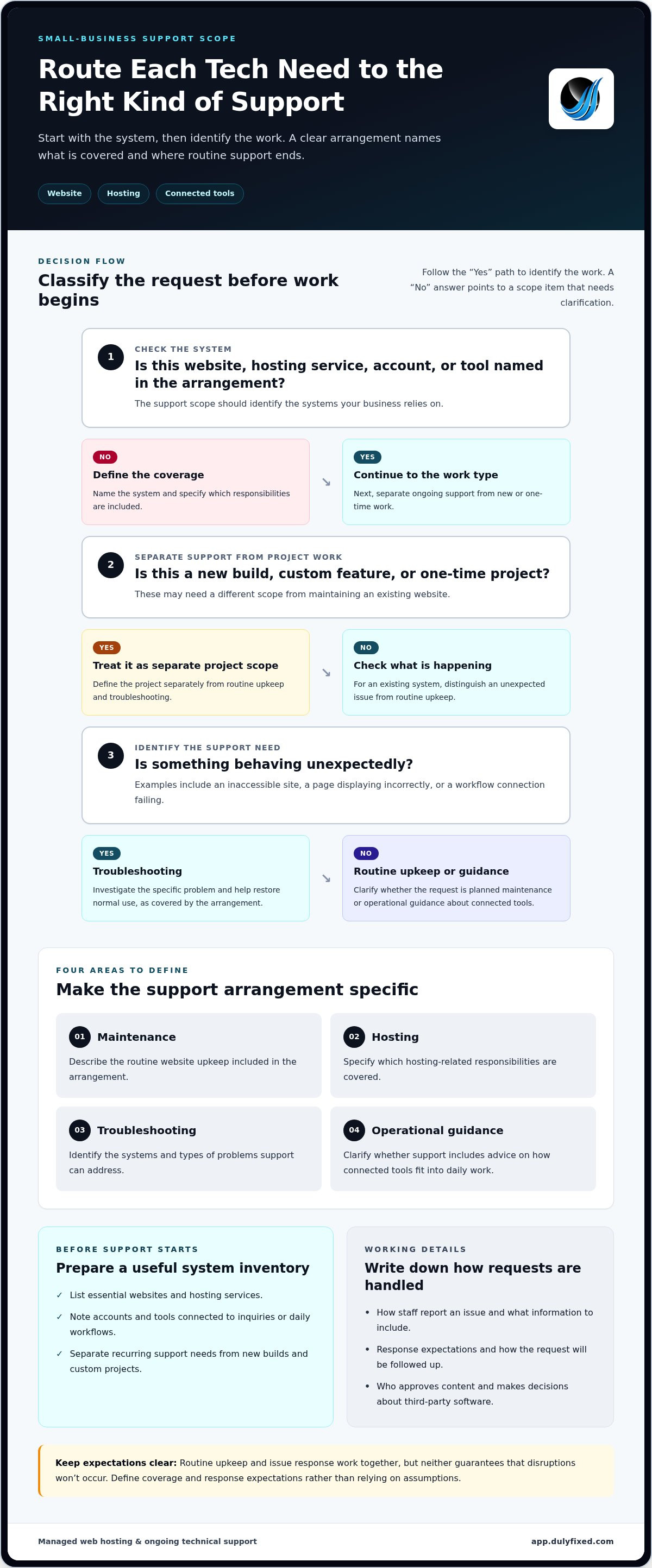
- List the websites and hosting services your business depends on.
- Note the accounts and tools connected to customer inquiries or daily workflows.
- Separate recurring troubleshooting needs from new builds or custom projects.
This inventory gives support a clearer starting point and helps prevent routine technology issues from consuming an ownerâs attention. The goal isnât to hand off every digital decision. Itâs to make support fit the systems your business actually uses.
What Does Managed Technical Support Include, and What Should Be Defined?
A clear support arrangement turns a broad promise into practical responsibilities. For a small business, the work may fall into four areas: maintenance, troubleshooting, hosting, and operational guidance. Define the mix around the website and digital tools your business depends on rather than assuming every support arrangement covers the same tasks.
Routine maintenance, hosting, and troubleshooting
Maintenance means ongoing attention to the agreed systems. Hosting support concerns the environment where a website operates. Troubleshooting starts when something behaves unexpectedly, such as a site becoming inaccessible or a connected workflow failing to pass information where it needs to go. Routine upkeep and issue response work together, but neither guarantees that disruptions wonât occur.
Website maintenance and technical support overlap, but they arenât identical. Maintenance focuses on continued upkeep. Support may also involve investigating a specific problem and helping restore normal use. For broader context on why security belongs in these conversations, review this guidance on the threats businesses may face online.
- Maintenance: Define the routine website upkeep included in the arrangement.
- Hosting: Specify which hosting-related responsibilities are covered.
- Troubleshooting: Identify the systems and types of problems support can address.
- Operational guidance: Clarify whether help includes advice about how connected tools fit into everyday work.
How to set clear support boundaries
Put the working details in writing. Name the covered websites, hosting, accounts, and tools. Describe how staff should report an issue, what information to include, and how it will be followed up. Set response expectations so everyone knows what happens after a report, without relying on assumptions about timing.
Separate routine support from new work. A content correction, new site feature, custom development, or one-time project may require a different scope from maintaining an existing website. Document who approves content and who makes decisions about third-party software. Clear ownership prevents a troubleshooting request from quietly turning into an undefined project.
For a useful companion, read about managed website maintenance alongside support planning. Dulyfixed provides managed web hosting and ongoing technical support for small-business digital operations. To discuss support for your website and hosting, share your support needs.
Managed Support vs. Break-Fix Help: Which Approach Fits?
Break-fix help begins after someone notices a problem. You report the issue, get assistance with that specific problem, and decide what to do if it happens again. Managed support is an ongoing arrangement with defined responsibilities for agreed systems. It can create more continuity and room for planned maintenance, but it doesnât prevent every outage or technical issue.
Hereâs how the approaches differ in day-to-day practice:
| Consideration | Break-fix help | Managed support | Internal handling |
|---|---|---|---|
| Timing | Starts after someone reports a problem. | Ongoing relationship for the systems and tasks in scope. | Staff respond as time and skills allow. |
| Planning | Focuses on the issue at hand. | Can include agreed routine upkeep as well as troubleshooting. | Depends on internal priorities and available expertise. |
| Continuity | Knowledge may need to be rebuilt with each request. | Support can build familiarity with covered systems over time. | Knowledge stays in-house, but may rest with a small number of people. |
| Owner effort | Owner identifies the problem and arranges help. | Owner defines the scope and reports issues through the agreed process. | Owner or staff spend time diagnosing and resolving issues. |
How reactive support differs from ongoing support
The key difference is what happens between problems. Break-fix assistance is useful for a discrete issue, such as restoring access to a website. Managed technical support adds an ongoing structure around covered systems, so responsibilities and reporting donât have to be worked out from scratch each time. Its value depends on what the arrangement includes, not on the label.
When does a small business benefit from ongoing help?
Occasional problems may not justify ongoing support if theyâre easy to resolve and have little effect on customers or staff. An issue-by-issue approach may fit when needs are infrequent and someone in the business has time and confidence to handle them.
Consider ongoing help if a website or hosting interruption could affect customer inquiries, or if recurring troubleshooting keeps pulling staff away from essential work. Ask yourself:
- Does a digital disruption interrupt sales, customer communication, or routine operations?
- Can your team diagnose recurring issues without delaying other work?
- Would continuity and planned attention be more useful than arranging help only after a problem appears?
The right fit depends on how much your business relies on its digital systems, the capacity you have internally, and how much disruption you can tolerate. Choose a level of support that matches those realities, then define exactly which systems and responsibilities it covers.
How to Make Managed Technical Support Work Day to Day
A consistent reporting process gives support useful information from the start, helps staff describe whatâs affected, and makes follow-up easier. Keep it simple enough that everyone can use it during a busy workday.
What to do when a technology issue disrupts work
Use this workflow when a problem affects a business task:
- 1. Record the issue. Note what happened and when you first noticed it. Describe the behavior rather than just saying âitâs broken.â
- 2. Report the impact. Explain which task is blocked or slowed, who is affected, and whether thereâs a workable alternative. This helps support understand the business impact.
- 3. Share useful details. Include relevant error messages, the page or tool involved, and any recent changes that may be related. Donât send passwords through insecure messages. Use the agreed access process instead.
- 4. Track progress. Keep the issue and updates in one agreed place. Note who is handling the next step and whether staff need to provide more information.
- 5. Review the resolution. Record what fixed the issue and whether any follow-up is needed. If it happens again, that history can help identify a pattern.
Build a practical support routine
Managed technical support works best when the people involved know what the business relies on and who owns each account. Maintain an inventory of essential websites, hosting, business accounts, and tools connected to daily workflows. For each item, record its purpose and the person responsible for managing access. Keep credentials private, and use the relevant serviceâs access controls to provide authorized access when needed.
Set an internal process for reporting problems, sharing updates, and flagging urgent business impact. For example, staff can send issues through one agreed channel while a designated person gathers the details and tracks follow-up. This keeps context from getting lost across separate messages and gives support a clearer starting point.
Review recurring issues and changes to your digital setup. A new account or workflow can affect how existing tools connect, so update the inventory and ownership details as the setup changes. If your main concern is ongoing site upkeep, pair this routine with a clear website maintenance plan.
Discuss your technical support needsHow Dulyfixed Supports Small-Business Websites and Digital Operations
Small businesses need digital tools that support everyday work, not another layer of complexity. Dulyfixed Small Business Solutions provides managed web hosting and ongoing technical support, including troubleshooting for website and operational technology needs. The focus is practical: maintaining the web and digital systems a business relies on and addressing technical issues that get in the way of using them.
Support for websites, hosting, and routine technical needs
Dulyfixedâs managed hosting includes website maintenance and security. Ongoing technical support helps troubleshoot operational issues, such as difficulty accessing a business website or a technical problem affecting a digital workflow. These services connect the website with the hosting behind it, so support can reflect how your business uses its online presence.
Clear scope helps distinguish routine troubleshooting and website upkeep from a new website build, custom development, or another project. Dulyfixed also provides small-business digital services for related website needs, including mobile-first website and landing page development with SEO-ready site structures.
A local partner for connected business needs
Dulyfixed is based in Soap Lake and serves small businesses in Ephrata, Moses Lake, Wenatchee, and Seattle. For a local business, the website may be one part of a wider digital setup. Customer inquiries, hosting, online content, and back-office tasks can all connect to daily operations. For example, a website update may sit alongside a workflow that organizes or routes incoming information.
Technical support is most useful when it reflects how your business actually works. Dulyfixedâs back-office automation helps integrate systems and streamline workflows, while its web services address the site customers use to find and engage with your business. These capabilities serve different purposes, but both relate to keeping digital operations aligned with business needs.
If youâre deciding what support should cover, start with the websites, hosting, and workflows your team depends on. Then identify the issues that consume the most time or interrupt routine work. Dulyfixed provides managed technical support and can help you shape it around your day-to-day digital operations.
Talk through your businessâs technical support needsBuild Support Around the Technology Your Business Depends On
Effective managed technical support starts with a clear scope: identify the websites, hosting, accounts, and workflows your business relies on, then define how issues are reported and handled. Ongoing support offers continuity beyond calling for help after something breaks. The right level still depends on your teamâs capacity and how much disruption your operations can absorb.
Dulyfixed pairs managed web hosting with ongoing technical support for small businesses, connecting website upkeep and troubleshooting with day-to-day digital needs. Based in Soap Lake, Dulyfixed serves nearby communities including Ephrata, Moses Lake, Wenatchee, and Seattle.
Start by noting which technology interruptions cost your team the most time. That list gives you a practical foundation for shaping support around the work your business actually does.
Discuss your small businessâs technical support needsA clear support plan can make technology easier to manage, leaving you more time to focus on running and growing your business.
Frequently Asked Questions
What is managed technical support?
Managed technical support is ongoing assistance for maintaining and troubleshooting the business technology included in an agreed support arrangement. Unlike a single repair, support continues over time, with responsibilities shaped around the systems the business uses. For a small business, that might include website or hosting needs and routine operational technology issues. Define whatâs covered and how to report a problem.
Is managed technical support different from break-fix IT help?
Yes. Break-fix help typically starts after you notice a problem and request assistance with that issue. Managed support is an ongoing arrangement with agreed responsibilities for specified systems. It can make room for regular attention as well as troubleshooting, while break-fix focuses on the immediate repair. Neither approach eliminates technical problems. The practical choice depends on how much you rely on your technology and whether your team can manage issues internally.
Can managed technical support include website hosting?
Yes. Dulyfixed provides managed web hosting alongside ongoing technical support for website maintenance, security, troubleshooting, and operational technology needs. Dulyfixed is based in Soap Lake and serves small businesses in Ephrata, Moses Lake, Wenatchee, and Seattle. Define which website and hosting responsibilities are included so routine upkeep and issue handling are clear.
What happens when a business website has a technical problem?
Record what happened, when you noticed it, and how it affects work, then report those details through the agreed support process. Include relevant error messages and recent changes, such as a site update, but donât send passwords through insecure channels. Explain whether customers can still reach the site or submit an inquiry. This context helps support understand the business impact and investigate the issue.
How does a small business know if it needs ongoing technical support?
Consider ongoing support if website, hosting, or workflow problems repeatedly interrupt customer communication or take staff away from core work. Also consider whether anyone on your team has the time and confidence to troubleshoot recurring issues. If problems are occasional, low-impact, and easy to handle internally, a lighter approach may fit. Base the decision on your reliance on digital tools, available internal capacity, and tolerance for disruption.
Does managed technical support cover every business technology issue?
No. Coverage depends on the systems and responsibilities defined in the support arrangement. A plan focused on website hosting may not automatically include every account, device, third-party platform, new feature, or custom development project. List the digital services your business depends on and specify which are covered. Clear boundaries distinguish ongoing maintenance and troubleshooting from new builds, one-time projects, or issues outside the agreed scope.
How should a small business prepare to work with technical support?
Prepare an inventory of essential websites, hosting, accounts, and tools connected to daily workflows. Note who owns each account, how staff should report problems, and where updates will be tracked. When an issue occurs, record its timing, symptoms, relevant error messages, and business impact. Keep passwords out of insecure messages and use an agreed access process. This preparation gives support useful context and helps avoid delays caused by missing details.
Talk With Dulyfixed
If this article connects with something you are trying to improve, send a note about your website, marketing, search visibility, or AI discovery goals.