

Published October 16, 2026
The best first automation may be the one that removes a handoff, not the one that adds a new tool. If customer details get copied between systems or routine tasks pull you away from customer work, workflow automation for small business may help. But automating a process that changes every week can create more work than it saves.
Start with a workflow that happens often, follows clear steps, and has a consistent outcome. You donât need to automate everything at once or add another app before you know what is slowing the work down.
This guide shows you how to spot a worthwhile workflow, map its steps, and test an automation before relying on it. Youâll also learn how to handle exceptions and disconnected tools, so you can choose a practical next step for back-office work.
Key Takeaways
- Workflow automation for small business works best for repeatable steps, not decisions that need human judgment.
- Choose one narrow, stable process and map its handoffs before deciding what to automate.
- Define what a successful outcome looks like and plan for exceptions before building the workflow.
- Test realistic scenarios, then assign someone to review exceptions and keep the workflow current.
What Workflow Automation for Small Business Does: And What It Should Not Replace
Workflow automation for small business uses defined rules to move repeatable work from one step to the next with less manual handling. It can route information, create a notification, or pass a task to the next person when a clear condition is met. A workflow management system helps organize and track those steps, but the process still needs sensible rules and oversight.
Automation fits best when the same inputs usually lead to the same next step. It should not replace decisions that depend on personal context, judgment, or care. A rule can flag an incomplete submission for review, but it may not know how to resolve an unusual customer concern. Keep people responsible for exceptions and conversations where listening or discretion matters.
The goal is not to remove every human handoff. Itâs to make routine handoffs clear and dependable, while preserving human attention for work that needs it. Back-office automation and system integration can help connect suitable internal processes without treating every task as a candidate.
Which recurring tasks are good candidates for automation?
Look for work that happens often, follows a consistent pattern, and has clear inputs and next steps. For example, a recurring task may be a good candidate if someone repeatedly checks the same required details, routes the request to the same role, and sends a standard notification. If each case depends on a conversation or a judgment call, keep a person involved.
Hypothetical example: When a form arrives with the required details, a rule could direct it to the right review queue and notify the responsible person. If key information is missing, the workflow could flag it for manual follow-up instead. This illustrates the logic, not a claim about any specific software connection. Start with one handoff, define what counts as complete, and make the exception path clear before expanding the process.
How to Choose and Map Your First Small-Business Workflow
Pick a small process with clear steps, then document how it works before deciding what to automate. This keeps the first project manageable and helps show whether automation will remove friction or simply reproduce a confusing process.
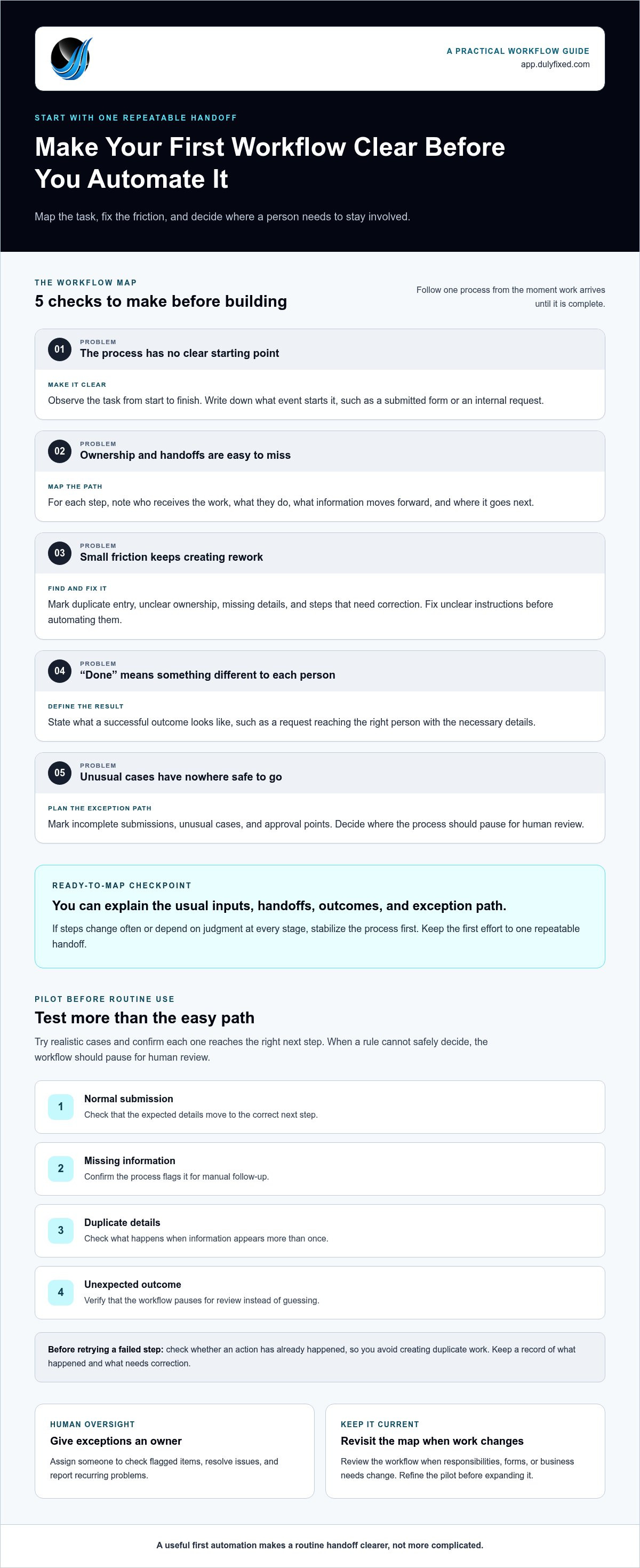
- Observe the task. Follow it from the moment work arrives until itâs complete. Note repeated actions, delays, and information staff have to enter or pass along.
- Map each handoff. Record who receives the work, what they do, and where it goes next. Include the event that starts the process, such as a submitted form or an internal request.
- Find the friction. Mark duplicate entry, unclear ownership, missing details, and steps that often need correction. Fix unclear instructions before automating them.
- Define the result. State what âcompleteâ means, such as a request reaching the right person with the necessary details. A clear outcome gives you something practical to check during testing.
- Assess exceptions. Note incomplete submissions, unusual cases, and points where someone must review or approve the work. Decide where the process should pause for human attention.
A workflow is ready to automate when its usual inputs, handoffs, and outcomes are clear, and exceptions have a defined path. If the steps change often or depend on judgment at every stage, map and stabilize the process first. Avoid starting with an entire department. Choose one repeatable handoff that you can evaluate on its own.
Map the trigger, handoffs, exceptions, and intended result
Write the workflow as a simple path: what starts it, who handles each step, what information moves forward, and what happens next. Add branches for missing information and unexpected outcomes before describing any automated action. Mark approval points where a person must decide whether work can continue. Also note which system holds the authoritative record, so a workflow does not rely on conflicting or outdated details.
When steps cross between systems or teams, back-office workflow integration can connect suitable processes. A clear map gives you a practical starting point for deciding which handoffs to streamline.
How to Test and Maintain Small-Business Workflow Automation
Start with a limited pilot before relying on a new process for routine work. A pilot helps you check whether workflow automation for small business handles expected cases correctly and gives you a chance to catch problems while the process is still easy to adjust.
Test with realistic examples, not just the simplest path. Include a normal submission, missing information, duplicate details, and an unexpected outcome. Confirm that each case reaches the right next step and that the process pauses for human review when a rule cannot safely determine what to do. Check whether any action has already happened before retrying a failed step, so you can avoid creating duplicate work. Keep a record of what happened and what needs correction.
Human review catches exceptions and protects decisions that need context, care, or accountability. Assign a person to check flagged items, resolve issues, and report recurring problems. That person should also revisit the workflow when responsibilities, forms, or business needs change.
When to refine the workflow or get integration help
Revisit the map if staff still re-enter information, steps remain unclear, or the same exceptions keep appearing. Those patterns may point to a rule that needs adjusting, a process that needs simplifying, or a handoff that still depends on manual coordination. Avoid expanding the automation until the pilot behaves as intended.
Dulyfixed Small Business Solutions helps small businesses with back-office automation and system integration to connect suitable internal processes. The right approach depends on the workflow and its handoffs, so identify the specific task and where it gets stuck before deciding what to streamline.
Make Your Next Workflow a Practical One
The next step for workflow automation for small business doesnât have to be a major rebuild. Choose one process that causes repeated friction, then decide whether to refine it, connect its handoffs, or leave the work with a person.
Before making a change, write down what starts the process, where information goes, who handles exceptions, and what a successful handoff looks like. That gives you a focused way to evaluate whether automation fits.
Frequently Asked Questions
Is workflow automation worth it for a small business?
It can be worth it when a recurring process creates enough rework or delay to justify setup and upkeep. Compare the current process with the change you want, such as fewer repeated entries, clearer ownership, or fewer missed handoffs. Workflow automation for small business is less compelling for a task that happens rarely or changes each time. Start with a process you can evaluate against a clear outcome, rather than assuming it will save time or money.
Can workflow automation work with the software a small business already uses?
Sometimes, but compatibility depends on how each system can share information, what access it allows, and whether the data fields line up. Identify which tool holds the authoritative record before connecting anything, or automation could copy an outdated value. Based in Soap Lake, Dulyfixed provides back-office automation for small businesses in Soap Lake, Ephrata, Moses Lake, Wenatchee, Seattle, Coulee City, Hartline, Wilson Creek, and Marlin, as well as nationwide.
How much does small-business workflow automation cost?
There isnât one standard cost. The scope of the process, the number of handoffs, the systems involved, and ongoing software or maintenance needs can all affect the total. Separate setup costs from recurring platform costs when comparing options. To understand the scope, document the workflow, the tools it touches, and the upkeep it may need.
What happens if an automated workflow encounters an error?
Check the workflowâs failure record before retrying. It can help identify the step that failed and whether the action already happened, which reduces the risk of duplicate work. If the cause isnât clear, use a documented manual fallback to keep the task moving. Record the issue and review whether the workflow needs a rule change before running it again.
Discuss a back-office workflow with Dulyfixed by describing what starts the task, where it gets stuck, and what a better handoff needs to do.
Talk With Dulyfixed
If this article connects with something you are trying to improve, send a note about your website, marketing, search visibility, or AI discovery goals.