

Published November 12, 2026
A client handoff shouldnât depend on someone remembering every next step. Service business workflow automation connects tasks such as capturing an inquiry, assigning it to the right person, and sending follow-up messages. It keeps work moving while reducing repetitive manual tasks.
You can make handoffs smoother without making customer service feel impersonal. Automation can support timely responses, clearer transitions between service stages, and consistent communication. The key is knowing what to automate first, where human judgment matters, and how to shape workflows around the way your business serves clients.
Key Takeaways
- Separate day-to-day workflow management from broader process improvement so you can target the right problem before automating.
- Use customer service automation to handle routine updates while keeping human attention available for complex requests.
- Map each client handoff, including who acts next and what information they need, to reduce missed steps.
- Consider back-office automation when repetitive admin work is slowing service delivery or making client workflows harder to manage.
How can workflow automation services help me?
Workflow automation services connect repeatable tasks across a service business. For example, a new inquiry can create an assigned task, update its status, and prepare a client document.
Workflow and Process Management
Business workflow management tracks tasks, owners, handoffs, and status within a process, such as moving an estimate from review to approval. Business process management looks at the full process, from intake through delivery, to improve how teams work across roles.
Workflow automation uses rules to trigger actions; business process automation uses technology to automate larger process steps. A CRM organizes customer records and sales activity, while field service management software handles jobs, schedules, and field teams. Automation platforms can connect tasks across these systems. Software costs depend on users, features, integrations, and workflow complexity.
Automation Benefits and Process Optimization
Automating manual business processes can reduce duplicate data entry and make handoffs more consistent. For example, an approved estimate can prompt a team task and prepare a document for the next service stage. Automation handles defined steps, while staff manage exceptions and decisions that require judgment.
Improve the process before automating it. The U.S. Environmental Protection Agencyâs blueprint recommends streamlining and modernizing programs before automation. Remove unnecessary approvals and clarify who owns each action; otherwise, automation may repeat a confusing process faster.
Workflow Consulting and Process Analysis
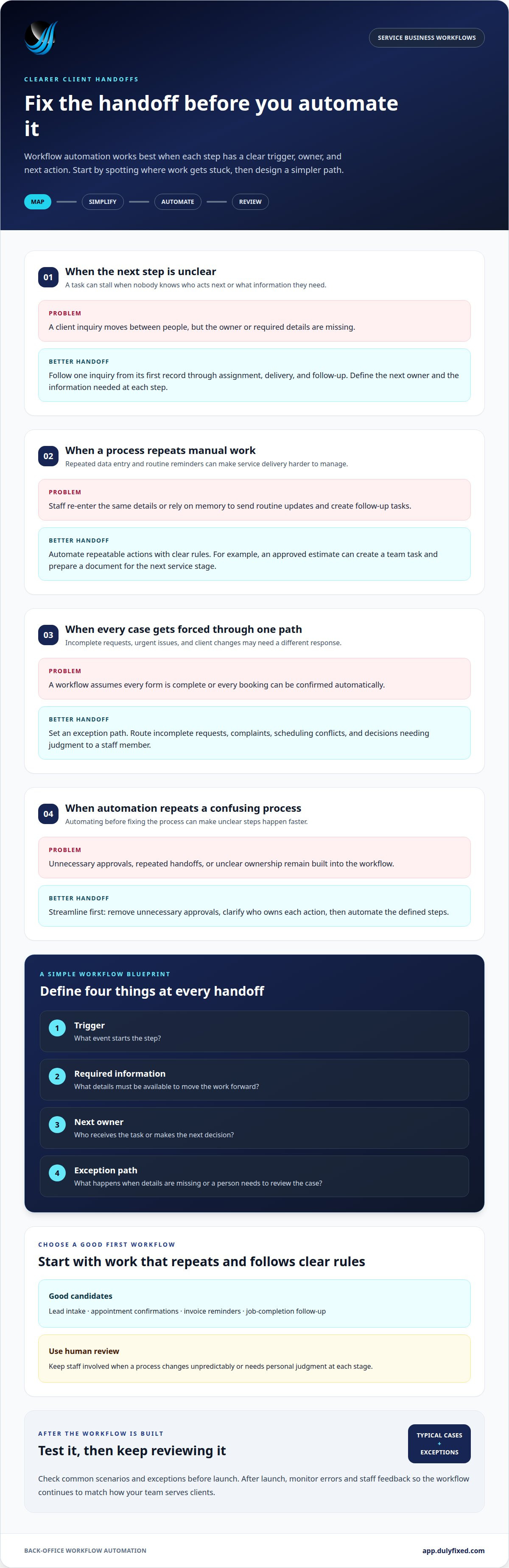
Workflow consulting starts by mapping how work moves today. Process analysis can reveal delays, repeated data entry, missing information, and unclear ownership. Follow a single example, such as a client inquiry, from its first record through assignment, delivery, and follow-up.
Then define the trigger, required information, next owner, and exception path for each step. This structure helps determine what belongs in an automation and what needs human review. For service businesses planning back-office workflow automation, mapping those handoffs makes the intended process clearer before rules are built.
Customer service automation
Automation can handle routine customer updates and repetitive internal tasks, giving staff more time for complex requests. Build each workflow around a clear trigger, action, and point for human review.
Workflow Design and Customization
Start with one service journey, such as a new booking or support request. Map the information collected, who receives it, and what happens next. Then configure a tool to route the request, update its status, or create a task. Include exceptions, such as incomplete forms or urgent issues, rather than forcing every case through the same path.
Customer Communications and Review Requests
Automated messages can confirm receipt, share appointment details, or explain what happens next. For example, a completed job can trigger a review request, while a complaint is routed to a person. Customer workflows also involve privacy risks: limit access to necessary information, protect stored records, and avoid sending sensitive details through unsuitable messages. Applicable privacy duties depend on the information and business context.
Lead Capture and Follow-Up
Connect a website form to a lead record, then use clear criteria to qualify the inquiry. A service area, requested job type, or missing contact detail can determine where it goes. Next, trigger an acknowledgment and assign follow-up to a staff member. Review messages and routing rules to avoid irrelevant or repeated outreach.
Workflow Implementation Steps
Choose one workflow with repetitive tasks, such as customer support triage, invoice reminders, or HR document routing. Map its current steps, clarify ownership, and remove unnecessary handoffs before automating it. Test typical cases and exceptions, then monitor errors and staff feedback after launch. Apply the same method to sales or finance once the first workflow operates reliably.
Automating service-business client workflows
Start with client-facing steps that repeat and depend on manual handoffs. A clear trigger, owner, and next action can keep each client moving through the service pipeline.
Choosing Workflows to Automate
Prioritize tasks that happen often, follow consistent rules, and cause delays when someone forgets a step. Lead intake, appointment confirmations, invoice reminders, and job-completion follow-up are practical candidates. For example, a completed job can trigger an invoice task and notify the staff member responsible for billing.
Automated billing software may help staff manage billing tasks, but the effect on staffing depends on the business and its processes. Avoid automating processes that change unpredictably or need personal judgment at every stage. First clarify who owns each action and what happens when information is missing.
Scheduling and Appointment Changes
Connect booking details to the calendar and client record. A confirmed appointment can trigger a confirmation message, preparation task, and reminder. If a client requests a change, route it to the person who can approve a new time, then update the schedule and notify affected staff.
Build safeguards for double bookings, cancellations, and incomplete requests. For example, automation can flag a conflict instead of assigning a time automatically. Keep a clear handoff for exceptions, and update the client after a change is approved.
Use the same pipeline to connect appointment completion with follow-up, such as sending service notes or creating an invoice task. This reduces repeated data entry while keeping responsibility clear.
Dulyfixed Small Business Solutions: Back-Office Automation
Dulyfixed Small Business Solutions helps service businesses streamline administrative work through back-office automation. Consider this service when manual office tasks make it harder to manage client handoffs. Start by identifying a recurring task and the information needed to move it forward. That gives the workflow a clear purpose before automation is designed.
Automation should fit the way your business handles client requests and staff responsibilities. If youâre ready to discuss a workflow your team wants to improve, contact Dulyfixed Small Business Solutions.
Make the Next Handoff Easier
As your service business workflow automation takes shape, plan to keep each workflow useful as your services, staff roles, or client expectations change. Assign someone to review the rules when the process changes, and make sure staff know how to handle exceptions automation cannot resolve. Clear ownership helps keep the system aligned with how your business works.
Start with one back-office handoff that involves repeated manual work. Map who handles each step, what information they need, and what should happen when a request falls outside the usual process. This can help you decide whether automation fits and what staff still need to manage.
Discuss back-office automation with Dulyfixed
A documented process gives staff a clear reference as the workflow changes.
Frequently Asked Questions
What's the difference between workflow automation and AI automation?
Workflow automation follows defined rules, while AI automation can interpret less structured information. For example, a rule-based workflow can route a form based on a selected service. An AI-enabled step might categorize a free-text request before routing it. Use fixed rules for predictable tasks; consider AI only when interpreting language or varied inputs adds practical value.
Do I need to know how to code to build automations?
No. Many automation tools offer visual builders for connecting triggers and actions without writing code. A simple example is sending an internal alert when a form arrives. Complex workflows may need technical setup, especially when systems lack direct connections or require custom logic. Start with the process, then choose a tool that fits its complexity.
What are the benefits of workflow automation for small businesses?
Automation can make routine work more consistent, reduce repeated data entry, and clarify who owns the next step. For example, a completed service record can create a billing task instead of relying on someone to remember it. The value comes from choosing a frequent process with clear rules, rather than automating everything at once.
What workflow automation software is best for non-technical teams?
Choose a tool your team can operate and maintain, with clear visual workflows, understandable error alerts, and suitable access controls. Test it against a real task, such as routing a new inquiry to the right staff member. Before expanding, check that it supports the systems already used in the process.
What is workflow automation for a service business?
Service business workflow automation uses software to move information and trigger routine actions as a client progresses from inquiry to completed work. For service businesses in Soap Lake, Ephrata, Moses Lake, Wenatchee, Seattle, Coulee City, Hartline, Wilson Creek, and Marlin, it can coordinate intake details with internal follow-up. Staff still handle decisions that need personal judgment.
Talk With Dulyfixed
If this article connects with something you are trying to improve, send a note about your website, marketing, search visibility, or AI discovery goals.