

Published November 18, 2026
Connecting apps is only part of workflow automation. It uses software to move information through routine business steps, such as capturing a lead, updating records, or sending a follow-up. A workflow automation consultant in Moses Lake can map your current process, identify friction, and design a more consistent way to handle information.
Consider automation when staff spend time copying information between tools or managing repetitive handoffs. But automating a messy process can make the mess move faster, so clarify and improve the workflow before choosing technology.
This article explains how automation can improve data capture and management, what a consultant does, and how to plan your next step. Effective automation starts with understanding the work, then connecting the right tasks and tools around a clearer process.
Key Takeaways
- Map each handoff from start to finish before automating, so the process is clear before tools are connected.
- Use automation to capture, organize, and move information between business steps with less repetitive manual entry.
- A consultant can help identify process gaps, plan practical automations, and support their use across the workflow.
- Consider Dulyfixed Small Business Solutions’ Back-Office Automation when routine administrative work is slowing down your operations.
What is workflow automation?
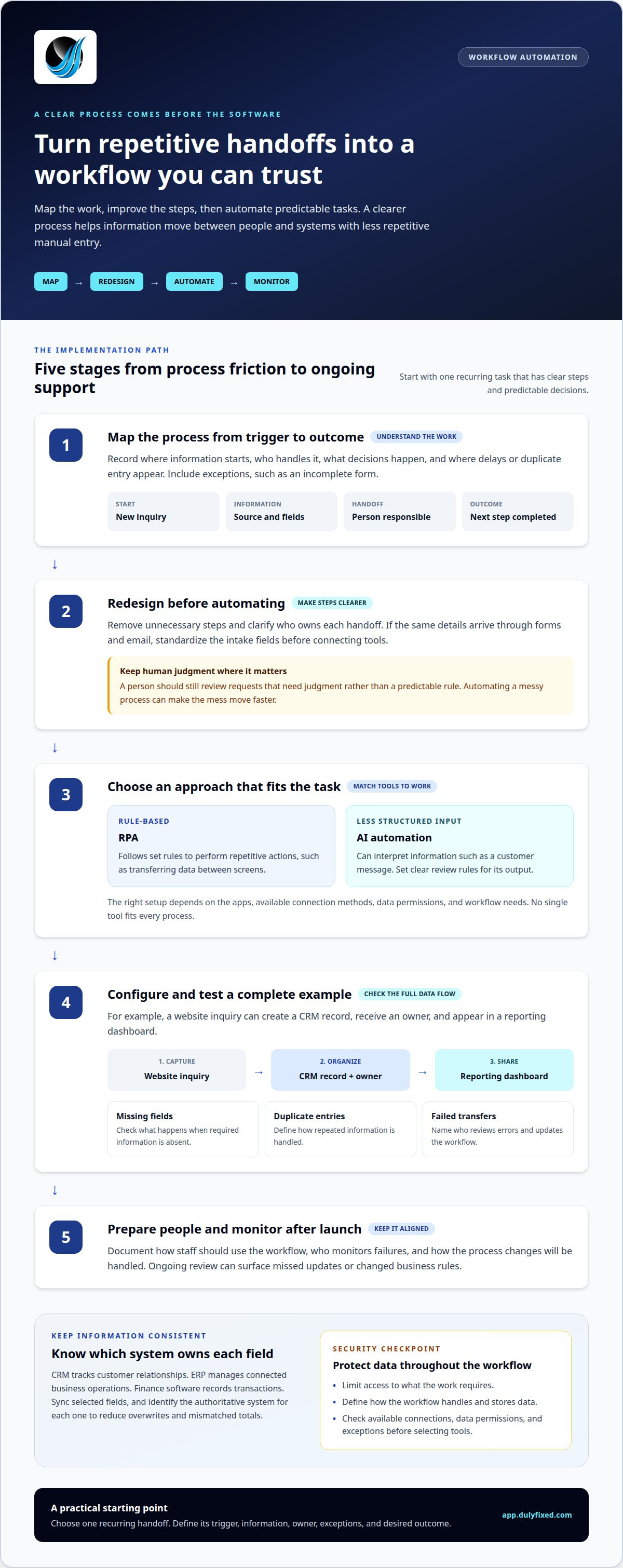
Workflow automation starts by mapping a business process and improving its steps, then uses technology to handle repeatable tasks. A clear implementation plan also explains how people will use the workflow after launch.
Security and privacy risks include exposing sensitive data, granting excessive access, or sending information to the wrong system. Limit access to what the work requires, and define how each workflow handles and stores data.
Don’t build an automation budget around a grant or tax incentive until you’ve identified a current program and reviewed its eligibility and permitted uses. Treat funding as a possibility, not an assumed part of the plan.
Process Assessment and Mapping
Assessment traces each process from its starting event to its final outcome. For a lead intake workflow, mapping records where information comes from, who handles it, what decisions occur, and where delays or duplicate entry happen. It should also capture exceptions, such as incomplete forms. This creates a practical blueprint before you select tools.
Process Redesign Before Automation
Mapping may show that a process needs fewer steps before software can help. For example, a team receiving the same details through forms and email could standardize intake fields and assign follow-up ownership. This reduces ambiguity before automating a handoff. Keep human decisions in place when a request requires judgment rather than a predictable rule.
Automation Approach and Implementation
Robotic process automation, or RPA, follows set rules to perform repetitive actions, such as transferring data between screens. AI automation can interpret less structured information, such as a customer message, but requires clear review rules. Implementation typically moves from selecting a process and approach to configuring and testing the workflow. Ongoing support helps keep it aligned with changing business needs.
Automating data acquisition and management
Data automation moves information from its source into the systems your team uses. For example, a website inquiry can create a CRM record, assign an owner, and appear in a reporting dashboard. Define which fields move, how duplicates are handled, and what happens when required information is missing. This keeps operations organized without manually copying the same details.
CRM, ERP, and finance data serve different purposes. A CRM tracks customer relationships, an ERP manages connected business operations, and finance software records transactions. Integration can sync selected fields, such as customer details or invoice status, across these systems. Specify which system is authoritative for each field. Otherwise, updates can overwrite accurate records or create mismatched totals.
Zapier, Make, Microsoft Power Automate, and Salesforce are examples of automation platforms or business systems. The right setup depends on the apps you use, available connection methods, data permissions, and workflow needs. No single tool fits every process. Before choosing an approach, compare how each option handles cross-app synchronization, exceptions, and access controls.
Test a complete example, such as a new inquiry becoming a CRM record and then appearing on a dashboard. Check for duplicate entries, missing fields, and failed transfers. Define who reviews errors and updates the workflow when operations change. Dulyfixed provides Back-Office Integrations and Automation to help plan practical data flows for your business.
Workflow automation consultant responsibilities
A consultant connects business goals to practical software changes. The work can include revenue systems, CRM workflows, customer journeys, and process improvement. The core responsibilities are documenting what should happen, configuring and testing the workflow, and planning how to monitor it after launch.
For businesses in Moses Lake, useful specialties include CRM and workflow engineering, revenue systems, and process optimization. Assess a consultant’s experience by asking about similar processes, not just software names. Reviews can offer insight into communication and follow-through, while specialties show whether the consultant understands your workflow. A useful scope explains testing, ownership, and how errors will be handled.
Consultants serving Moses Lake may work locally or remotely from elsewhere in Washington. Remote work can suit software-based mapping, configuration, and testing when you can share process details securely. Set clear access rules and name a contact who can make decisions.
Workflow automation can support businesses across industries. A service company might route new inquiries, while a retailer could coordinate order updates. A finance team might organize invoice approvals. The best fit is repetitive manual work with defined steps, clear data, and predictable decisions.
Before launch, test routine cases and exceptions, document how staff should use the workflow, and identify who will monitor failures. After launch, monitoring can surface missed updates or changed business rules. Ongoing adjustments help keep the software aligned with evolving operations.
Discuss workflow automation needs
Dulyfixed Small Business Solutions: Back-Office Automation
Dulyfixed Small Business Solutions provides Back-Office Integrations and Automation to streamline recurring administrative work. This can help when staff repeatedly move information between tasks or manage routine handoffs manually. The process starts by understanding the work, its steps, and where automation can support daily operations.
For example, a defined workflow can help organize how incoming information moves through back-office tasks. The right setup depends on the process, the tools involved, and the decisions that still need human attention. Explore back-office automation and integrations to see how this service relates to workflow needs.
If you’re ready to discuss a back-office process, contact Dulyfixed Small Business Solutions.
Choose the Next Workflow to Improve
Start by choosing one operational friction point and defining what a better handoff would look like. A workflow automation consultant in Moses Lake can help turn that priority into a clear process, while your team identifies decisions that still need human judgment.
A useful starting brief names the process trigger, the information involved, who owns each step, and what should happen when details are missing. This sets a practical boundary for the work and keeps the focus on a real business need.
Dulyfixed provides Back-Office Integrations and Automation to help address operational workflow needs. Choose one process to improve and outline how information should move through it.
Get It DulyfixedA focused next step can make progress manageable.
Frequently Asked Questions
How Do I Know What To Automate First?
Prioritize a task by how often it happens, how many people it affects, and how easily staff can recognize an exception. A process with frequent handoffs and clear completion criteria may be easier to scope than one requiring many case-by-case decisions. Compare candidate tasks using these factors, then choose the one with the clearest boundaries.
How long does a business process automation project take?
Project timing depends on the scope and the decisions needed along the way. A workflow with a clear owner and agreed steps is easier to plan than one involving several teams or unresolved process questions. The number of systems, access arrangements, and review needs also shape the schedule. Set milestones for decisions, configuration, testing, and launch.
Should I hire a consultant or a platform specialist?
Choose a consultant when the main challenge involves process design, team handoffs, and tool selection. A platform specialist may be a better fit when the task is already defined and requires detailed configuration in one system. For example, a company unsure how requests should move between departments may need broader process guidance before focusing on one platform.
What Does It Cost, And What ROI Can I Expect?
Project costs depend on scope, systems involved, data condition, and support needs. Estimate potential return by recording current labor time, rework, and errors tied to the process. After implementation, compare those measures over a suitable period. This gives you a practical basis for judging value without assuming a guaranteed financial result.
What workflow automation services do consultants in Moses Lake offer?
Services may include workflow planning, system integration, CRM setup, and support for back-office processes. The work depends on your business needs and the systems involved. One company may need help organizing routine internal requests, while another may focus on customer follow-up. Dulyfixed provides Back-Office Integrations and Automation for business operations.
Workflow and automation support
Start with a recurring task, the systems involved and what needs to work better.