

Published November 9, 2026
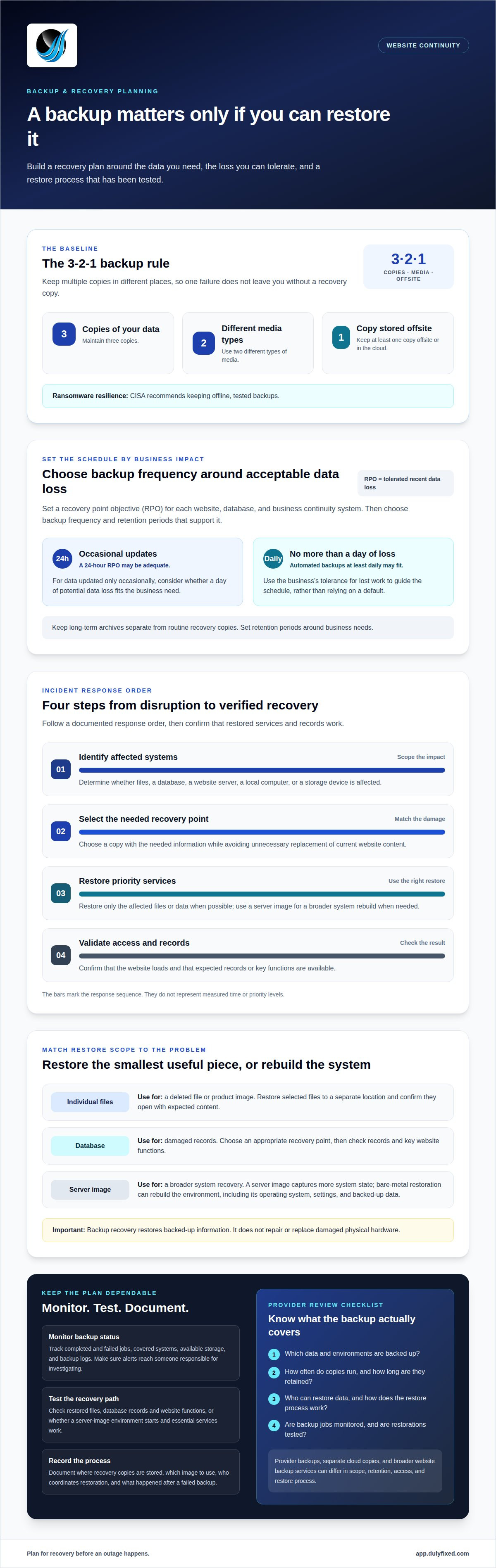
A backup only helps if you can restore it. When evaluating website providers, distinguish backup and recovery coverage from advertising and marketing services. A practical baseline is the 3-2-1 rule: keep three copies of your data, use two different media types, and store at least one copy offsite or in the cloud.
A providerâs value isnât just having a local address. Itâs having a clear recovery process and backups tested before an outage. CISA recommends keeping offline, tested backups, which can help protect recovery copies from ransomware.
This guide explains how file, database, and server-image restoration works, what to consider when setting backup frequency, and how to assess recovery plans. Youâll also learn how managed web hosting and technical support may fit into a small businessâs plans for website disruptions.
Key Takeaways
- Set backup frequency around how much recent work your business can afford to lose, rather than relying on a default schedule.
- Match the restore method to the problem: recover individual files, databases, or a full server image as needed.
- Test restored data and key website functions so you know the recovery process works before an outage.
- After accidental deletion or hardware failure, identify what was affected and choose a suitable recovery point before restoring.
How to choose a website backup and disaster recovery plan
Choose backup frequency according to how much recent work your business can afford to lose. Set recovery goals for each website, database, and business continuity system, then choose copies and retention periods that support those goals.
Prevention and Long-Term Data Archiving
Start by identifying data loss risks in your environments. Accidental deletion, faulty updates, compromised accounts, and hardware failure can affect website files, databases, or Microsoft business records. Set a recovery point objective, or RPO, for each system. It defines how much recent data loss the business can tolerate. For data updated only occasionally, a 24-hour recovery point objective may be adequate.
For systems where a business can tolerate no more than a day of data loss, automated backups at least daily may be appropriate. Keep long-term archives separate from routine recovery copies, and define retention periods around business needs. Limit account access, update software carefully, and document who handles restoration. These steps strengthen data protection and support continuity when essential records or services are unavailable.
Comparing Backup Options and Providers
Hosting-provider backups are often tied to the hosted website environment. Cloud backups store copies separately, while website backup services in Seattle may coordinate coverage across files, databases, and server images. These options can complement each other, but differ in scope, retention, access, and restore process. Seattle businesses comparing backup approaches can review available service options for context.
Check which data and environments are backed up, how often copies run, how long theyâre retained, and who can restore them. The 3-2-1 backup rule calls for three copies of data, two different media types, and at least one offsite or cloud copy. Check backup monitoring and restoration tests, too. CISA recommends maintaining offline, tested backups, and says businesses using a third party to maintain and secure backups should check that it follows applicable best practices.
File, database, and server-image restoration
Start by matching the restore to the damage. A deleted product image may need only a file restore, while a damaged customer database needs an appropriate recovery point. Identify the affected files, database, or server image, then select a copy that contains the needed information without replacing unrelated, current website content. This focused approach helps avoid unnecessary changes during recovery.
A server image captures a broader system state than individual files. Bare-metal restoration uses that image to rebuild a server or computer environment after serious hardware failure. It can restore the operating system, settings, and backed-up data together. Document which image to use, where it is stored, and who coordinates the restore. That record helps staff follow a consistent recovery process during an outage.
Monitoring makes backup status visible. Track completed and failed jobs, available storage, and backup logs. A failed job needs attention if it leaves a database or Microsoft 365 content without a recent copy. Review the job details and identify what the backup covers before relying on it. Clear records also help organizations spot recurring problems and understand which data needs another copy.
Test the recovery path, not just whether a backup file exists. Restore selected files to a separate location, then confirm they open and contain expected content. For a database, check records and key website functions after restoration. For a server image, confirm the environment starts and essential services work. If you need help assessing website recovery needs, contact Dulyfixed.
Accidental deletion and hardware failure
After deletion or hardware failure, limit changes to the affected system, identify critical data, and locate a usable recovery copy. These steps help focus recovery on restoring service without overwriting a needed version.
Recovering from Deletion and Hardware Damage
For accidental deletion, record the file or database name, affected account, and approximate time. Avoid saving changes to the affected area until you select a recovery point. For a failed hard drive or damaged computer, identify which server or workstation holds the critical data. These details help determine whether to restore individual files or use a broader disaster recovery process.
After hardware failure, determine whether the website server, local computer, or storage device is affected. Restore essential services onto functioning equipment, then test access to the site, database, and business records. A damaged device may need repair or replacement. Backup recovery restores backed-up information, not the physical hardware itself.
Backup Monitoring and Failure Alerts
Monitoring should show whether each scheduled backup completed, which systems it covered, and when a failure occurred. Set alerts to reach someone responsible for investigating failed jobs, unavailable storage, or missing backup copies. A warning is useful only when someone knows which critical data and server environment need attention.
When an alert arrives, review the job details and identify the affected backup before the next scheduled copy. Record the cause, the action taken, and whether the missing data was backed up successfully afterward. This record can reveal repeated failures and clarify who handles recovery during an outage.
During a disaster, follow a documented response order: identify affected systems, select the needed recovery point, restore priority services, then validate access and records. For example, confirm that a restored website loads and that a test transaction or customer record appears correctly. Clear recovery steps help limit avoidable downtime and keep business continuity decisions grounded in the actual failure.
Make recovery part of your next website decision
Make recovery planning part of website management. Clear responsibilities and a support plan can help your business respond when an issue disrupts site operations.
Dulyfixed Small Business Solutions provides managed web hosting and technical support for business websites. If youâre reviewing how your website is managed, build those needs into a practical recovery plan.
Take the next step toward a website setup thatâs easier to manage.
Contact Dulyfixed Small Business Solutions
A focused plan can help you approach future disruptions with greater clarity.
Frequently Asked Questions
Why is a local data backup provider important for my business?
A local provider may understand regional conditions that affect your operations, but proximity alone doesnât make backups dependable. For a Seattle business, clear communication, defined recovery responsibilities, and support that fits your working hours matter more than an address. Confirm who can access recovery copies and how your team will coordinate if your website or office systems become unavailable.
Can you help my business recover data quickly in an emergency?
Recovery speed depends on the affected system, the available backup, and the equipment needed to restore service. A single deleted document is different from rebuilding a failed server. Dulyfixed provides technical support for website troubleshooting, but no specific emergency recovery time is promised. Keep a current list of critical systems, account access, and staff responsibilities so recovery work can begin with useful information.
Do you offer cloud-based backup solutions?
Cloud-based backups store copies separately from a live website or computer. Dulyfixed provides managed web hosting and technical support for website operations. In your recovery plan, document where backup copies are stored, who controls account access, and who restores them if the main hosting environment is unavailable. This distinction helps your business understand how hosting and backup storage work together.
Want backups you can actually trust?
Trust comes from knowing a backup can be accessed and used, not just seeing a completed status. Assign someone to review backup alerts and keep recovery instructions available to authorized staff. For example, a business might document who approves restoring an older customer record and who checks its accuracy afterward. Clear roles help prevent confusion during a disruption.
What Backup and Recovery Risks Are Seattle Businesses Facing?
Seattle-area businesses can face accidental deletion, hardware failure, ransomware, and interruptions that affect access to systems. In November 2024, a bomb cyclone left hundreds of thousands of Puget Sound customers without power. That event illustrates why continuity planning should cover more than website files: include staff communication, access to essential records, and how work continues during an outage.
Talk With Dulyfixed
If this article connects with something you are trying to improve, send a note about your website, marketing, search visibility, or AI discovery goals.