

Published October 26, 2026
A current website backup is useful only if it includes the information you need and can be restored. Missing files, database content, or clear recovery steps can leave a business unsure how to bring important pages back. This guide to website backup services for Moses Lake businesses explains what to review: What is protected, how recent is the saved copy, and what does recovery involve?
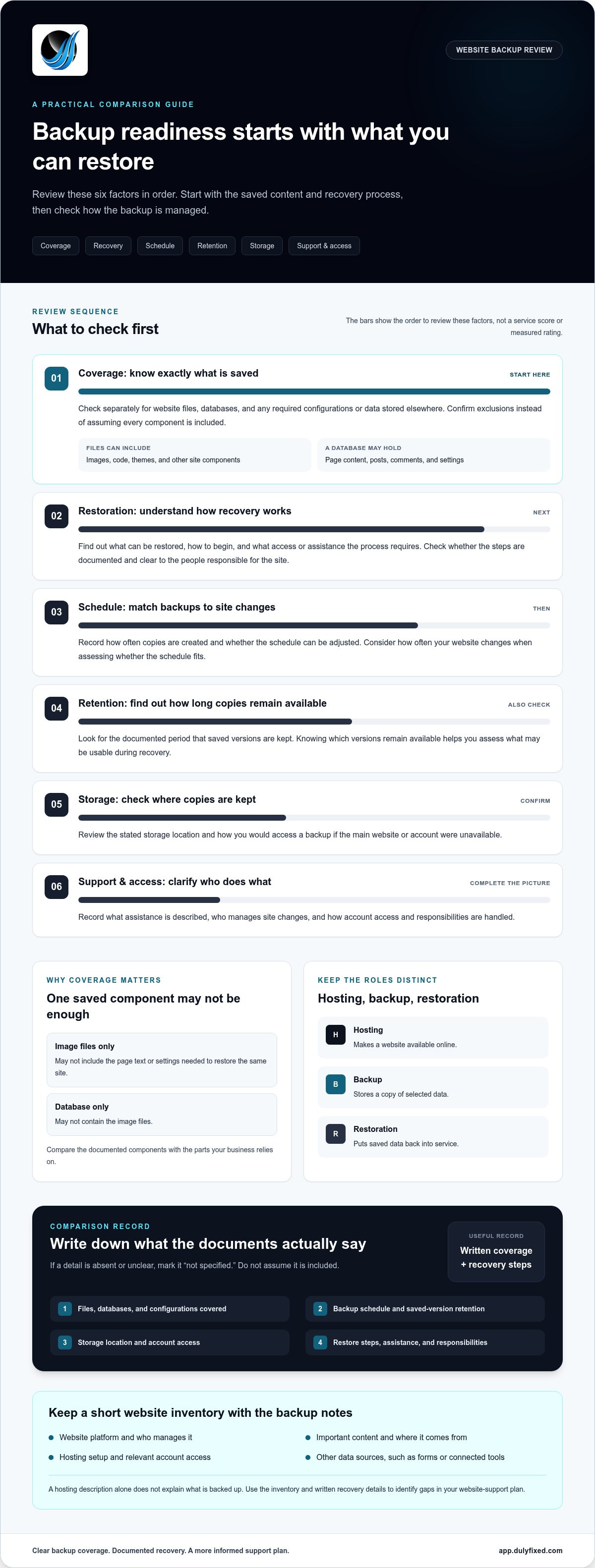
Compare more than backup frequency. Check which website components are covered, how long copies are kept, where they are stored, and whether the restoration process is documented. Then match the backup schedule to how often your site changes. These steps can help you assess backup options and decide whether managed hosting and technical support fit your website needs.
Key Takeaways
- When comparing website backup services in Moses Lake, focus on what can be restored, not only how often backups run.
- Review documentation for covered files and databases, backup retention, and storage location.
- Understand how restoration begins, what can be restored, and what access or assistance the process requires.
- Record your website platform, key content, data sources, and hosting setup before reviewing backup and support options.
Website backup services in Moses Lake: what they protect and why it matters
A website backup is a saved copy of selected website content and data that can be used for recovery. It is separate from the live site visitors use. What a backup can restore depends on which components it captures and how the website is built.
What should a small-business website backup cover?
Look for separate details about files and databases in the backup documentation. Files may include images, code, themes, and other site components. A database may hold page content, posts, comments, and settings. Some websites also rely on configurations or data stored outside the main site. Coverage varies, so check what is included rather than assuming that saving one part captures everything. The overview of data backup basics explains common backup concepts, but the documentation for your site should define its actual coverage.
For example, a copy of image files alone may not include the page text or settings needed to restore the same site. A database copy may not contain the image files. Identify each protected component and any exclusions, then compare that list with the parts your business relies on.
Hosting, backups, and restoration serve different purposes. Hosting makes a website available online. A backup stores a copy of selected data. Restoration puts saved data back into service. A hosting description by itself does not explain what is backed up or how recovery works.
Dulyfixed provides managed hosting, maintenance, and support for website needs. If your site also supports a marketing campaign, Advertising and Marketing can be part of the wider planning. For website backup services Moses Lake businesses are comparing, start with the written coverage and recovery process. Knowing what is saved helps you judge whether a backup could support recovery.
How Moses Lake businesses can compare website backup services
Compare documented coverage and recovery steps, not broad statements such as âyour site is protected.â A side-by-side record can show what each option covers and which details need clarification.
A practical checklist for comparing backup coverage
Use the table to record what the service documentation says. If a detail is absent or unclear, mark it ânot specifiedâ rather than treating it as included.
| Item | What to record |
|---|---|
| Coverage | Which website files, databases, and configurations are included? |
| Schedule | How often are copies created, and can the schedule be adjusted? |
| Retention | How long are saved versions kept? |
| Storage | Where are backup copies stored? |
| Restoration | What can be restored, and how do you start the process? |
| Support | What assistance and account access are described? |
Review how the backup dashboard shows status, dates, and available restore points. Clear labels make it easier to identify what is saved and which version may be useful. Read the security information as well. Consider how you would access the backup if the main website or account were unavailable.
Match the process to the way your site is managed. If you make frequent edits, check whether you can find the right saved version and understand the restoration steps. If someone else handles site changes, record how responsibilities and account access are managed. For related upkeep tasks, use this website maintenance checklist.
Keep your comparison with your website records. It provides a useful reference when reviewing backup coverage or updating your website-support plan.
Next steps for website backup and managed support in Moses Lake
Before changing your hosting or backup arrangement, create a short website inventory. Record the platform your site uses, who manages it, where important content comes from, and which hosting account serves it. Note other data sources, such as forms or tools that send information to the website, if your business uses them.
Keep the inventory with your backup and restoration documentation. Review what the documents say about account access, saved versions, and the steps involved in recovery. A general hosting description is not a substitute for details about backup coverage. A clear record makes it easier to identify gaps and explain what you need when comparing website backup services in Moses Lake.
When managed hosting and technical support belong in the decision
Hosting keeps your website available online, while technical support helps address website-related needs. Consider both alongside backup planning if you want a clearer picture of who manages the site and where to turn for technical help. Dulyfixed provides managed hosting, maintenance, and support. Review backup coverage and restoration steps as part of the documented scope for your website.
Use your inventory to describe the siteâs platform, important content, data sources, and hosting setup. Then outline the support questions you want to resolve. Dulyfixed is based in Soap Lake and works with businesses in Moses Lake, Ephrata, Wenatchee, Seattle, Coulee City, Hartline, Wilson Creek, and Marlin. Tell Dulyfixed what your website needs to discuss managed hosting and technical support.
Make your website support plan clear
Turn uncertainty into a practical next step by documenting your site and its support setup. With that information, you can decide what needs protection and identify details to resolve. When assessing website backup services Moses Lake businesses can use, focus on documented coverage and a recovery process you understand.
If you are considering managed hosting or technical support, Dulyfixed can help you discuss those website needs. Keep backup coverage and restoration steps clear in your website-support plan.
A useful plan starts with accurate information about your site. Tell Dulyfixed what your website needs to discuss a practical next step.
Frequently Asked Questions
What is included in a website backup?
A website backup may include selected site files, database records, and other components, but the exact scope varies. Look for details about uploaded media, form submissions, configuration files, and external data sources. For example, if your booking form sends entries to a separate platform, check whether those records are covered by the website backup or need separate protection.
Does website hosting automatically include backups?
Hosting makes your site available online, while backup coverage depends on the service terms and how the site is set up. Review the hosting agreement and backup documentation together. Pay attention to third-party services, such as email or a separate form tool, because their data may have different retention and recovery arrangements from the website itself.
How often should a small-business website be backed up?
Set the schedule based on how quickly important information changes and how much recent work you could recreate if needed. A mostly static service page may change less often than a site with frequent event updates, product changes, or incoming orders. Use the pace of change to guide the schedule, and revisit it when the way you use the site changes.
Can a website backup restore a site after an attack or accidental change?
It may, depending on which saved copy is available, what it contains, and the documented recovery steps. If a suitable version exists, check whether restoring it could replace newer updates. A backup can restore saved content, but it does not by itself address the cause of an attack. Treat security cleanup as a separate task.
Talk With Dulyfixed
If this article connects with something you are trying to improve, send a note about your website, marketing, search visibility, or AI discovery goals.