

Published November 19, 2026
The fastest way to improve business operations isn’t always adding another tool. To streamline business operations with software, first identify where work gets stuck, repeated tasks pile up, or information has to be entered more than once. Then choose tools that address those specific friction points.
If your team is juggling manual admin, scattered information, or unclear handoffs, you’re not alone. The goal isn’t to automate everything. It’s to make everyday work easier to manage while keeping people in control of decisions that need their judgment. This article explains what streamlining business operations with software means, how software can support process improvements, and which common small-business workflows may benefit from better tools. You’ll also learn how to approach changes thoughtfully, so new software supports the way your business works instead of adding complexity.
Key Takeaways
- Map a workflow to spot delays, repeated tasks, and unnecessary handoffs before choosing software.
- Standardize the steps that should stay consistent, then set a clear measure for improvement.
- Match software to a specific small-business need, such as organizing customer information or coordinating tasks.
- Back-office workflow planning and integrations can help connect processes, with implementation scoped to the project.
1. What is Streamlining in Business?
Business streamlining means finding delays, duplicate work, and manual steps in an existing process. Map an order from customer request through delivery. If staff re-enter details in several files, that handoff signals a bottleneck. Track where work waits, errors occur, and corrections are needed.
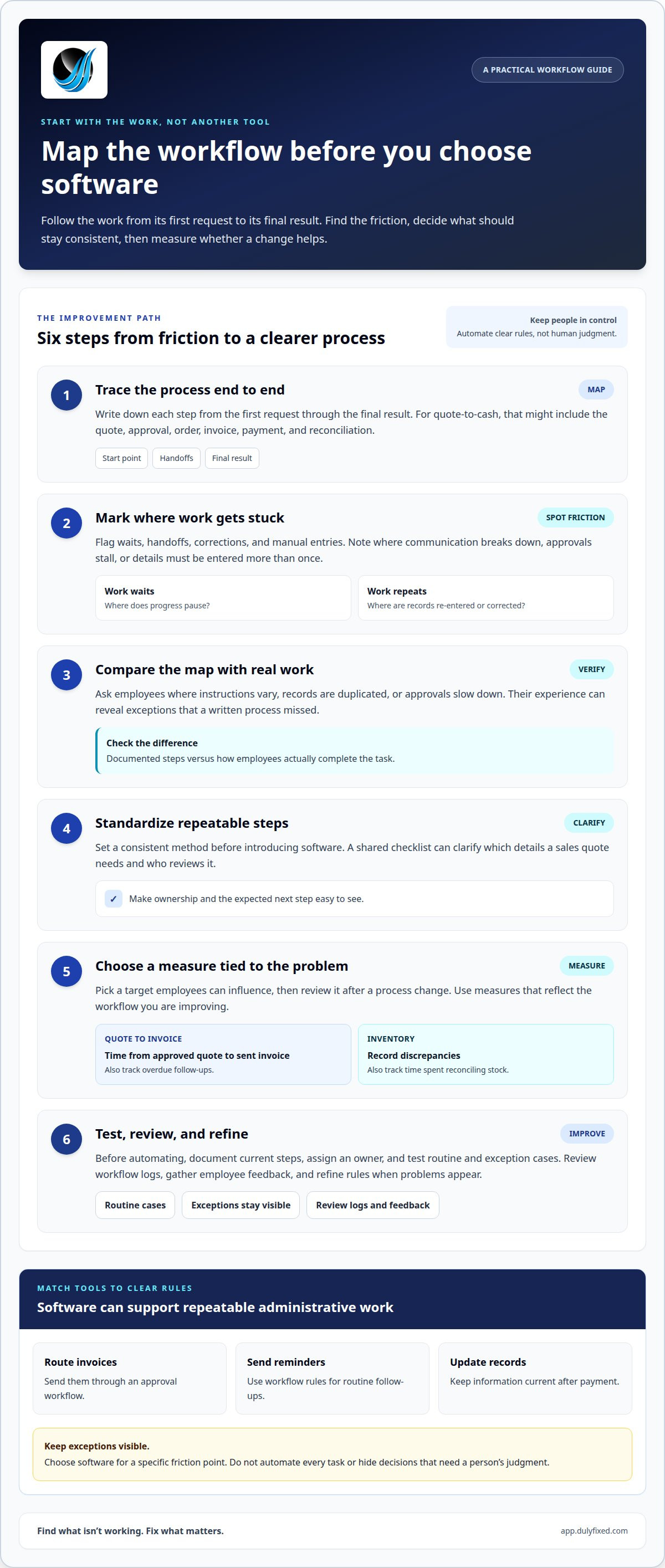
A practical way to streamline business operations with software is to automate tasks governed by clear rules. Workflow software can route invoices for approval, send reminders, or update records after payment. Automating repetitive steps can reduce duplicate entry and keep information accurate.
Software can support administrative work, customer records, order entry, inventory tracking, and production scheduling. A warehouse system can update stock after an order, while production software can align schedules with available materials. Project management tools assign tasks, track progress, and support collaboration, helping managers spot stalled work.
Review who can access customer or employee data. Note where it’s stored and how connected systems share it. Security and privacy risks include excessive access, unnecessary data collection, and keeping records longer than business needs require. Compliance risks include handling records contrary to rules that apply to the business. Limit permissions to job needs, protect accounts, and remove access when roles change.
Before automating, document current steps, assign an owner, and test routine and exception cases. Review workflow logs to catch problems and refine rules. Keep exceptions visible during testing.
2. Business process streamlining benefits
Map a process from its first request to its final result. For quote-to-cash, document the quote, approval, order, invoice, payment, and reconciliation steps. Mark each handoff, wait, correction, and manual entry. This view can reveal where communication breaks down and which delays limit productivity.
Then compare the documented process with how employees actually work. Ask where instructions vary, records are duplicated, or approvals stall. Standardize repeatable steps before introducing software, so tools support a clear method. For example, a shared checklist can clarify which details a sales quote needs and who reviews it. Consistent practices make work easier to follow as the organization grows.
Set measurable goals tied to the issue. Track the time from an approved quote to a sent invoice, along with overdue follow-ups. For inventory, monitor record discrepancies and time spent reconciling stock. These measures give managers a basis for evaluating changes. Productivity can improve when employees spend less time correcting records or chasing updates. Costs may also ease when delays and rework take less staff time.
Choose a target employees can influence, then review it after a process change. Their feedback can surface exceptions that a written procedure missed. Use those findings to refine the workflow and adjust responsibilities as business needs change.
3. Benefits of streamlining small-business operations
For a small business, smoother processes can give employees more time for customer needs and skilled work. In a hypothetical repair shop, a shared service queue could replace scattered messages. Staff can see who owns each request, what details are missing, and which customer needs a response. Clear ownership helps prevent overlooked tasks and supports a consistent customer experience.
Operations software costs in the United States vary by features, users, support, and implementation needs. Off-the-shelf software may add licensing expenses as a business grows, while custom software generally has a higher initial cost. Compare the effort of adopting and maintaining a tool with the manual work it replaces. Include staff training and the time needed to keep records accurate.
To integrate new software with existing systems, identify what information must move between them. A sales tool, for example, may need to pass customer details to another business system. Use an available integration or planned data exchange, then test sample records for missing fields and duplicates. Assign an employee to review exceptions before broader use.
Implement the change in stages. Train employees on updated tasks and gather feedback about confusing steps. Track a practical measure, such as how quickly the team responds to requests. If duplicate records appear or response times slow, pause expansion and adjust the setup. Regular reviews help the business adapt the workflow as its needs change.
How Dulyfixed Can Help With Back-Office Workflows
Dulyfixed Small Business Solutions can plan and implement back-office workflow improvements and integrations when agreed. This is a practical option when internal tasks create extra handoffs, repeated updates, or unclear ownership. The work starts with the business problem and the desired outcome, so the proposed process addresses a real operational need rather than adding tools without purpose.
Planning can document how information moves, who handles each step, and where decisions or exceptions occur. For example, a vendor setup process may involve collecting details, reviewing them, and recording an approved vendor for future use. Mapping those steps can show where responsibilities need clarification and which parts may benefit from a workflow change.
Implementation depends on the project and its agreed scope. That scope determines which processes and systems are involved, what information needs to pass between steps, and how the revised workflow will be tested. The plan can also clarify how employees handle exceptions, so unusual requests do not disappear into an automated path.
Businesses with a defined process problem can explore back-office workflow and integration planning as a focused next step. A useful starting point is to describe the task that causes friction, who relies on it, and what a better process should make easier. This gives the project a clear operational focus.
Make Your Next Improvement Count
Choose a workflow issue that affects daily work, then define what a better process should make easier. A focused plan helps you decide whether software, an integration, or a change to existing steps is the right move. The goal is not to automate every task. It’s to build a process your team can understand, use, and adjust as the business changes.
A thoughtful approach to streamlining business operations with software starts with the work itself, not the tool. Dulyfixed Small Business Solutions can help plan and implement back-office workflow improvements within an agreed project scope. For related digital needs, Dulyfixed also offers website design, redesigns and landing pages, local and national SEO, and AI discovery and structured data optimization.
Start with the process that creates the most friction, then take the next step when you’re ready to work through a practical solution.
Get It DulyfixedFrequently Asked Questions
What is Streamlining in Business?
Business streamlining means making work simpler to complete and manage. It can involve removing unnecessary approvals, clarifying who handles each task, or reducing repeated data entry. For example, a small service business might use one intake form to collect the details staff need before assigning a customer request.
What does it mean to streamline business operations with software?
It means using digital tools to make selected business tasks easier to complete, track, or coordinate. A small team might use a shared task board to assign work and see its current status, while retaining human review for decisions that need judgment. Start with a specific problem, then assess whether software addresses its cause.
What types of business operations software are available for small businesses?
Common options include customer relationship management software for customer records and sales activity, project management tools for team tasks, accounting tools for financial records, and inventory systems for stock tracking. Some businesses use separate tools for each function; others choose platforms that combine several capabilities. The right category depends on the work that needs support.
How do you choose the right operations software for a business?
Start by defining the task, users, and information the software must handle. Then compare how each option supports the current workflow, connects with tools already in use, and handles exceptions. Consider training and ongoing administration, too. A simpler tool that fits employees’ daily work may be more useful than a feature-heavy system.
How do leading operations software platforms compare?
Compare platforms by their core purpose rather than popularity alone. Review which tasks they support, how they share information with other systems, and whether employees can follow the workflow without extra workarounds. For example, a project tool may organize assignments, while accounting software focuses on transactions and reports. Test the same sample workflow against each option.