

Published October 21, 2026
Automate the handoff, not the relationship. Small business CRM automation works best when it takes repetitive steps off your plate without removing the judgment and personal attention customers expect. If customer details sit in one place, reminders in another, and follow-ups depend on memory, even simple admin can interrupt good service.
Itâs reasonable to wonder whether automation will add another complicated tool or make your messages feel impersonal. The answer is to start small: choose one repeatable customer workflow, set clear limits on what the system handles, and keep exceptions and sensitive decisions under human review.
This guide explains which CRM tasks are good candidates, how to choose a useful first workflow, and when connecting your CRM with other business systems through back-office automation can reduce duplicate work.
Key Takeaways
- Use small business CRM automation for repeatable steps tied to customer records, not tasks that need personal judgment.
- Choose a workflow by looking at how often it happens, how clear the steps are, and what exceptions might need human attention.
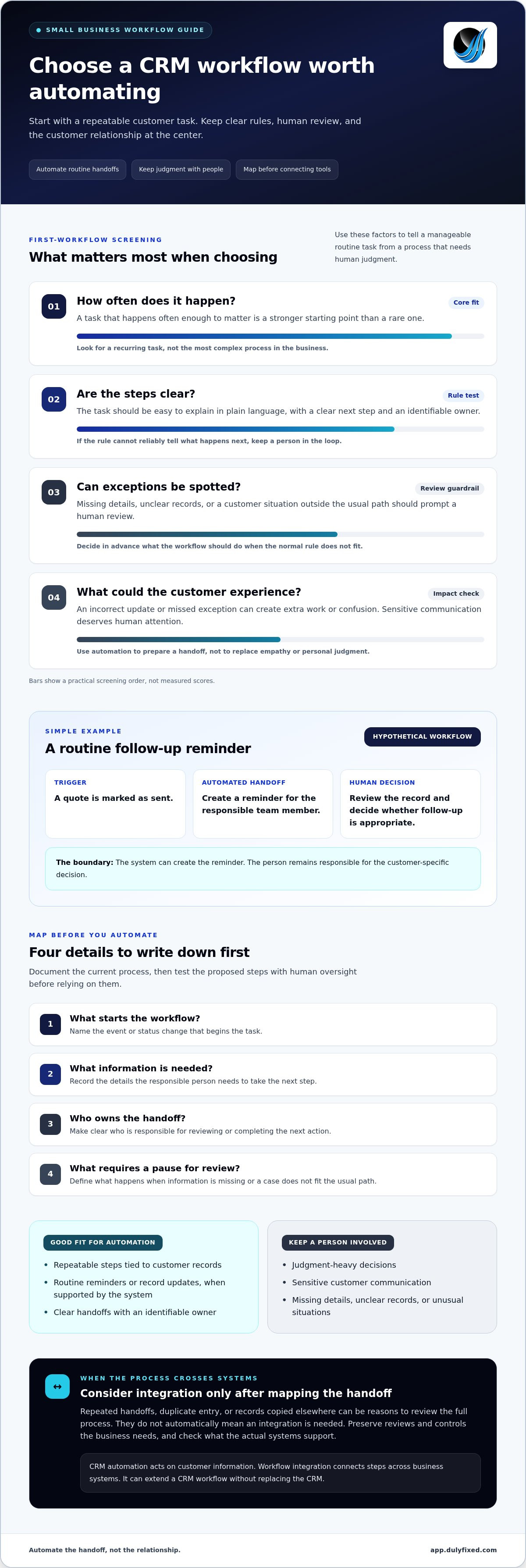
- Map the trigger, handoff, owner, and intended outcome before deciding what to automate.
- When a customer process crosses systems or teams, back-office integration may help connect the workflow without replacing your CRM.
What Small Business CRM Automation Does: And What It Shouldnât Replace
Small business CRM automation uses rules or workflows to handle repeatable steps connected to customer records. CRM software organizes customer information. Automation acts on that information to move work forward, where the system allows it. For a broader overview of Customer Relationship Management (CRM), see the Wikipedia entry.
For example, a business might set a rule to create a follow-up task after a customer record reaches a certain status, or update a record when a defined step is complete. These are examples, not features available in every CRM. The right workflow depends on the tools in use and how the business handles its customer information.
Which customer tasks benefit from automation, and which need a person?
Look for steps that happen consistently and follow clear rules. A task reminder, a routine record update, or a handoff to the next person may be a good candidate if the relevant system supports it. Start with a small, easy-to-check action. If the rule canât reliably tell what should happen next, keep a person in the loop.
Judgment-heavy decisions and sensitive customer communication deserve human review. A person can interpret context, respond with empathy, and adjust when a situation doesnât fit the usual pattern. Automation can prepare a handoff or flag a record for attention, but it shouldnât make a delicate conversation feel like a script.
Automate routine handoffs; keep relationship-building conversations human. That distinction helps protect the customer experience while reducing repetitive administration. If your mapped workflow crosses systems or teams, back-office integrations and automation can be a practical way to connect internal processes. The aim is to move work between steps, not replace the CRM or the person responsible for the customer.
How to Choose and Map Your First Small Business CRM Automation
Start with a task that repeats, not the most complex process in the business. Small business CRM automation is easier to scope when you can describe the task in plain language and identify who owns the next step. For example, in a hypothetical workflow, marking a quote as sent could create a reminder for the responsible team member to review the record and decide whether follow-up is appropriate.
Before changing tools, check whether the task happens often enough to matter, whether its steps are clear, and what exceptions could affect the customer. A frequent task with consistent rules may be a good starting point. A rare task, or one that depends on personal judgment, may be better left manual. Consider the customer impact, too: an incorrect update or missed exception can create extra work or confusion.
Map the workflow before connecting tools
Write down the current process first. Note what starts it, what information the person needs, what happens next, and who is responsible. Record what should happen when details are missing, the record is unclear, or a customerâs situation doesnât fit the usual path.
A useful first workflow is repeatable, clear, and easy for a person to review.
Then test the proposed steps with human oversight. Compare what the workflow does with what the responsible person expects, and pause it for review when required information is missing or an exception appears. Adjust the process before relying on it. Mapping first can also show whether the work stays within one system or crosses tools and teams. If those handoffs need to connect, back-office integrations and automation may be relevant.
Use your process map to discuss a back-office workflow that could benefit from a clearer handoff.
When Back-Office Integration Can Extend Small Business CRM Automation
A CRM workflow may handle its part well but still leave work stranded between systems or teams. Repeated handoffs, duplicate entry, or a customer record that someone has to copy elsewhere are signs to review the full process. They donât automatically mean you need an integration. First, identify where the work slows down and whether the extra steps serve a real purpose.
CRM software organizes customer information. Workflow integration connects steps across business systems so information or tasks can move through a process. It isnât the same as buying a CRM, and small business CRM automation doesnât require replacing the system you already use. The right approach depends on the tools involved, the process, and how each team handles the work.
Recognize when a workflow needs more than a CRM setting
If a process crosses systems or teams, look at each handoff: who acts, what information they need, and where they enter or find it. Duplicate entry may point to an opportunity to simplify, but it can also reflect a review or control the business needs. Keep necessary checks in place.
Platform capabilities vary, so donât assume a particular CRM can connect to a particular tool or perform a specific action. Assess the actual systems and workflow before settling on an approach. Dulyfixed Small Business Solutions provides back-office automation from its base in Soap Lake, Washington, serving clients throughout Grant County and Central Washington cities including Ephrata, Moses Lake, Wenatchee, Seattle, Coulee City, Hartline, Wilson Creek, and Marlin. Its back-office integrations and automation service focuses on connecting systems and streamlining internal workflows.
A practical next step is to document one cross-system handoff and note the tools, information, owner, and review points involved. Then discuss your business automation needs with Dulyfixed Small Business Solutions.
Make the Next Workflow Easier to Manage
Let the day-to-day work guide what you improve next. As your business changes, a process that once felt manageable may start pulling attention away from customers. Keep a short list of recurring friction points so you can decide where small business CRM automation might fit as needs shift.
Thereâs no need to automate every task. Choose changes that support how your team wants to serve customers and leave room for the personal judgment that makes your service yours.
Discuss your business automation needs with Dulyfixed Small Business Solutions
A thoughtful next step can make growth easier to manage.
Frequently Asked Questions
Is CRM automation useful for a very small business?
Yes, if a recurring customer-related task takes time or is easy to overlook. A small business can start by tracking one step, such as whether a customer record has the details needed for a follow-up. If setting up and maintaining automation takes more effort than the task itself, a simple manual checklist may be the better fit. This test applies to businesses in Soap Lake, Ephrata, Moses Lake, Wenatchee, Seattle, Coulee City, Hartline, Wilson Creek, and Marlin.
Can CRM automation work without replacing existing business software?
Often, yes. Small business CRM automation may use settings in the software you already have, or it may involve connecting steps across tools. Whatâs possible depends on the systems and workflow. Before changing software, write down what information needs to move, where it starts, and who uses it next. That map can help show whether a built-in option is enough or a broader connection is worth exploring.
How can a small business tell whether CRM automation is working?
Choose a few practical measures before the workflow begins. For example, note how often staff need to correct a record, repeat an entry, or step in because a task didnât reach the right person. Review those same signs after the workflow is in use, and ask the people handling the work whether itâs clearer. If errors or extra steps increase, pause and adjust the process rather than adding more automation.
Talk With Dulyfixed
If this article connects with something you are trying to improve, send a note about your website, marketing, search visibility, or AI discovery goals.