

Published November 8, 2026 Updated November 9, 2026
A slow website fix in Moses Lake starts by finding what delays your pages and addressing the cause, not changing settings at random. A website can feel sluggish in different ways: a page may take too long to appear, or an important action may not respond promptly. First, identify what visitors experience and focus on the issue that gets in their way. This gives each improvement a clear purpose and helps you decide what to address first.
Website performance affects more than convenience. A frustrating online experience can shape how customers view a business and whether they continue toward an inquiry or purchase. This guide explains how to diagnose slow pages, make image-loading choices that support a smoother visit, and connect performance improvements to customer trust. It also helps you decide whether a focused technical adjustment or a broader mobile-first website improvement better fits the problem.
Key Takeaways
- Test your site to pinpoint its biggest slowdown, then address that bottleneck and measure again.
- Resize and compress images to suit their display size, and prioritize the image visitors see first.
- Lazy load images below the fold so they load as visitors scroll, rather than delaying the initial view.
- Improve page speed to make browsing smoother and support customer confidence and business goals.
1. Why is my website so slow?
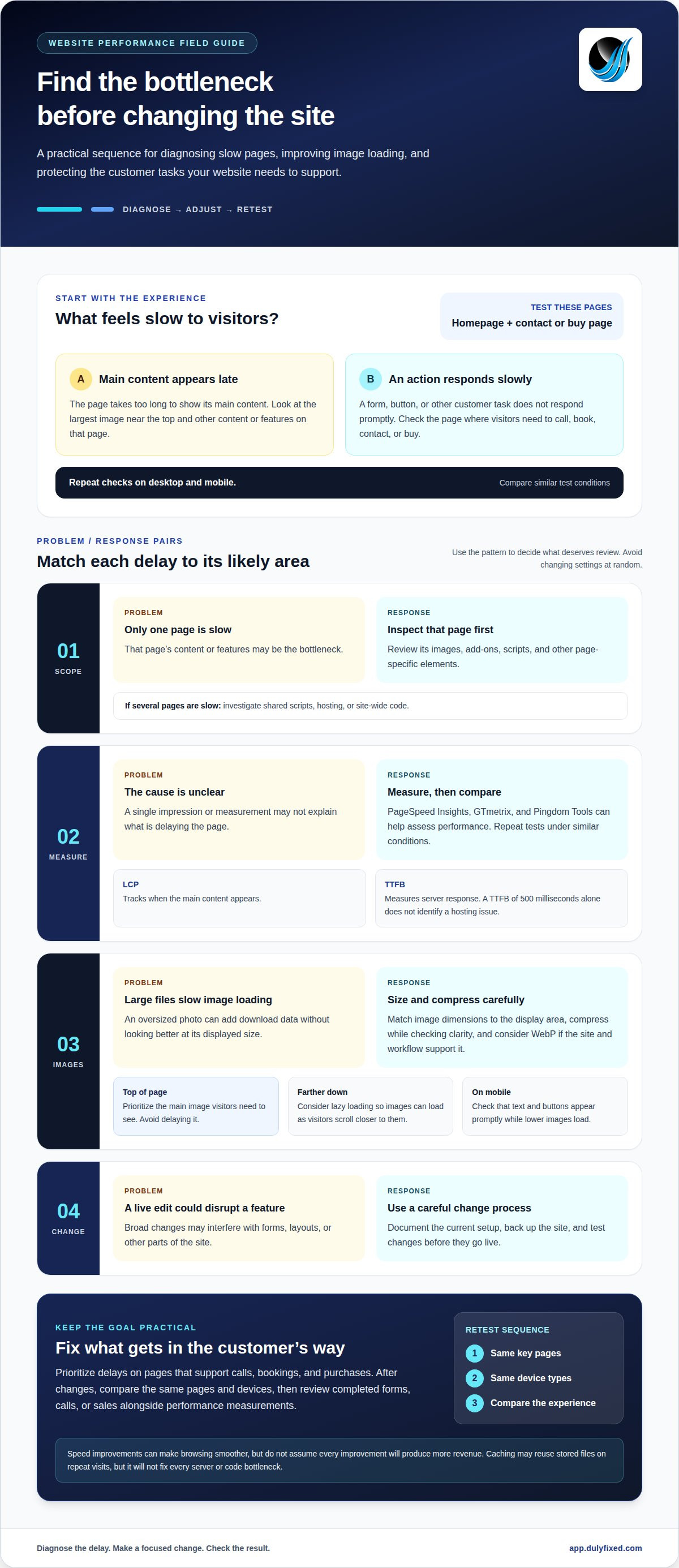
A slow website fix in Moses Lake starts with isolating the delay. Test the homepage and a page customers use to contact or buy from you, on both desktop and mobile. If only one page lags, its content or features may be the bottleneck. If several pages lag, investigate shared scripts, hosting, or site-wide code.
PageSpeed Insights, GTmetrix, and Pingdom Tools can help measure performance. Review Largest Contentful Paint (LCP), which tracks when the main content appears, and Time to First Byte (TTFB), which measures server response. Repeat tests under similar conditions and focus on the slowest result. Use these measurements to identify what may need further review.
Limited server resources can delay a page. Large images take longer to download, while plugins may add scripts, styles, and external requests. Code that blocks the browser from displaying content can slow the experience too. For example, several add-ons may require more browser processing before the main content appears.
Website speed optimization needs vary with the siteâs size, technical complexity, hosting needs, and required changes. Available solutions can include managed web hosting, mobile-first design, and technical support. A TTFB of 500 milliseconds, by itself, does not identify a hosting issue. Managed web hosting addresses hosting needs.
Before changing a live site, consider the risk of disrupting forms, layouts, or other features. A careful process documents the current setup, backs up the site, and tests changes before they go live. Start speed work with a clear diagnosis and scope, not broad edits that could interfere with customer tasks.
2. Image sizing, prioritization, and lazy loading
Large image files can require more data to download before they appear. Start with the largest image near the top of each important page. Resize it to match its displayed dimensions, then compress it while checking that it remains clear. A full-size camera photo in a small card may add data without making the image look better to visitors.
Consider WebP if your site and image workflow support it. Compare the result with the original, especially for product photos, logos, and detailed graphics. Choose a file that looks right on phones and larger screens, and check how the page loads after replacing images. Image changes may affect how quickly prominent content appears.
Loading order matters. Avoid delaying the main image at the top of the page if visitors need it right away. For images farther down the page, consider lazy loading, which can defer loading until visitors scroll closer to them. Check the results on your site, since loading behavior can vary. JavaScript-heavy galleries and image widgets may also affect how quickly content appears.
To improve mobile speed, resize images for their displayed area, compress them, and test pages on a phone-sized screen. Check that text and buttons appear promptly, even while images lower on the page are loading. Compare the optimized page with the earlier test and confirm that images remain sharp and correctly placed.
If image loading and mobile layout need coordinated changes, get help reviewing the page.
3. Effects of slow websites on customer trust and revenue
When a page takes too long to respond, visitors may leave before seeing your offer. Someone trying to book an appointment could abandon a form that stalls after they press âSubmit.â That can mean a missed inquiry, while repeated delays may make the business seem less dependable.
Speed also shapes how people judge a company. If a product page loads in pieces or its buttons fail to respond, visitors may hesitate before sharing payment details. A polished browser experience builds confidence by making services, prices, and next steps easy to find. This matters especially on pages tied to calls, bookings, and purchases.
Slow loading can also hurt the user experience, making visitors more likely to leave before exploring related pages. A fast first view helps people reach useful content without waiting through unnecessary requests.
Measure the impact before and after changes. Compare the same key pages, devices, and network conditions, then review completed forms, calls, or sales alongside performance metrics. On a site that uses plugins, test whether plugins or added scripts delay pages that drive customer action. Caching can reuse stored files on repeat visits, but it will not fix every server or code bottleneck.
Prioritize fixes by customer impact: address delays on high-value pages first, then retest. This connects performance work to practical outcomes without assuming every speed improvement produces more revenue.
Discuss your websiteâs performance
Dulyfixed Small Business Solutions: Mobile-First Website Design
Dulyfixed Small Business Solutions can help when slow pages, awkward mobile layouts, or unclear navigation make it harder for customers to use your website. Its mobile-first website design focuses on building for phone screens as well as larger displays, where image size, page structure, and loading choices shape the experience.
If testing points to server resources as a bottleneck, managed web hosting may help address the issue. For a focused campaign or service page, landing page development can create a simpler path from the visitorâs first click to a clear next step. Choose an approach based on what the tests reveal and which pages customers need most.
Contact Dulyfixed Small Business Solutions to discuss your websiteâs performance needs.
Make your next website improvement count
For a slow website fix in Moses Lake, treat performance as part of the customer journey, not a score to chase. Focus on pages that help customers act, then decide whether the improvement belongs in the site structure, a landing page, or the hosting setup. Keep the goal practical, such as helping visitors find a service or submit an inquiry easily on a phone. Dulyfixed Small Business Solutions offers Landing Page Development, Managed Web Hosting, and SEO-Ready Site Structure for these website needs. From Soap Lake and Ephrata to Moses Lake, Wenatchee, Seattle, Coulee City, Hartline, Wilson Creek, and Marlin, start by noting which page needs attention and what customer task it should support. Then contact Dulyfixed to plan a practical next step. This gives future updates a clear purpose and helps you judge whether each change improves the experience.
Contact Dulyfixed Small Business Solutions
A focused improvement can make your website easier for customers to use.
Frequently Asked Questions
Why is my website so slow?
A page may take longer to appear when the server has to assemble information for each visit instead of sending a ready-made page. This can affect personalized areas, such as an account dashboard or live inventory, more than static pages. The work required to create a page can vary with its content and the services it relies on.
Why is my Internet slow and sites & pages won't load?
A slow connection can delay downloads before a website finishes loading. Large household or office downloads may compete for available bandwidth, while a service interruption can affect access more broadly. In Moses Lake, as elsewhere, trouble reaching unrelated websites may point to the connection or provider rather than a problem with your business website.
How can I diagnose why a website is slow?
Record what happens from the moment you open a page until it becomes usable. Browser developer tools can show a request timeline, including requests that take unusually long or fail. Save the results with the page name and test conditions. This record helps distinguish a slow response from a page that loads but remains difficult to use.
What are the most effective ways to speed up a website?
Match each change to the cause of the delay instead of applying a generic checklist. For sites that change often, review performance when publishing a new feature, embedded tool, or campaign tag. Keep a note of changes and their effects so later updates do not quietly undo improvements.
How do I test website speed and Core Web Vitals?
Use a website performance testing tool that reports Core Web Vitals, and test the pages customers rely on most. Save each report with the page and test date, then compare results after changes. One pageâs result may not represent the whole site, so review important service, booking, and contact pages separately.
Talk With Dulyfixed
If this article connects with something you are trying to improve, send a note about your website, marketing, search visibility, or AI discovery goals.