
Published September 26, 2026
An outdated look isnât, by itself, a reason to replace your website. The clearest signs you need a new website are recurring problems that stop customers from finding information, contacting you, or taking the next step. If your site feels dated or is hard to update, appearance is only part of the decision.
The right answer might be a full rebuild, a targeted repair, or a focused landing page. The difference depends on whether the problem affects the siteâs structure or is limited to a few pages, features, or messages.
This checklist will help you assess usability, performance, content, and customer inquiries. Youâll also learn how to weigh the evidence and choose a next step that fits your business goals.
In this article:
- Business-focused website checks
- Performance, content, and structure
- Rebuild, repair, or landing page
- Website audit checklist
- Choosing a website partner
Key Takeaways
- The signs you need a new website are recurring problems that interfere with business goals, not simply an older design.
- Test important tasks on mobile and desktop, including finding essential information and submitting an inquiry form.
- Use the pattern of failures to decide whether targeted repairs, a full rebuild, or a focused landing page makes the most sense.
- Review analytics, search data, customer questions, and form submissions to add evidence to your website audit.
- Ask a prospective website partner to explain how each proposed change addresses an issue you documented.
Table of Contents
- Signs You Need a New Website: Start With These Business-Focused Checks
- How Website Performance, Content, and Structure Reveal Deeper Problems
- Should You Rebuild, Repair, or Create a Focused Landing Page?
- Use This Website Audit Checklist Before Choosing Your Next Step
- Choose a Website Partner Who Can Explain the Fix, Not Just Sell a Redesign
Signs You Need a New Website: Start With These Business-Focused Checks
A dated color palette or an older-looking logo may call for a visual refresh, but it doesnât automatically mean you need a new site. Start by checking whether people can complete important tasks. If visitors canât understand what you offer, find key details, or contact you, the problem goes beyond personal design preference.
Use this checklist to look for practical friction:
- Mobile usability: Can people read the text, open the menu, tap buttons, and complete forms on a phone?
- Navigation: Are page labels clear, and can visitors find services, location details, and contact information?
- Content: Does each key page explain what the business does and what a visitor can do next?
- Accessibility: Is text easy to read, are links distinguishable, and can you move through the site with a keyboard?
- Inquiries: Can a prospective customer find a working way to ask a question or request information?
One personâs preference for a different style is weak evidence for a rebuild. Repeated customer questions about what you offer, where to click, or how to reach you are more useful signals. The fundamental principles of web design cover both how a site looks and how people interact with it, so assess appearance and usability together.
Does your website work well on phones?
Check more than whether the page fits the screen. Read the text, open the menu, tap each important button, and submit a form. If possible, repeat the test on another phone. Note specific friction, such as a button thatâs difficult to tap or a form field hidden behind the keyboard. If the layout works but one image is oversized, a focused content fix may be enough.
Can visitors quickly understand and act?
Ask whether a first-time visitor can identify the business, understand its offer, and find the area it serves without searching through several pages. Check navigation labels, contact details, forms, and calls to action. Then ask someone unfamiliar with the site to complete an important task, such as finding a service or sending an inquiry, without coaching them.
A redesign is more likely to be warranted when core tasks repeatedly fail. These signs you need a new website carry more weight when the same obstacles affect multiple pages or customers. If the issue is isolated, a targeted repair may be enough.
How Website Performance, Content, and Structure Reveal Deeper Problems
A page that loads slowly or behaves unpredictably can interrupt a customerâs task. A visitor may leave before a service page appears, abandon a form that wonât submit, or lose confidence when a link leads nowhere. One slow visit or isolated error isnât enough to justify a rebuild. Look for recurring problems that affect important pages or tasks.
Technical symptoms can come from hosting, implementation, or page design. Identifying where the problem originates helps you choose the right scope. A server or configuration issue may call for a targeted fix, while a site-wide structure that makes important tasks difficult may require broader changes.
Are speed or reliability issues affecting real tasks?
Test representative pages on mobile and desktop. Include a main service page, a contact page, and any form customers use. Repeat the test at a different time, and use available browser or analytics tools to look for patterns rather than relying on one impression.
- Check whether large images delay a page or display incorrectly.
- Follow important links and note broken pages or unexpected redirects.
- Submit a test inquiry, then confirm it reaches the intended inbox.
- Compare your observations with any recurring downtime reports.
Record the page, device, task, and result whenever something fails. Repeatable evidence helps separate a persistent problem from a temporary glitch and gives whoever investigates it a useful starting point.
Does the site structure still match the business?
Compare your pages with the services you currently provide, the locations you serve, and the questions customers ask. For a business serving Soap Lake, Ephrata, Moses Lake, Wenatchee, or Seattle, check that location details are clear and accurate. An outdated offer, missing service details, or a page without a clear next step can make the business seem less reliable than it is. Similar or duplicated content can also leave visitors unsure which page has the information they need.
Review navigation and page paths, too. If customers have to guess which menu label contains a service or reach a page with no relevant next step, the structure may no longer match how they choose and contact a business. Use this website maintenance checklist as a prompt to review site details over time.
These patterns can be stronger signs you need a new website when they appear across multiple pages and interrupt related tasks. If only one image, link, or section causes trouble, a focused repair may be more sensible. If youâve documented recurring issues and want help assessing them, you can share your website concerns with Dulyfixed.
Should You Rebuild, Repair, or Create a Focused Landing Page?
Choose based on the problems youâve verified, not the age of your website. If one form fails but the rest of the site supports customer tasks, a targeted repair may be enough. If multiple problems share a root cause, such as outdated navigation, a poor mobile experience, and a structure that no longer fits your services, a rebuild may address them more effectively.
Choose the smallest change that resolves the verified business problem. Repairs preserve more of your current setup and can work well for isolated issues. A rebuild involves broader change but may address structural limits that repeated fixes wonât solve. A landing page is narrower by design: it gives one service or campaign a clear path without replacing the whole site.
| Option | Best fit | Trade-off |
|---|---|---|
| Targeted repair | A specific, testable issue on an otherwise useful site | Preserves the current setup, but wonât resolve deeper structural problems |
| Full rebuild | Related problems across navigation, mobile use, content, or ongoing maintenance | Can address connected issues, but requires broader planning and change |
| Focused landing page | One service, offer, or campaign needs a direct visitor journey | Creates a focused destination, but doesnât fix problems elsewhere on the site |
When are targeted website fixes enough?
Choose repairs when the site structure still makes sense and the problem is contained. Examples include correcting a form that doesnât deliver inquiries, replacing outdated copy on a service page, or making one important page easier to use on mobile. Test the fix afterward. If similar failures keep appearing across many pages, the issue may be larger than one repair can address.
When does a rebuild or landing page make more sense?
Consider a rebuild when problems overlap. Confusing navigation, hard-to-maintain content, and mobile usability issues may point to a site structure that no longer supports the business. A landing page may be a better fit when one service or campaign needs a clear message and next step, while the rest of the website remains useful.
If youâre weighing a focused page, review landing page development services as one possible approach. Match the scope to the evidence: recurring problems across connected tasks can be signs you need a new website, while a single isolated failure usually calls for a smaller fix. To discuss which scope fits your findings, contact Dulyfixed about your website needs.
Use This Website Audit Checklist Before Choosing Your Next Step
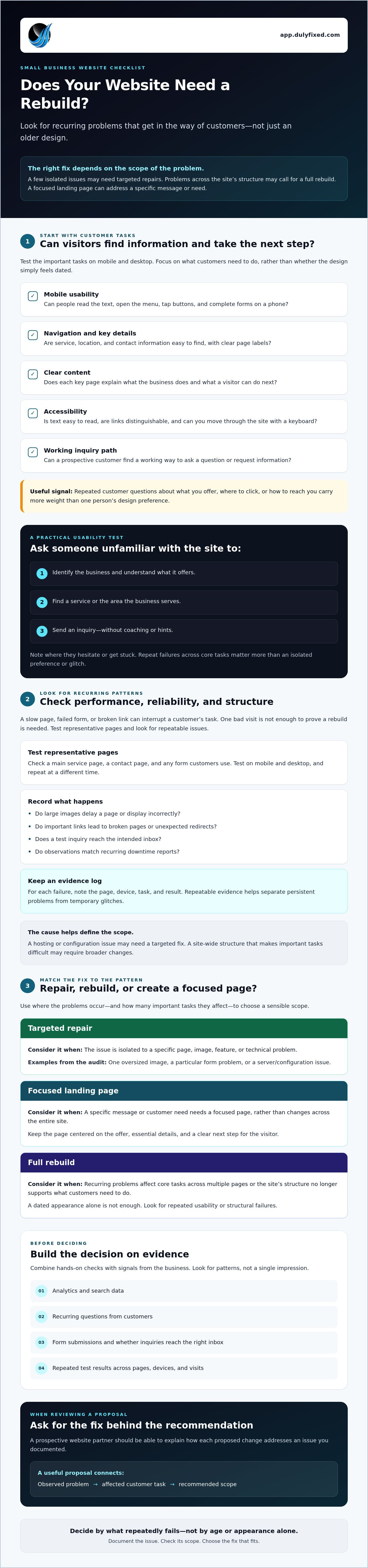
A useful audit turns general frustration into evidence you can act on. Before requesting a proposal, connect each website issue to a business priority, such as helping customers understand a service, find location details, or send an inquiry. That context helps distinguish urgent failures from improvements that can be planned over time.
- Define the goal. Choose the customer task the site should support, such as finding a service or submitting an inquiry. Be specific about what a successful visit looks like.
- Test key journeys. Complete the task on mobile and desktop. Note confusing labels, extra steps, display issues, or points where you canât continue. Ask someone unfamiliar with the site to try the same task and describe whatâs unclear.
- Record evidence. Log the page, device, task, and result. Add screenshots or examples where useful. Review available analytics, search data, customer questions, and form submissions for patterns that support or challenge your observations.
- Rank the issues. Consider customer impact, how often the issue occurs, and whether it blocks an important task. A form that prevents inquiries deserves attention before a visual detail that doesnât affect how customers use the site.
- Compare findings with priorities. Decide which problems need attention now and which can wait. Match the proposed scope to the evidence instead of assuming every improvement requires a full rebuild.
How do you test the website as a customer?
Pick a few important tasks that reflect how customers use your site. Try to find a service, understand whether it fits your needs, and submit an inquiry. Repeat each task on a phone and a computer. Donât guide a first-time tester. Ask them to say what they expect each link or button to do. Their pauses and questions can reveal friction youâve learned to overlook.
How should you prioritize the findings?
Sort issues by whether they block a business task, how often they appear, and how many pages they affect. Keep a brief record instead of relying on memory. For example, note whether an unclear service description appears on one page or across several, then compare it with customer questions and inquiry patterns. The signs you need a new website are more compelling when evidence points to connected problems rather than isolated preferences.
If youâre comparing professional support options, review available website design and digital services against the issues in your audit. Bring your prioritized findings into any discussion so the proposed work can be tied to specific business needs.
Review your website audit findingsChoose a Website Partner Who Can Explain the Fix, Not Just Sell a Redesign
A useful website proposal should start with the problems you documented, not a preset package. A prospective partner should explain which issues the work will address, why the proposed scope fits, and how youâll check whether important tasks work as intended. If the recommendation is a full redesign but your audit found one isolated form issue, ask why a smaller repair wouldnât solve it.
What should you ask before approving a website project?
Get clear answers before work begins. Ask which findings the proposed work addresses and what youâll be able to test when itâs complete. Clarify who supplies and approves content, who owns the site and its accounts, and what hosting, maintenance, and technical support are included. Ask the provider to separate essential launch work from optional future improvements.
- How will the mobile experience support the tasks customers need to complete?
- What changes to navigation or site structure are necessary, and why?
- Who writes, supplies, and updates the content?
- Who manages hosting and handles technical issues after launch?
These questions help expose gaps in scope. They also let you compare proposals based on responsibilities and practical outcomes, not just visual concepts.
How can a practical web partner support the decision?
Look for explanations that connect each design or technical choice to a real user need. A mobile-first layout should make important information and actions usable on smaller screens. An SEO-ready site structure should organize pages clearly; it doesnât guarantee search rankings. A targeted repair may still be the best recommendation if the existing structure supports your business.
Dulyfixed Small Business Solutions provides mobile-first website design, landing page development, SEO-ready site structures, managed web hosting, and technical support for small businesses. If one service or campaign needs a focused visitor journey, landing page development may be worth considering alongside other options. Dulyfixed is based in Soap Lake, Washington, and serves local businesses in Ephrata, Moses Lake, Wenatchee, and Seattle.
Bring your audit findings to a conversation with a prospective partner and ask for a recommendation tied to those specific issues. The signs you need a new website should inform the scope, not determine it before the evidence is reviewed.
Discuss your website audit with DulyfixedMake Your Next Website Decision With Confidence
The clearest signs you need a new website are recurring problems that get in the way of customer tasks, not simply a design that feels dated. Use your audit to separate isolated issues from deeper problems across mobile usability, content, navigation, and site structure. Then choose the smallest change that addresses what youâve verified, whether thatâs a repair, a focused landing page, or a rebuild.
A good project starts with clear priorities and a partner who can explain the work. Dulyfixed offers mobile-first website and landing page development, SEO-ready site structures, managed web hosting, and technical support. Match those services to the issues you found, and ask how the proposed scope will address them.
Discuss the website issues you foundYou donât have to decide based on guesswork. With clear evidence and a practical next step, you can make changes that better support your business and the people looking for what you offer.
Frequently Asked Questions
What are the most common signs you need a new website?
Common signs include recurring mobile usability problems, confusing navigation, outdated service information, broken inquiry forms, and pages that no longer reflect what the business offers. The key question is whether these issues prevent customers from understanding your services or taking action. A dated visual style alone doesnât prove the site needs replacing. Look for repeated obstacles across important pages and consider whether focused fixes could address them.
How do I know if my website needs a redesign or just a few fixes?
Start by identifying how many important tasks fail and whether the problems share a cause. If a single form or service page needs attention while the rest of the site works well, a targeted fix may be enough. If mobile usability, navigation, content, and maintenance problems overlap across the site, a redesign may make more sense. Test the issues more than once and base your choice on what you can document.
Can an old website still work well for a small business?
Yes. A websiteâs age alone doesnât determine whether it serves the business well. If visitors can find accurate service information, use the site on their devices, and complete important tasks, the current setup may still be effective. Check that the content matches your current services and that forms and contact details work. If those basics hold up, updates or maintenance may be more useful than a full redesign.
Does a website that is not mobile-friendly need to be replaced?
Not always. First, determine whether the problem is limited to a particular page, image, or feature, or whether the siteâs layout makes key tasks difficult across multiple pages. An isolated display issue may be fixable. If menus, text, buttons, and forms are consistently hard to use on phones, the underlying design may need broader changes. Test the tasks customers rely on before deciding between repairs and a rebuild.
How can I tell if my website is losing potential customers?
Look for evidence that visitors have trouble moving from interest to action. Review inquiry form submissions, customer questions, available analytics, and search data for patterns, then test key pages and contact routes yourself. A drop in inquiries alone doesnât prove the website is responsible, since other business factors can affect demand. Compare signals over time and check whether visitors encounter a specific barrier, such as unclear service details or a failed form.
Should I hire a web designer or update my website myself?
You may be able to handle straightforward edits, such as correcting business hours or replacing outdated text, if your site tools make those changes manageable. Consider professional help when updates affect mobile layouts, site structure, forms, hosting, or other technical functions. Before hiring, define the problem and ask what work is included. The right choice depends on your skills, the risk of disrupting the site, and the complexity of the changes.
What should I check before hiring someone to rebuild my website?
Ask how the proposed work addresses specific issues youâve documented, who supplies and approves content, who owns the site and its accounts, and what hosting and technical support cover. Clarify how youâll review the finished site and distinguish essential work from optional additions. Dulyfixed offers mobile-first website and landing page development, SEO-ready site structures, managed hosting, and technical support for businesses in Soap Lake, Ephrata, Moses Lake, Wenatchee, and Seattle.
Talk With Dulyfixed
If this article connects with something you are trying to improve, send a note about your website, marketing, search visibility, or AI discovery goals.