

Published October 25, 2026
A polished desktop website can still frustrate a customer on a phone. Mobile website optimization for local business starts with the moments that matter: finding key information, getting directions, or contacting you without pinching, zooming, or hunting through menus.
If youâre unsure whether to fix speed, layout, or local search details first, youâre not alone. A full redesign isnât always the right first move. This guide will help you set practical priorities and make the path from a local search visit to a customer action easier.
Youâll see how to spot mobile usability problems, improve loading and navigation, and make essential business details easy to find. Then you can choose a realistic next step, whether thatâs a focused update to your current site or a more substantial redesign.
Key Takeaways
- Mobile website optimization for local business starts with making key pages readable, usable, and functional on a phone.
- Test the main customer journey, then prioritize the friction that makes it harder to understand your offer, find service details, or contact you.
- Retest after making changes to see whether the core tasks feel easier on a phone.
- Choose focused updates for specific issues, or consider a landing page when one service or campaign needs a clearer path.
What mobile website optimization means for a local business
Mobile website optimization for local business means making pages readable, usable, and functional on phone screens, including when a visitor has limited time or a less reliable connection. A person might find your business in a local search, open your site, check whether you offer the service they need, and then call or send an inquiry. Each step should be clear on a small screen.
Mobile-friendly design is more than a smaller desktop layout
A phone-ready page rearranges content to fit the screen instead of simply shrinking a desktop layout. Text should be readable without zooming, navigation easy to spot, and buttons simple to tap. Put key contact details where visitors can find them without searching through several menus.
Responsive design helps a layout adapt to different screen sizes, but it doesnât make every phone, browser, or connection behave exactly alike. Check pages on an actual phone and consider how they work when images load slowly or the visitor is moving between tasks. The broader idea of The Mobile Web includes the technologies and standards that let people access websites through mobile devices.
- Usability is whether visitors can read, navigate, and complete basic tasks.
- Speed is how quickly page content loads and responds.
- Local search visibility is whether people can find the business through relevant local searches. A siteâs local and national SEO structure supports this separate goal.
These areas connect, but they arenât interchangeable. A fast page may still hide its phone number, and a clear layout doesnât guarantee local search visibility. Treat each as a distinct part of the customerâs path, then check whether the whole experience makes it easy to move from finding the site to contacting the business.
How to prioritize mobile website improvements for local customers
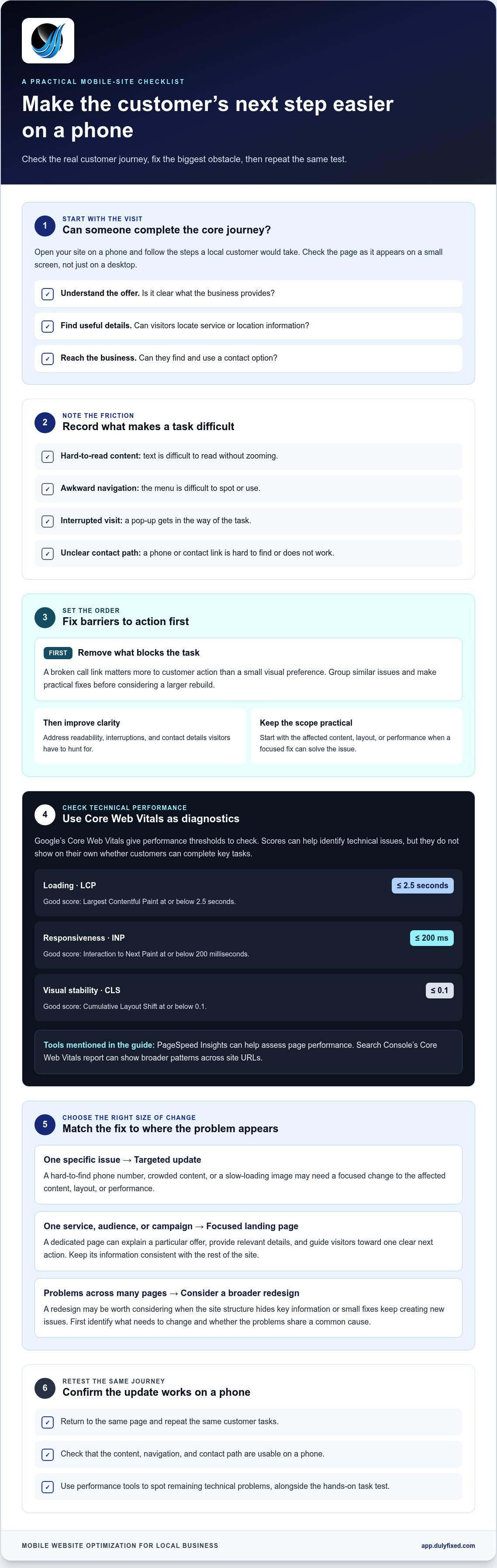
A practical mobile website optimization for local business starts with the actions a visitor needs to complete, not a long list of technical scores. Test the site on a phone, note where the experience breaks down, fix the highest-impact friction, and test again.
- Test a real visit. Open the site on a phone and try to understand the offer, find service or location details, and contact the business.
- Record the friction. Note anything that blocks a task, such as text thatâs hard to read, a menu thatâs difficult to use, an intrusive pop-up, or a contact link thatâs hard to find.
- Fix the biggest obstacle first. A broken call link matters more to customer action than a small visual preference. Group similar issues and tackle practical fixes before considering a larger rebuild.
- Retest the same tasks. Check that your updates work on a phone, then use performance tools to spot remaining technical problems.
Which mobile website issues should a small business fix first?
Start with problems that prevent visitors from acting, then address readability, interruptions, and unclear contact paths. Googleâs Core Web Vitals provide a diagnostic framework: good scores are LCP at or below 2.5 seconds for loading, INP at or below 200 milliseconds for responsiveness, and CLS at or below 0.1 for visual stability, as Googleâs Web Vitals guidance explains.
Google PageSpeed Insights can help assess page performance; Search Consoleâs Core Web Vitals report can show broader patterns across site URLs. For practical mobile design principles, consult Digital.govâs mobile guidance. These tools help identify issues, but scores alone donât show whether customers can complete key tasks.
If the same problems point to broader layout or technical changes, a website review can help clarify what to address. For hands-on support with your site, get help with mobile website improvements.
When mobile website improvements call for a landing page or redesign
Choose the smallest change that solves the problem. If the mobile customer journey is clear but a page has a hard-to-find phone number, crowded content, or a slow-loading image, targeted updates may be enough. Improve the affected content, layout, or performance, then test the same task again.
A focused landing page can make more sense when one service, audience, or local campaign needs a dedicated path. For example, if a campaign promotes a particular service, a page built around that offer can explain the service, provide relevant details, and guide visitors toward one clear next action. Keep its information consistent with the rest of your site.
A broader redesign may be worth considering when mobile problems appear across many pages, the site structure makes key information hard to find, or small fixes keep creating new issues. A redesign is a larger commitment, so first identify what needs to change and whether those problems share a common cause.
Choose a practical next step for your current website
Review the full mobile journey before deciding: arrive on a relevant page, understand the offer, locate useful details, and try to contact the business. Note where the experience breaks down and whether the issue affects one page or the site more broadly. This gives you a clearer basis for choosing between targeted changes, a landing page, or a redesign.
Dulyfixed Small Business Solutions is based in Soap Lake and provides mobile-first website and landing page development for small businesses focusing on effective mobile website optimization for local business. If youâre ready to talk through the right scope for your site, discuss your website project with Dulyfixed Small Business Solutions.
Choose a clear next step for your website
Your website should keep pace with the business. When your services, hours, or priorities change, review whether the pages still reflect what customers need to know. That gives mobile website optimization for local business a clear purpose beyond a one-time redesign.
If youâre considering a site update, bring the main business goal and the page you want to improve into the discussion. A focused starting point can help shape a practical scope.
Discuss your mobile website project
One thoughtful update can give you a useful place to start.
Frequently Asked Questions
Do I need a separate mobile website if my site already works on desktop?
No, a separate mobile site isnât automatically necessary. Responsive design is a common approach that adjusts one siteâs layout for different screen sizes. Before changing your siteâs structure, test key pages on a phone, including how visitors find service details and contact you. Check page performance too, since a usable layout alone doesnât show whether pages load well.
Does a mobile-friendly website automatically load quickly?
No. A layout that fits a phone and a page that loads quickly are separate things. Large image files, scripts, hosting, and page complexity can all affect speed, though the cause varies by site. Measure the actual pages you care about with a current performance tool before choosing fixes. One slow service page may need different attention than a slow homepage.
What should I check when testing my small-business website on a phone?
Open key pages on a real phone and check whether you can read the content, use the navigation, find accurate service-area information, and complete the main contact action. If you serve communities such as Soap Lake, Ephrata, Moses Lake, Wenatchee, Seattle, Coulee City, Hartline, Wilson Creek, or Marlin, make sure the areas shown match your actual service coverage. Treat this hands-on check as a starting point, not technical testing.
Can I improve my existing mobile website without rebuilding it?
Often, focused content, layout, or performance changes can address specific problems, but some sites need broader structural work. The right option depends on the siteâs condition and what you need it to do. For mobile website optimization for local business, map a visitorâs journey through the current site, note recurring barriers, and use those findings to guide the scope before committing to a redesign.
Talk With Dulyfixed
If this article connects with something you are trying to improve, send a note about your website, marketing, search visibility, or AI discovery goals.