

Published October 27, 2026
A responsive website adjusts its layout and content to fit the screen itâs viewed on, from a phone to a desktop. Mobile responsive web design services build one site that adapts across devices, rather than separate desktop and mobile versions. A mobile-first approach starts with the small-screen experience, then adds or rearranges elements for larger screens.
You already know a site needs to be easy to use on a phone. The practical question is what responsive design includes, how it compares with a separate mobile site, and what happens after launch. This guide explains how flexible layouts work, what to consider when choosing a design approach, and which services and ongoing support can help keep a small-business website useful across screens.
Key Takeaways
- Use flexible layouts, images, and screen-specific styles so pages adjust to phones, tablets, and desktops.
- Compare one responsive website with separate mobile and desktop versions by considering content consistency and maintenance needs.
- Test navigation, text, images, and interactive elements across devices to spot usability problems before launch.
- Look for design and ongoing support that match your siteâs needs, including hosting and technical help where useful.
How responsive design adapts websites to different screen sizes
Responsive design changes a websiteâs layout to fit the screen, while keeping its content available across devices. Current best practices include starting with small screens, using flexible layouts and images, and testing navigation and readability on different devices.
Fluid Grids and Flexible Media
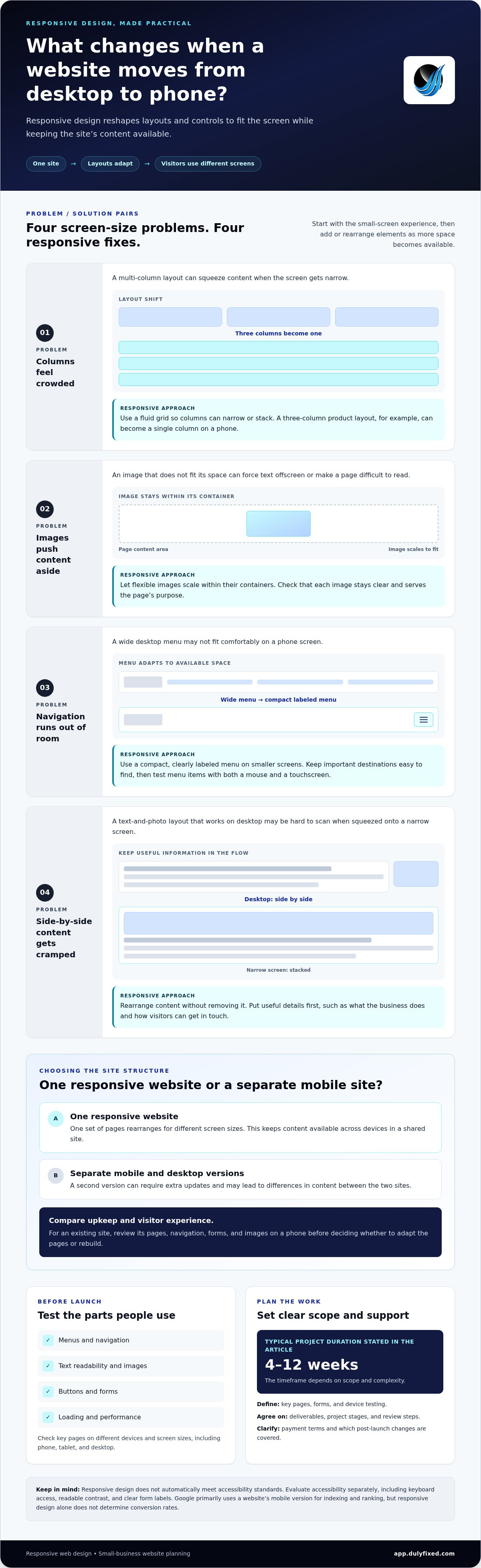
A fluid grid uses relative sizing, allowing columns to widen or narrow as the screen changes. For example, a three-column product layout can stack into one column on a phone. Flexible images scale within their containers, so oversized photos do not push text offscreen. Check that images remain clear and serve the pageâs purpose.
Adaptive Navigation
Navigation should fit both the available space and the way people use each device. A wide desktop menu might become a compact, clearly labeled menu on a phone. Keep key destinations easy to find, such as services, contact details, or a booking page. Test every menu item with a mouse and a touchscreen.
Layouts and Content Across Devices
Responsive layouts can rearrange content without removing information. A desktop page might show a service description beside a photo, then stack the photo above the text on a narrow screen. Put useful details first, such as what the business does and how to get in touch. Use CSS media queries to apply styles at suitable screen widths.
Responsive Design Best Practices
Start development with the smallest screen, then add layout features as space allows. Use CSS Grid or Flexbox for adaptable page sections, and limit images to those that help explain or sell the offering. Before launch, test text, menus, buttons, and forms on different devices. Website design and landing page development can address these details around the siteâs content and goals.
Responsive design compared with separate mobile websites
A mobile responsive website uses one set of pages that rearranges for each screen size. A separate mobile website maintains a second version, which can require extra updates and create differences in content. For small businesses, compare the technical upkeep and user experience visitors need across mobile devices.
For an existing site, first review its pages, navigation, forms, and images on a phone. A redesign can keep useful content while updating its layout and mobile usability. Larger organizations may need scalable development that supports more pages, platforms, and marketing needs. Responsive web design projects typically take 4 to 12 weeks, depending on scope and complexity.
Website builders and DIY tools provide templates and controls for owners to create or edit pages. A professional service can handle custom layout decisions, technical implementation, and testing when a site has specific needs. Responsive design is not an accessibility standard by itself. Evaluate accessibility separately using WCAG guidance, including checks for keyboard access, readable contrast, and clear form labels.
To test responsiveness, open key pages on different devices and screen sizes. Check menus, text, forms, images, and buttons, then test loading and performance. Google primarily uses a websiteâs mobile version for indexing and ranking. A clear mobile experience can make it easier for visitors to complete actions, such as calling or submitting a form, but responsive design alone does not determine conversion rates.
If your current site needs a mobile-focused redesign, define the project goals before deciding whether to adapt existing pages or rebuild them.
Responsive design services and ongoing support
Responsive work should cover design, development, testing, and a plan for changes after launch. Choose support that can keep the site useful as your content, customers, and business needs evolve.
Choose an agency by reviewing how it handles mobile layouts, technical testing, and post-launch support. Request a clear scope covering key pages, forms, and testing on desktop, phone, and tablet. A platform such as WordPress may shape the work, but the plan should fit your site and business goals.
Service Costs
In the United States, responsive design costs depend on the project and are provided after a quote request. Scope, the condition of the existing site, custom features, content needs, and testing affect the work involved. Compare proposals by checking what each includes, such as redesigning existing pages, building new layouts, and testing forms across devices.
Ongoing Support
After launch, support can address broken layouts, content changes, and issues found during device testing. Define how requests are handled and which tasks the agreement covers. For example, adding a new service page may require layout checks on phones, tablets, and desktop screens to keep the experience consistent.
A contract should define deliverables, project stages, review and approval steps, payment terms, and responsibility for ongoing changes. It should also explain how testing findings are handled and what support covers after launch. These details help you plan the work without assuming a search engine ranking or business growth is guaranteed.
To learn more about how Dulyfixed Small Business Solutions can help maintain your site, contact our team to discuss responsive design support today.
Dulyfixed Small Business Solutions: Landing Page Development
Dulyfixed Small Business Solutions can help when your business needs a focused landing page that works across screen sizes. Landing Page Development is useful for presenting one service, campaign, or customer action without adding unnecessary complexity to your main website.
For a broader site refresh, Mobile-First Website Design puts phone usability at the center of the design process. An approach to landing page development can also support a clear page structure, useful content, and a direct next step for visitors. The right starting point depends on whether you need one campaign page or a wider redesign.
Explore Dulyfixed Small Business Solutionsâ Landing Page Development service to discuss a practical next step.
Make your next website improvement count
Make your next step specific: choose one page or customer task that needs a clearer mobile experience. A service page, inquiry form, or campaign landing page gives you a practical starting point. Define what visitors should understand or do, then use that goal to guide design choices and future updates.
Dulyfixed Small Business Solutions offers Landing Page Development, Managed Web Hosting, and SEO-Ready Site Structure. These services can support a focused page, its hosting, and an organized site foundation. Mobile responsive web design services are most useful when they address a real need on your website, rather than introducing changes without a clear purpose.
Contact Dulyfixed Small Business SolutionsClarify your website goal, then take the next step with a plan that fits your business.
Frequently Asked Questions
What is Responsive Design?
Responsive design lets a website adjust its display as the viewing area changes. For example, a restaurantâs menu might show categories side by side on a wide screen, then stack them for easier reading on a phone. The aim is to keep pages usable without making visitors zoom, pan sideways, or search for key information.
What do mobile responsive web design services include?
The scope can include planning page layouts, adapting menus and forms, sizing images, and checking how key tasks work on different screens. Ask which pages and functions are included, such as appointment requests or product details. Some projects also cover post-launch technical support. Clear deliverables help you understand what the work addresses and what future updates involve.
What is the difference between responsive, adaptive, and mobile-first web design?
Responsive design uses flexible layouts that adjust to the available space. Adaptive design uses layouts prepared for selected screen sizes, switching between them as needed. Mobile-first describes the design process: begin with the phone experience, then expand for larger screens. These terms can overlap, so clarify whether a proposal describes layout behavior, design workflow, or both.
What steps are involved in making an existing website mobile responsive?
Start by identifying the pages that matter most to customers, then review their content and functions on a phone. Prioritize fixes such as hard-to-use forms, crowded menus, or clipped images. Update the design and code, then test common visitor tasks on mobile and desktop. After launch, review feedback and fix issues that affect those tasks.
How long does a responsive website redesign typically take?
Responsive website projects typically take 4 to 12 weeks. The schedule depends on the number of pages, the complexity of the design, and how much content needs revision. New features or delayed approvals can also affect progress. Before work begins, map out review points and identify who will provide content and feedback, so decisions donât stall the project.
Talk With Dulyfixed
If this article connects with something you are trying to improve, send a note about your website, marketing, search visibility, or AI discovery goals.