

Published November 3, 2026 Updated November 9, 2026
A hosting plan can keep your website online without leaving all server upkeep to you. Managed web hosting in Moses Lake typically includes help setting up, securing, updating, backing up, and monitoring the infrastructure that runs your site. It generally covers the server, not your websiteâs content, design, or custom code.
When comparing hosting options, the key difference is who handles the technical work behind your site. Unmanaged hosting leaves more of that work to you, so consider your technical skills and available time.
This guide explains how managed hosting supports website security, what to look for in backups and support, and how to compare providers. Youâll also learn what to consider when moving a site and where managed hosting fits alongside website design and technical support.
Key Takeaways
- Compare managed and unmanaged hosting by identifying who handles server updates, security, backups, and monitoring.
- Look beyond an SSL certificate: strong website security also depends on software updates, access controls, and safe account practices.
- Assess backup storage and restoration testing, not just whether backup files exist.
- Before choosing a hosting provider, clarify which services are included and how a site migration will be tested.
Website security
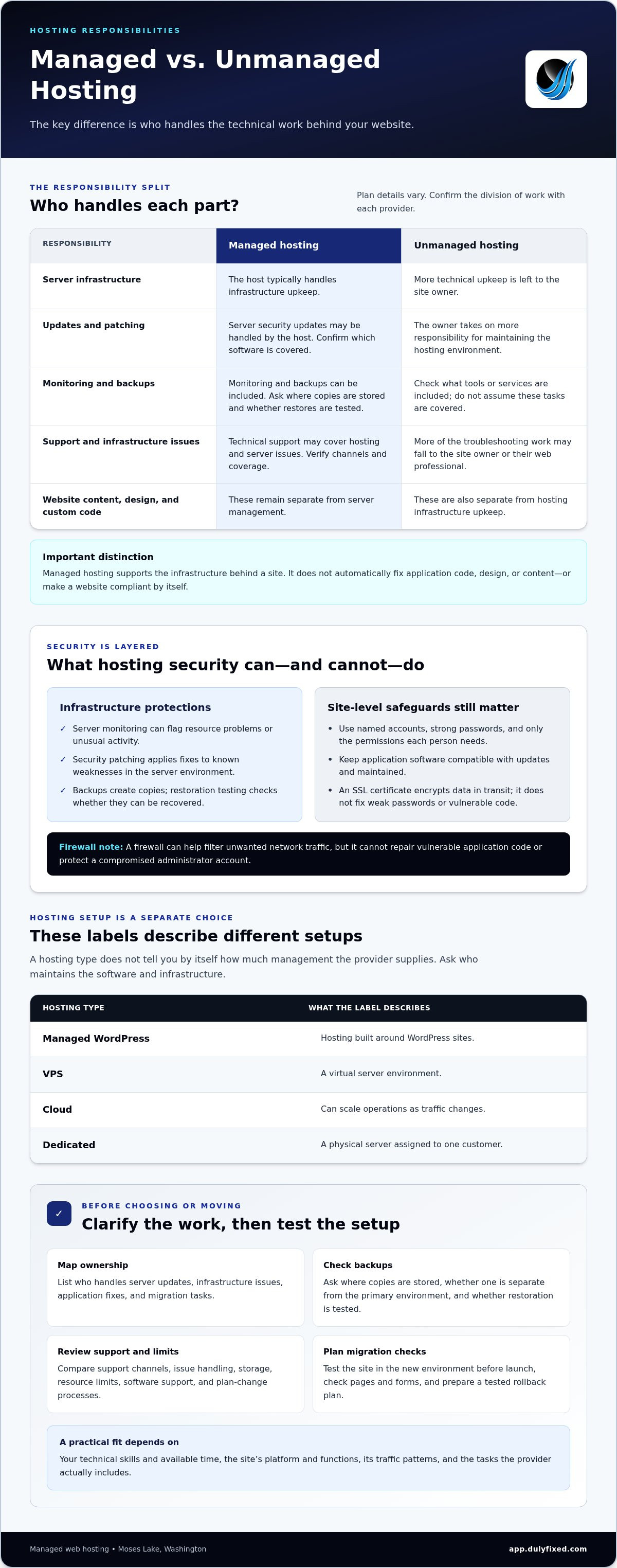
Managed hosting can cover server monitoring, security updates, backups, and technical support. It protects the infrastructure behind your website, while application security also depends on how the site is built and maintained.
Security Patching and Access Controls
Security patching applies software fixes to address known weaknesses in the server environment. Access controls limit who can sign in and what each account can change. Use named accounts, strong passwords, and only the permissions each person needs. A firewall can help filter unwanted network traffic, but it cannot repair vulnerable application code or protect a compromised administrator account.
Monitoring, Updates, and Backups
Server monitoring can flag resource problems or unusual activity before they disrupt your website. Ask how updates are handled and whether the process accounts for application compatibility. A backup plan should specify where copies are stored and whether one is kept separate from the primary hosting environment. Restore testing matters too: a backup file is useful only if it can be recovered.
An SSL certificate encrypts data moving between a website and its visitors. It does not fix weak passwords, unsafe permissions, vulnerable software, or compromised accounts. Treat it as one security layer, alongside patching, account controls, and monitoring. Hardware upkeep is another infrastructure concern, but it does not replace application-level protection or professional support for site issues.
Uptime commitments and performance benchmarks vary by provider. Compare the written availability commitment, how performance is measured, what exclusions apply, and what support steps follow an outage. For a practical benchmark, review your siteâs normal loading behavior and test important pages after changes. This gives you a baseline for spotting slowdowns without relying on a generic promise.
What makes managed hosting different?
Managed hosting shifts some server infrastructure work to the host, while unmanaged hosting leaves more technical upkeep to you. This division matters during security incidents, software changes, and site migrations.
Managed and Unmanaged Responsibilities
With managed hosting, the host typically handles server infrastructure, while you remain responsible for website content, design, and custom code. Unmanaged hosting requires more technical skill from the site owner to maintain the hosting environment. Before choosing, list who manages server updates, responds to infrastructure issues, and fixes application problems. Responsibilities can differ by provider and plan.
Hosting Type Comparisons
Managed WordPress hosting is built around WordPress sites; VPS hosting provides a virtual server environment. Cloud hosting can scale operations as traffic changes, while dedicated hosting assigns a physical server to one customer. These labels describe different hosting setups, not the level of management by themselves. Compare who maintains the software and infrastructure, then match capacity and control to your siteâs needs.
A migration should include testing in the new hosting environment before launch and a tested rollback plan. The host may handle server transfer tasks, but you or your web professional should check pages, forms, and site functions. Careful planning can keep downtime minimal or close to zero.
Washington location alone doesnât determine privacy obligations. Consider what visitor data your site collects and whether your business operates in a regulated industry; hosting does not make the site compliant by itself. Responsive design is another separate responsibility: test key pages on phones and computers so visitors can use them across devices.
Choosing a managed hosting provider
For managed web hosting in Moses Lake, compare the work each plan covers, not just its name. Providers may serve the area remotely, so local availability does not necessarily mean a nearby office.
Providers Serving Moses Lake Businesses
When comparing managed web hosting in Moses Lake, focus on whether the provider can support your website and its platform. Review who handles hosting issues, technical support, and migration tasks. A provider, for example, may maintain the server but leave application fixes to you. Map each task to the responsible party so there are no gaps when the site needs attention.
Available Managed Hosting Plans
Managed hosting plans vary by provider, so compare the work and limits each includes. Match the configuration to your platform, site functions, and traffic patterns. An informational site may need different resources than a store with frequent updates. Review storage, resource limits, backup handling, software support, and the process for changing plans as needs shift. Treat plan names as labels, not proof of coverage.
Ask how backups are stored and whether restoration is tested. Confirm which software the provider maintains and which updates remain your responsibility. Review support channels, issue handling, and migration steps too. These details show whether a plan covers ongoing hosting tasks or only server access.
Local Support and Nearby Data Centers
A nearby data center is not the only measure of a good fit. Consider where your visitors connect and test page performance from those locations. Compare support contact methods, coverage hours, and how technical issues are handled. A clear support process can matter more than a nearby office. Identify who manages each step during an outage or migration so responsibilities stay clear. For help evaluating hosting support for your site, share your hosting needs.
Dulyfixed Small Business Solutions: Landing Page Development
Dulyfixed Small Business Solutions provides managed web hosting for small businesses that need help maintaining the infrastructure behind their websites. If your site also needs a focused page for a service or campaign, Dulyfixedâs Landing Page Development can support that separate goal.
Hosting and page design address different needs: hosting supports the website environment, while a landing page gives visitors a clear place to learn about a specific offer or take a next step. Consider both if youâre building a new online presence or updating a site that needs clearer customer pathways. Explore managed hosting and technical support to see how these services fit your website needs.
Contact Dulyfixed Small Business Solutions to discuss your website needs.
Choose a Hosting Setup That Can Grow With Your Site
If your small business is considering managed web hosting in Moses Lake, map your websiteâs needs to the support you want. Think about what you may add, who will update the site, and how its pages should guide visitors. These priorities can help you plan a hosting setup for your next stage.
Dulyfixed Small Business Solutions offers Managed Web Hosting, Landing Page Development, and SEO-Ready Site Structure. These services can support your websiteâs hosting, focused campaign pages, and organized content. Start with the need that matters most now, then contact Dulyfixed Small Business Solutions to discuss your website needs.
A clear next step can make your website easier to manage and ready for what comes next.
Frequently Asked Questions
How can I tell if I have outgrown my current hosting?
You may need a hosting change if routine site tasks become unreliable, pages slow down during normal use, or your current setup canât support needed features. First, compare performance during ordinary and busy periods. If only one page or tool struggles, the cause may be its software or configuration, not hosting capacity. Track affected pages and errors before choosing a new plan.
How much does managed web hosting cost in Moses Lake?
Managed hosting costs depend on the website and support requirements, and a quote request determines the price. Factors can include the siteâs platform, resource needs, migration work, and the maintenance or support included. For a useful comparison, describe your siteâs functions and current pain points. Then compare what each proposed plan covers, rather than choosing by a plan label alone.
What features are included in managed hosting plans, such as backups, security, and updates?
Included features vary by provider and plan, so review the actual service scope. For example, a business website with online forms may need different application support than a simple informational site. Write down which tasks you expect the host to handle, then compare them with the planâs stated features. Separate server upkeep from changes to your siteâs content, design, and custom functions.
What security protections and backup recovery options are included with managed web hosting?
Ask what happens during recovery, not only whether backups exist. Find out whether restoration can cover the full website or selected components, how recovery requests are handled, and whether the process is tested. Clarify who investigates a suspected account compromise and who restores affected site content. These details help you understand what support looks like during an actual disruption.
How can a business migrate its website to a managed hosting provider?
Start by documenting the siteâs pages, forms, domain settings, and connected services, such as business email. Arrange a test copy in the new environment and check key actions, including form submissions and mobile layouts. Set a launch window, confirm who updates domain settings, and keep the previous setup available until the new site works as expected. This makes problems easier to isolate and address.
Talk With Dulyfixed
If this article connects with something you are trying to improve, send a note about your website, marketing, search visibility, or AI discovery goals.