

Published October 10, 2026
The lowest-cost hosting plan may leave you with the most technical work. With managed hosting for small business, the key question is not just where your website lives. It is who handles maintenance, security responsibilities, and troubleshooting when an issue comes up.
Hosting keeps your siteâs files available online, but âmanagedâ can mean different things. Some business owners have the time and technical skills to handle hosting tasks themselves. Others need ongoing technical support and prefer to focus on running the business.
This guide compares managed and self-managed hosting, explains which responsibilities to clarify, and offers practical ways to judge what fits your website and team.
Key Takeaways
- Managed hosting for small business can shift some website upkeep to a provider, but the responsibilities depend on the service.
- Before choosing a hosting arrangement, identify who handles maintenance, what support covers, and how to report an issue.
- Consider your websiteâs role, your teamâs technical skills, and the time you can devote to website tasks.
- Dulyfixed provides managed web hosting and ongoing technical support for hosting and website troubleshooting needs.
What Managed Hosting for Small Business Means Beyond Server Space
Web hosting stores a websiteâs files and makes them available online. The infrastructure may use a physical server or cloud resources. Managed hosting adds a service layer: the provider takes responsibility for some technical upkeep, while the business remains responsible for other website tasks. Managed Hosting Explained also distinguishes management services from the type of server used.
A hosting account can provide space for a site without taking routine technical work off your plate. Managed hosting for small business includes help with maintenance and security, but the responsibilities can differ between services. Look at the actual tasks covered rather than relying on the word âmanaged.â
Which website responsibilities might managed hosting cover?
Managed hosting covers some maintenance and security responsibilities. It does not automatically include every website change or issue. Design work, new features, and content edits are separate tasks unless they are included in the service.
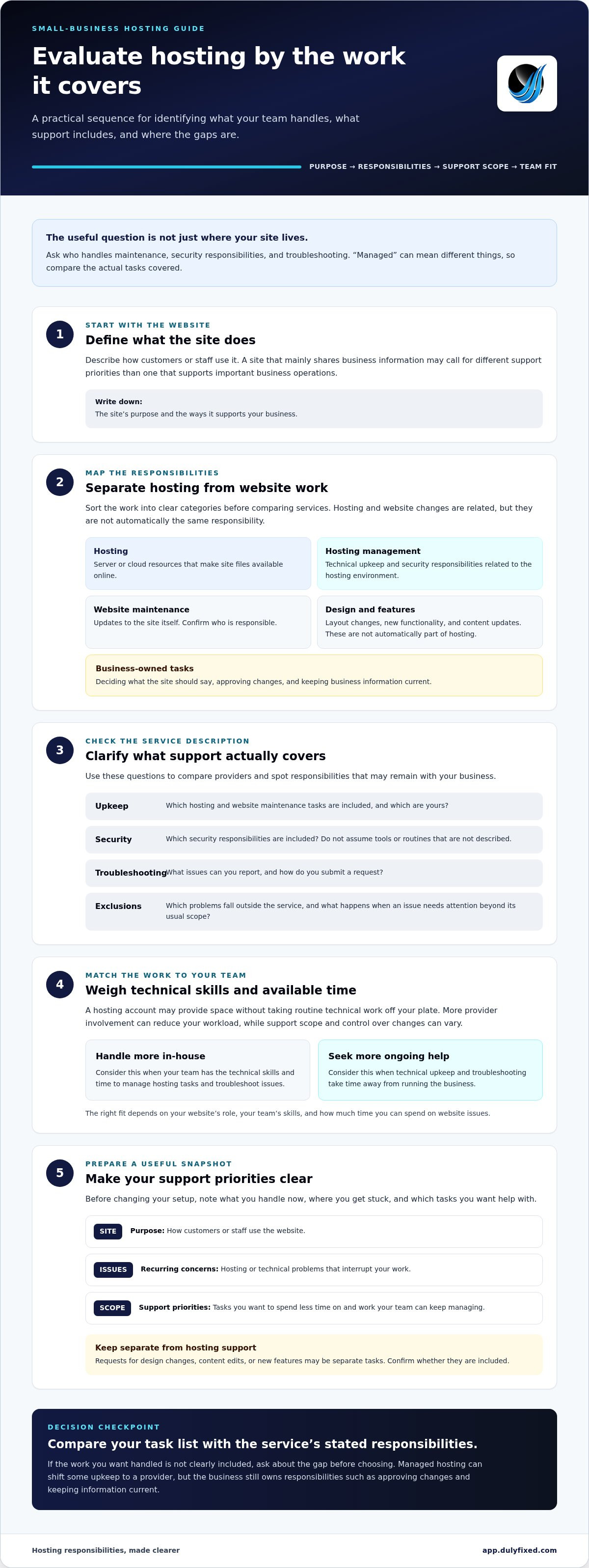
Use this responsibility map to sort the work:
Hosting: Provides the server or cloud resources that make the site accessible online.
Hosting management: Covers technical upkeep and security responsibilities related to the hosting environment.
Website maintenance: Can include updates to the site itself. Identify who is responsible for these tasks.
Design and feature development: Includes layout changes, new functionality, and content updates. These are not automatically part of hosting.
Business-owned tasks: Include deciding what the site should say, approving changes, and keeping business information current.
Dulyfixed combines managed web hosting with ongoing technical support for website and operational technology needs. This gives small businesses one place to turn for hosting and technical troubleshooting. Review Dulyfixedâs managed web hosting and technical support to see how these services fit your website responsibilities.
How to Evaluate Managed Hosting for Your Small Business
Compare the responsibilities a service covers, not just its label. The right fit depends on what your site does, your teamâs technical skills, and how much time you can spend handling website issues. More provider involvement can reduce your workload, but the scope of support and your control over changes can vary.
Which questions clarify the scope of hosting support?
Use this checklist to compare service descriptions and identify gaps:
- Upkeep: Which hosting and website maintenance tasks are covered, and which stay with your business?
- Security: Which security responsibilities are included? Do not assume specific tools or routines unless they are described.
- Troubleshooting: What types of issues can you report, and what process do you use to submit a request?
- Exclusions and escalation: Which problems fall outside the service, and what is the process when an issue needs attention beyond its usual scope?
Compare these responsibilities with your own website maintenance checklist. For a separate reference point, Cloud.govâs managed services describes services for a government platform, so its context may differ from that of a small-business website.
Let your siteâs purpose guide the decision. If it mainly shares business information, you may choose to handle content edits and design decisions in-house while getting help with technical upkeep. If the site supports important business operations, consider how much time your team can realistically spend troubleshooting and what support process would fit your workflow.
Write down the tasks you want handled, then compare that list with the service description. Dulyfixed brings managed web hosting and ongoing technical support together through its hosting maintenance and support service.
How Dulyfixed Managed Hosting and Technical Support Fit Together
Support is most useful when it addresses the website tasks that take up your time. Before changing your setup, note what you currently handle, where you get stuck, and how technical issues affect your workday. This gives you a clearer way to decide what to keep in-house and where ongoing help would be useful.
Dulyfixed is based in Soap Lake, Washington, and serves small businesses in Soap Lake, Ephrata, Moses Lake, Wenatchee, Seattle, Coulee City, Hartline, Wilson Creek, and Marlin. Consider your siteâs needs and the responsibilities you want handled when deciding whether managed hosting and technical support fit your workflow.
What is a practical next step if hosting takes too much owner time?
Make a brief snapshot of your website and recurring concerns. Note the siteâs purpose, the tasks that take the most time, and the technical problems you have had to troubleshoot. Separate those issues from requests for design changes, content edits, or new features so your priorities are clear.
- Site purpose: Describe how customers or staff use the website.
- Recurring concerns: List the hosting or technical issues that interrupt your work.
- Support priorities: Identify which tasks you want to spend less time on and what your team can continue managing.
This outline helps you focus a discussion about hosting support on the work that matters to your business.
Make Your Hosting Decision Easier
Before changing hosting, identify the website tasks that take attention away from running your business. Decide which responsibilities you want help with and which you prefer to keep in-house. You do not need to know every technical detail to explain what is slowing you down.
If managed hosting for small business looks like a fit, bring your notes about the website and your support priorities to the next step. A clear list makes it easier to compare what you need with the serviceâs responsibilities.
Explore Dulyfixed managed hosting and technical support for your website.
Frequently Asked Questions
Is managed hosting worth it for a small business?
Managed hosting can be worthwhile when the time and technical effort of handling website issues outweigh the value of managing hosting yourself. For a business without in-house technical staff, it may make sense to get help with hosting and troubleshooting. A simple site that your team can maintain may need less ongoing support. The decision depends on your websiteâs needs and how much time you want to spend on technical tasks.
Does managed hosting include website maintenance?
Managed hosting includes some maintenance and security responsibilities, but it does not automatically cover every task. Updating site software or fixing a display issue may be different from maintaining the hosting environment. Treat maintenance as a specific set of tasks, and distinguish technical upkeep from copy edits, redesigns, or new features.
Can I keep my existing website if I switch to managed hosting?
Changing hosting does not inherently require a redesign, so an existing site can often move to a new hosting environment. Start by identifying the siteâs technical requirements and preserving its files and database where relevant. Domain settings may also need to change. A migration can reveal compatibility issues, so keep the current hosting active until the site works in its new location.
Does managed hosting include business email?
Not necessarily. Website hosting and business email can be separate services, even when one company provides both. Before moving a website, identify where its email accounts are hosted and note the relevant mail settings, such as domain records. If email is separate, changing website hosting may not require moving inboxes, but incorrect domain changes can interrupt mail delivery.
Talk With Dulyfixed
If this article connects with something you are trying to improve, send a note about your website, marketing, search visibility, or AI discovery goals.