

Published November 14, 2026
If you’re asking why your business website is so slow, start by looking at oversized images, hosting resources, and scripts or widgets that take too long to load. Images that are larger than the space they fill can delay a page, especially on mobile. Google considers a Largest Contentful Paint time of 2.5 seconds or less good.
A slow page can frustrate customers, weaken the experience after an ad click, and affect search visibility, where speed is one factor among several. You’ll learn how image sizing and compression affect load time, how to spot other common bottlenecks, and which improvements to prioritize. The goal is to identify the cause before deciding whether your site needs focused optimization or a broader rebuild.
Key Takeaways
- Trace slow loading to the browser, page elements, server, or delivery setup before choosing a fix.
- Resize and compress images so they fit their display space without carrying unnecessary file weight.
- Assess speed alongside customer experience, search visibility, and the path from an ad click to a landing page.
- Consider mobile-first website design when performance problems point to a wider issue with how your site works on phones.
Why is My Website Slow, and How Is It Hurting My Business?
Find where the delay starts before changing your site. Compare key pages, devices, and the steps visitors need to complete.
-
Test website speed and locate bottlenecks
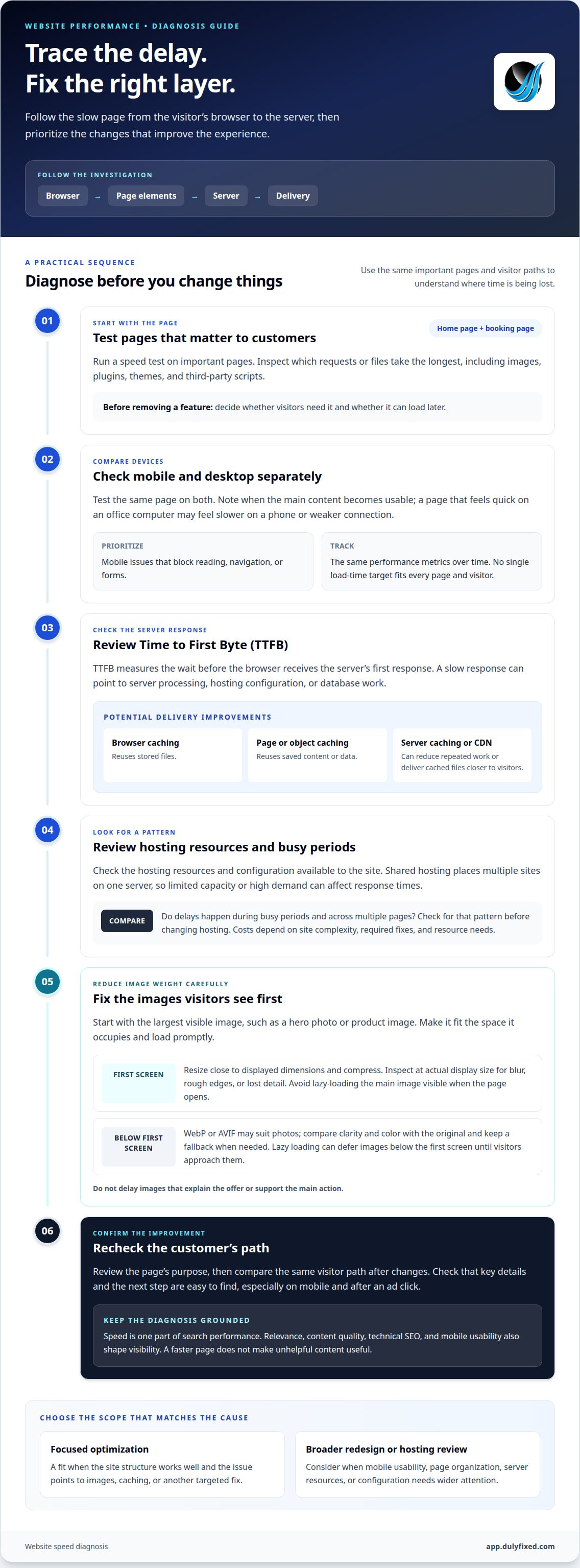
Run a speed test on important pages, such as the home page and booking page. Compare mobile and desktop results, then inspect which requests or files take the longest. Images, plugins, themes, and third-party scripts can all contribute. Don’t remove a feature just because it adds a request. First decide whether visitors need it and whether it can load later.
-
Compare desktop and mobile load times
Test the same page on mobile and desktop, and check when its main content becomes usable. A site that feels quick on your office computer may feel slower on a phone or a weaker connection. There isn’t one load-time target that fits every page and visitor. Use performance reports to track the same metrics over time, and prioritize mobile issues that block reading, navigation, or forms.
-
Check Time to First Byte and server response
Review Time to First Byte (TTFB), which measures the wait before the browser receives the server’s first response. A slow response can point to server processing, hosting configuration, or database work. Browser caching reuses stored files; page and object caching reuse saved content or data. Server-side caching and a CDN can reduce repeated work or deliver cached files closer to visitors.
-
Review hosting resources and server bottlenecks
Review the hosting resources and configuration available to your site. Shared hosting places multiple sites on one server, so limited capacity or high demand can affect response times. Check whether delays occur during busy periods and across multiple pages before changing hosting. Optimization and hosting costs depend on site complexity, required fixes, and resource needs.
Image sizing, compression, and modern image formats
Start with the images visitors see first, then work through the rest of the page. On mobile, oversized files can add unnecessary download time even when the displayed image looks small.
-
Prioritize the largest contentful image
Identify the main image visible when the page opens, such as a hero photo or product image. Make sure it loads promptly and fits the space it occupies. Avoid lazy-loading this first-screen image, since delaying it can postpone the main visual. Check the result on a phone-sized layout as well as desktop, because the featured image may differ between layouts.
-
Resize and compress images
Prepare each image close to its displayed dimensions instead of relying on the browser to shrink a much larger file. Compress it, then inspect it at its actual display size for blur, rough edges, or lost detail. A product photo may need more detail than a decorative background. Check repeated images too, since oversized files can add unnecessary weight to a gallery.
-
Use modern image formats
Try WebP or AVIF for suitable photos, then compare each result with the original for clarity and color. Keep a fallback when your site setup or audience requires one. For images below the first screen, use lazy loading so they can wait until visitors approach that part of the page. Avoid delaying images that explain the offer or support the main action.
If mobile layouts need broader work beyond image files, explore mobile-first website design.
Effects of slow websites on customers, rankings, and ads
Slow pages can create friction at key points in a customer’s visit. To understand why your business website is so slow for visitors, connect speed observations to the page’s purpose and the action it supports.
- Review customer paths, not just the homepage. A visitor may arrive on a service page from search, then open pricing details or a contact form. If the next step feels delayed, the page can interrupt that path. Compare where people enter and exit, and note whether the same pattern appears on mobile and desktop.
- Treat speed as one part of search performance. Search engines consider page load time, but relevance, content quality, technical SEO, and mobile usability also shape visibility. A faster page doesn’t make unhelpful content useful. Check whether important information is easy to find and whether the page answers the need behind the search.
- Follow the journey from an ad click to the landing page’s main action. Confirm that the offer, form, or booking details appear without being obscured by pop-ups or delayed scripts. If an ad attracts visits but few people continue, review the page experience and the match between the ad’s message and its destination.
- Choose a performance fix based on the business task. On a lead page, make the form easy to find and use. On a product page, keep key details clear before decorative elements. After making changes, compare the same visitor path again. This helps distinguish a useful improvement from a change that only improves a test result.
Dulyfixed Small Business Solutions: Mobile-First Website Design
Dulyfixed Small Business Solutions can help when speed issues point to a mobile layout, landing page, or hosting setup that needs broader attention. Its mobile-first website design and landing page development focus on how pages display and work on phones, where large content and awkward layouts can slow the experience. Managed web hosting may also fit when server resources or configuration are part of the problem. Choose targeted image or caching improvements when the site structure works well; consider a broader redesign when mobile usability or page organization needs attention.
Share which pages feel slow and whether the issue appears on desktop, mobile, or both. That context helps connect the symptoms to a practical next step.
Get It DulyfixedTurn the Diagnosis Into a Clear Next Step
Understanding why your business website is so slow is most useful when it points to a priority: a better mobile experience, a focused landing page, or a hosting change. Choose the page that matters most to customers, then let its performance and purpose guide the work. A targeted fix may be enough; wider structural issues may call for a redesign rather than another isolated tweak.
Dulyfixed Small Business Solutions offers Landing Page Development, Managed Web Hosting, and SEO-Ready Site Structure. The right fit depends on whether your main need is a clearer page, hosting support, or a stronger foundation for search and visitors. Start with the page and task that matter most to your business.
Contact Dulyfixed Small Business SolutionsClear priorities make the next improvement easier to plan and assess.
Frequently Asked Questions
Should You Optimize Your Existing Website or Rebuild It?
Optimize the existing site when its structure still supports your business goals and the slowdown comes from fixable issues. For example, a service page with useful content may need technical cleanup, not a full replacement. Consider rebuilding when outdated technology, confusing navigation, or a layout that no longer fits your business creates deeper problems. Compare the scope of repairs with what the site needs to do.
What are the most common causes of a slow business website?
Common causes include oversized media, resource-heavy plugins or themes, slow external scripts, and hosting limits. The main cause can vary by page: a homepage may carry a large banner, while a booking page may wait on a third-party tool. Identify which pages are slow and what they load before removing features. A plugin that provides a needed function may be worth keeping.
How do large images and video slow down a website, and how can I optimize them?
Large media files take longer to transfer, especially on mobile connections. Resize and compress images, then use a suitable modern format. For video, consider showing a lightweight preview and loading playback only when a visitor chooses it. This can keep video from competing with the page’s main content during initial loading. Preserve visual quality and make playback controls clear.
How do web hosting, server response time, and traffic affect website speed?
Hosting determines the server resources and configuration available to deliver your pages. During a traffic surge, limited processing capacity can increase wait times or cause errors, even if the site feels responsive during quieter periods. Compare performance during busy and quiet periods, and note whether delays affect every page or only resource-heavy features. This pattern helps distinguish hosting limits from page-specific problems.
How do caching, a CDN, and code minification improve website speed?
Caching stores reusable content or data, so the site can avoid repeating some work. A content delivery network (CDN) serves cached files from servers closer to visitors, which can reduce transfer delays. Minification removes unnecessary characters from CSS and JavaScript files, reducing the data browsers download. These changes address different parts of delivery, so apply them according to what slows the page.
Website design and landing pages
Plan pages around the information visitors need and the action they want to take.