

Published October 24, 2026
The best first automation is usually a handoff nobody needs to think about. If you want to automate small business operations, start with the repetitive steps that move information between people or systems, not the parts that depend on judgment.
Itâs frustrating to re-enter the same details, chase routine updates, or lose time to tasks that follow a predictable pattern. But adding a tool before you understand the workflow can create more work instead of less.
This guide will help you spot a suitable first workflow, weigh the setup and maintenance involved, and choose a manageable next step. Youâll see why stable handoffs are often good candidates for automation, while exceptions and decisions are better kept in human hands. Start small, make the process clear, and build from there.
Key Takeaways
- To automate small business operations, look for recurring tasks with clear steps and handoffs between people or systems.
- Map a process before choosing it for automation. Note how often it happens, where exceptions occur, and what an error could affect.
- Start with one documented workflow, assign someone to own it, and check that it works as intended.
- Keep automation manageable by reviewing exceptions, updating rules when processes change, and deciding who handles failures.
What Does It Mean to Automate Small Business Operations?
Automation uses software or connected systems to carry out repeatable steps under rules you set. A rule might say, âWhen this form arrives, copy its details to the customer record.â The system handles the defined action, while a person remains responsible for decisions that require context or judgment. In short, automation follows rules; it does not replace business judgment.
A single automated task handles one action, such as sending a routine internal notification. Workflow automation connects several steps so information moves from one stage or system to another. This broader approach is often called Business Process Automation. The useful distinction is whether youâre speeding up one step or improving the handoff across a whole process.
For example, imagine a small service business that receives an inquiry through a form. In a hypothetical setup, the system could copy the submitted details into a tracking sheet and notify the person responsible for follow-up. That would reduce manual re-entry, but a staff member would still decide how to respond and whether the inquiry is a good fit. Back-office integrations can connect steps like these when the process and tools support it.
Which everyday work is a realistic automation candidate?
Look for recurring work with clear instructions: moving information between records, creating a task after a request arrives, or sending an internal alert when a step is complete. These actions are easier to automate because the rules stay consistent.
Keep a person involved when the next step depends on nuance, risk, or a customerâs specific circumstances. If youâre deciding whether to integrate systems and streamline internal workflows, first identify where routine work ends and human judgment begins. That boundary helps keep automation useful without making the process harder to manage.
How to Automate Small Business Operations Without Automating Everything
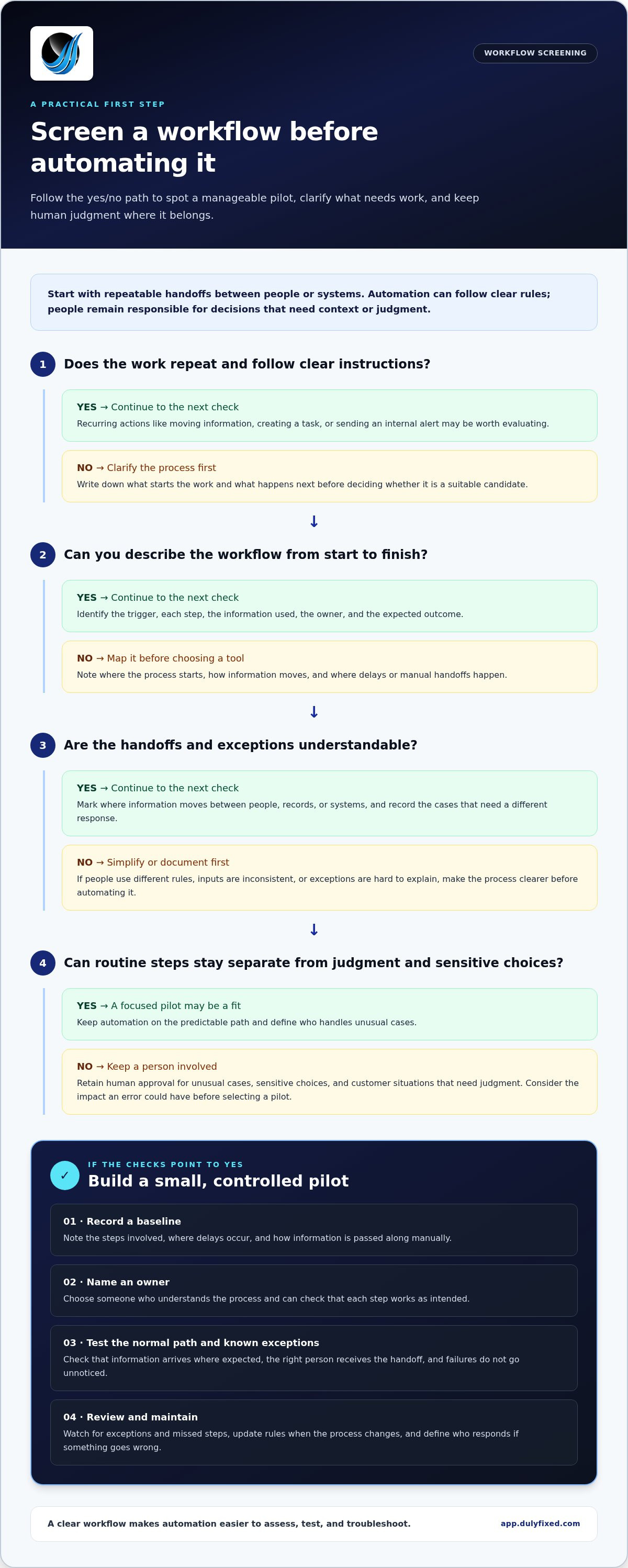
Choose a workflow based on its fit, not just because a tool can automate it. Use this sequence to find a manageable pilot:
- Map the process. Write down what starts it and the steps that follow.
- Count repeats. Notice how often the process occurs and how much manual effort it takes.
- Identify handoffs. Mark where information moves between people, records, or systems.
- Note exceptions. Record the cases that require a different response or extra judgment.
Prioritize work that happens often and follows predictable rules. Then weigh the impact of an error against the effort needed to build and maintain the automation. A frequent task may not be a good first choice if mistakes could affect sensitive decisions or if the rules change constantly. Keep human approval for unusual cases, sensitive choices, and customer situations that call for judgment. Automation should handle the routine path, not remove sensible controls.
How can you tell if a workflow is ready to automate?
Document the trigger, each step, the information used, the owner, and the expected outcome. If people follow different rules, inputs arrive inconsistently, or exceptions are hard to explain, simplify the process first. A clear workflow is easier to automate and easier to troubleshoot.
Record a baseline before changing anything. Note the steps involved, where delays happen, and how often someone manually passes information along. You donât need to predict savings. These observations give you a fair comparison after the pilot and help show whether the workflow is behaving as intended. For help connecting systems around a defined process, explore back-office integrations and automation.
A focused, documented workflow is a practical starting point to automate small business operations without making the process harder to control.
How to Put a Small-Business Automation Plan Into Practice
Start with one documented workflow, not a company-wide overhaul. Assign an owner who understands the process and can check that each step works as intended. Before rollout, test the normal path and known exceptions. Confirm that information arrives where expected, the right person receives the handoff, and a failure does not disappear unnoticed.
Keep the process under review after launch. The owner should look for exceptions, missed steps, and changes in how the business works. Update the rules when the process changes, and write down who responds if the automation stops or produces an unexpected result. Clear ownership makes it easier to spot small issues before they become routine workarounds.
When does a small business need help connecting its workflows?
Consider support when staff repeatedly copy information between systems or a manual handoff keeps slowing a documented process. These are signs that the workflow may need more than a single automated action. Dulyfixed Small Business Solutions provides back-office integrations and automation to connect systems and streamline internal workflows. The right approach depends on how your process works and where information needs to move.
As you plan to automate small business operations, keep the pilot narrow: define the outcome, name the owner, and decide how the team will handle exceptions and failures. That gives you a practical way to assess the process without committing to a broad overhaul.
Discuss your workflow and automation needs as a next step.
Turn One Clear Workflow Into a Practical Next Step
Your next move doesnât need to be a full-scale automation project. Choose one process that keeps creating extra work, write down what a smoother handoff should look like, and use that as the starting point for a focused conversation. A clear goal makes it easier to decide what should happen automatically and where a person should stay involved.
Dulyfixed provides back-office automation to integrate systems and streamline internal workflows. Based in Soap Lake, Washington, the business serves clients nationwide. If youâre ready to explore a practical way to automate small business operations, bring the workflow you want to improve and the main sticking point.
Discuss your back-office workflow
A manageable first step can create room for progress without making your operations harder to run.
Frequently Asked Questions
What is small business operations automation?
Itâs the use of configured software to carry out business actions consistently. Automation and artificial intelligence arenât the same: a rule-based automation follows instructions you set, while an AI system may interpret or generate information. Either way, decide what the system is allowed to do and what outcomes a person should check before relying on it.
Which small business processes should I automate first?
Favor a process where a mistake is easy to catch and correct. Avoid making your first automation responsible for an action thatâs hard to reverse, such as sending a firm commitment to a customer or changing a financial record without review. A contained task gives you room to learn how the process behaves before expanding its scope.
Can automation work without replacing human decisions?
Yes. Keep responsibility clear: software can carry out a defined action, but a person remains accountable for the business policy behind it and the effect on customers. For example, a team member can review an automated draft before it communicates a promise or exception. That control makes the boundary between system actions and business responsibility explicit.
How do I know whether a business workflow is ready for automation?
Check whether the people who use the process know who can change its rules and who should approve those changes. Unclear authority can lead to conflicting instructions even when the workflow itself is documented. Agree on who owns rule changes and how the team will learn about them before putting the automation into regular use.
Talk With Dulyfixed
If this article connects with something you are trying to improve, send a note about your website, marketing, search visibility, or AI discovery goals.