

Published October 11, 2026
The best first target for healthcare office automation is often a small administrative handoff, not an entire department. Repetitive scheduling, intake, and follow-up tasks can pull staff away from patients, while manual steps can lead to delays or duplicated work. Privacy concerns, existing software, and exceptions can also make automation feel risky.
Start by mapping one routine workflow and identifying where clear rules could reduce repetitive effort without disrupting patient service. This guide explains how to compare clinic tasks, weigh potential risks and safeguards, and choose a manageable first step. It also covers why assigning a staff owner and planning for exceptions matter before a process goes live. The focus is administrative work, where careful changes can clarify handoffs without automating clinical judgment.
Key Takeaways
- Start with repeatable administrative steps, such as reminders or form routing, rather than clinical decisions.
- Map a workflow from trigger to completion to spot handoffs, delays, and exceptions.
- Compare staff effort, patient impact, error risk, and exception frequency before choosing what to automate.
- Plan healthcare office automation as a focused pilot, with staff review and clear steps for handling exceptions.
What Healthcare Office Automation Can and Cannot Handle
Healthcare office automation uses software to handle repeatable administrative steps, with staff oversight and a clear way to manage exceptions. It can reduce routine coordination work, but it should not replace professional judgment about a patientâs care.
Good candidates follow consistent rules and have a predictable next step. Examples include:
- Sending appointment reminders on a set schedule.
- Routing completed forms to the right team or queue.
- Notifying staff when a task needs attention.
- Sending routine follow-up messages based on a defined process.
The value is not simply completing a task faster. A well-mapped process makes it clear who owns the next step and what happens when a request does not fit the usual pattern. For a broader overview of how AI can be used in health settings, see Artificial intelligence in healthcare.
Which clinic tasks are repeatable, and which need human judgment?
Consider a completed patient form. Software might route it to the right staff queue based on the selected form type. Interpreting a symptom described in that form is different. That requires qualified professional judgment, not a routine routing rule. Keep automation focused on the administrative step, and define how staff will review information that could affect care.
Plan an exception path before anything goes live. If a form is incomplete, a notification fails, or a request falls outside the usual process, direct it to a named staff role for review rather than letting it stall or proceed unchecked.
Mapping these handoffs is central to back-office automation and integrations. Document the administrative task and its exceptions, and keep clinical decisions with the appropriate care professional.
How to Choose a First Healthcare Office Workflow to Automate
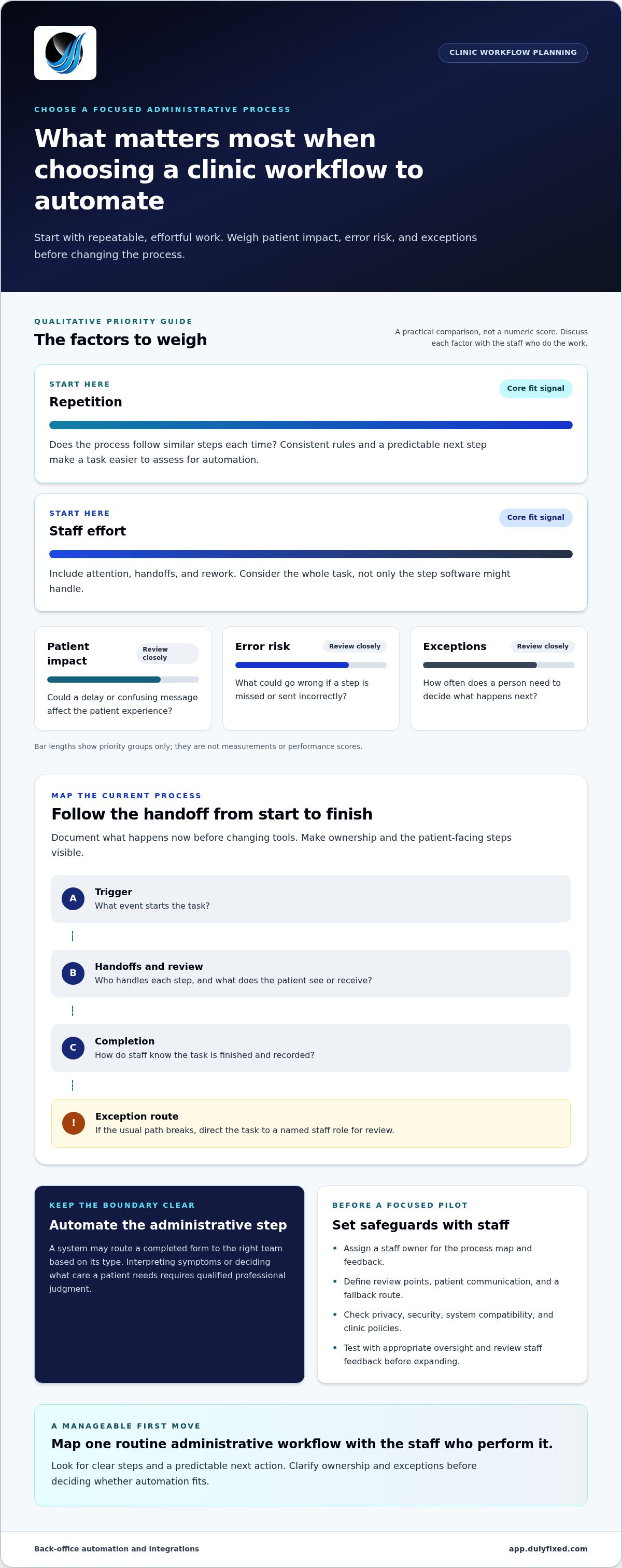
Choose one process that happens regularly and has clear steps. Before changing tools, document how it works now, from the event that starts it to the point where the task is complete. Note who handles each handoff, what the patient sees or receives, and what staff do when the usual path breaks down.
For example, a clinic might map how an appointment reminder is prepared, reviewed, sent, and recorded. The map may show that the main delay occurs when staff must decide who handles a patient response. That handoff matters as much as the reminder itself.
A practical checklist for evaluating the first workflow
Compare candidate workflows qualitatively. Use simple labels such as low, medium, or high, and discuss what staff experience rather than chasing a benchmark or promised savings.
- Repetition: Does the process follow similar steps each time?
- Staff effort: How much attention does it take, including handoffs and rework?
- Patient impact: Could a delay or confusing message affect the patient experience?
- Error risk: What could go wrong if a step is missed or sent incorrectly?
- Exceptions: How often does the process need a person to make a decision?
Prioritize work that is repetitive and effortful, while keeping patient impact, error risk, and exceptions in view. A task with frequent exceptions may need clearer rules before automation makes sense. Assign a staff owner to maintain the process map and gather feedback. Define staff review points, patient communication, and a fallback route for missed or unusual cases. These steps help keep back-office integrations and automation grounded in the clinicâs actual workflow.
As a first step, map one candidate process with the staff who perform it. Dulyfixed provides back-office automation and integrations to help streamline administrative handoffs.
Plan a Safe, Staff-Friendly Automation Pilot for a Clinic
A small pilot lets a clinic test an administrative process before extending it. Keep the purpose narrow: support a defined handoff, preserve staff review, and learn where the process needs adjustment. Before choosing tools, confirm how information moves between systems and who can access it.
What a hypothetical clinic pilot could look like
Hypothetical example: A clinic maps its appointment reminder and follow-up process. Staff review the message and timing, then the system handles the agreed routine step. If a response is missing or a handoff fails, the workflow creates a task for a staff member to review. It does not interpret symptoms or decide what care a patient needs.
Before testing, document the normal path, staff review points, and exceptions such as incorrect contact details or an unanswered message. Decide how staff will spot a failed handoff and what they should do next. Test the process with appropriate oversight, then gather staff feedback and review any effects on patient communication before expanding it.
Privacy, security, and compatibility need their own review. Have the clinicâs appropriate privacy and security leads assess how information is handled, and consult current authoritative guidance that applies to the clinic and the tools involved. Confirm the proposed workflow fits the clinicâs existing systems and policies. A toolâs general capabilities do not establish that fit.
This is a planning illustration, not a documented Dulyfixed clinic project. Dulyfixed helps map and streamline administrative handoffs through back-office automation and integrations. To discuss a clinicâs administrative workflow and a practical next step, contact Dulyfixed about back-office automation.
Turn One Workflow Into a Clear Next Step
Workflow notes can help turn an initial idea into a focused plan. Identify who owns each step, which systems need to connect, and how staff will handle exceptions. That gives your clinic a way to assess the change before expanding it.
Dulyfixed provides back-office automation and system integrations for clients nationwide from its base in Soap Lake, Washington. Healthcare businesses in Soap Lake, Ephrata, Moses Lake, Wenatchee, Seattle, Coulee City, Hartline, Wilson Creek, and Marlin can use the same practical approach: map an administrative workflow, clarify handoffs, and plan for exceptions.
Discuss a clinic workflow with Dulyfixed
Move forward one considered improvement at a time.
Frequently Asked Questions
Can healthcare office automation work with a clinicâs existing software?
Sometimes. A clinic may be able to keep its existing tools and automate only a handoff, though staff might still need to transfer or confirm information if systems do not share it. Identify which system is the source of truth for each record and how staff will catch duplicate or outdated entries. This helps distinguish a useful connection from another disconnected inbox.
Does healthcare office automation require artificial intelligence?
No. A fixed rule can handle a predictable action, such as sorting a request by a selected category. AI may be relevant when a task involves interpreting less structured information. If a clinic considers AI-generated summaries or suggestions, define who checks the output and how errors are corrected before staff rely on it.
How should a clinic assess patient-data privacy before automating a workflow?
Limit the workflow to the patient information it needs, and avoid unnecessary sensitive details in notifications. For example, an appointment reminder can share logistics without describing a condition or service. Decide how staff should respond if a message goes to the wrong destination, and make sure they know when to pause automated messages.
Can automated appointment reminders eliminate missed appointments?
No. A reminder cannot resolve every barrier to attendance, such as a schedule conflict or transportation issue. Make it easy for patients to confirm, cancel, or request staff help, then track those outcomes separately from message delivery. This gives the clinic a clearer view of how reminders support scheduling without treating them as a guarantee.
Talk With Dulyfixed
If this article connects with something you are trying to improve, send a note about your website, marketing, search visibility, or AI discovery goals.