
Published November 4, 2026 Updated November 9, 2026
The lowest monthly fee isnât always the lowest-cost website. The DIY website vs. professional cost-benefit choice depends on add-ons, the value of your time, ongoing support, and whether the site can grow with your business. Professional design pricing depends on the project and is provided after a quote request; scope reflects page count, features, content, and support needs.
Building your own site can make sense when you have the time and your needs are simple. But platform fees are only part of the comparison: updates and troubleshooting can take time long after launch. This guide covers ongoing costs, support, and scalability so you can choose what fits your business now and as it grows.
Key Takeaways
- Compare the full cost of a DIY site, including add-ons and the time needed to build and maintain it.
- Assess whether professional design and ongoing maintenance fit your budget, workload, and website goals.
- Choose an approach that can handle future changes without creating unnecessary rework or migration.
- See how landing page development, managed hosting, and an SEO-ready site structure can support your next step.
DIY vs Professional Web Design: Whatâs Best for Building Your Small Business Website?
A DIY build gives you direct control over layouts and content. Professional design puts planning and implementation in a specialistâs hands, with the scope and ongoing responsibilities shaped by your needs.
DIY Website Design
You select a platform, choose a template, and add your business information. A basic site can launch quickly, but learning the tools and resolving issues are part of the work. This approach suits a straightforward online presence if you have time to build and manage it.
Professional Web Design
A professional can tailor page structure and design to your goals. A small-business project commonly takes 4-8 weeks to launch. Its upfront cost depends on factors such as page count, custom features, content, and support needs, so compare project scope rather than relying on one figure.
Website Credibility and Business Value
Either approach can present your business clearly. Accurate details, consistent branding, readable text, and working contact paths help visitors understand what you offer. Templates provide a starting point, while custom layouts give you more control over how information appears. Review every finished page on desktop and mobile before launch.
SEO, Speed, Accessibility, and Conversions
Neither DIY nor professional design guarantees stronger SEO, faster pages, accessibility, or conversions. Page structure, useful content, load performance, readable contrast, and clear actions all matter. A professional can plan and test these elements during development; DIY owners need to choose settings and review each page themselves. Test forms and navigation before publishing.
| Option | Build work | Timeline | Ongoing responsibility |
|---|---|---|---|
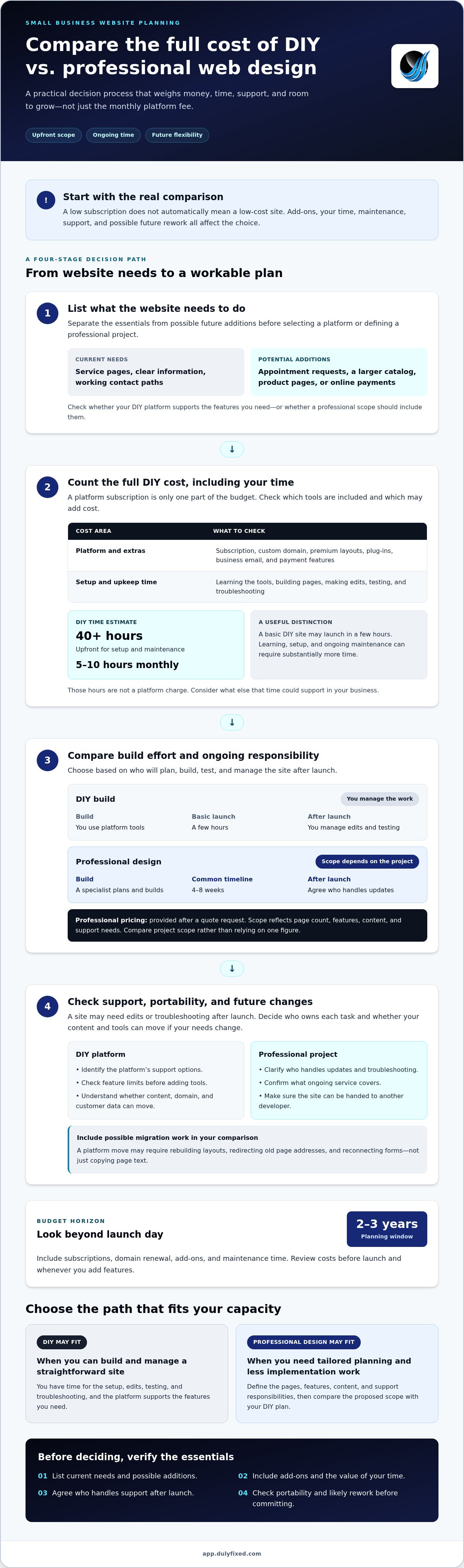
| DIY | You build with platform tools | A few hours for a basic launch | You manage edits and testing |
| Professional | A specialist plans and builds | Commonly 4-8 weeks | Agree who handles updates |
Choose DIY if you can manage the build. Choose professional design if you need tailored planning and want to spend less time on implementation.
DIY platform pricing and add-on costs
Compare plan limits before choosing, especially if your site needs forms, booking tools, or extra storage.
The subscription isnât the only budget factor. A custom domain, premium layouts, plug-ins, business email, and payment features may cost extra. List the tools your site actually needs, then check which the platform includes and which require add-ons.
Learning and upkeep also take time. Estimates put DIY setup and maintenance at 40 or more hours upfront, then 5-10 hours monthly. That time can go toward customer work, sales, or operations instead. Business owners should include those hours when comparing DIY costs with hiring someone.
That isnât a platform charge. It represents time spent on the site instead of other business priorities. Your estimate depends on the tasks you handle and what else that time could support.
Plan your budget over two to three years, including subscriptions, domain renewal, add-ons, and maintenance time. Review costs before launch and whenever you add features. If you need a professionally built, mobile-first website, compare its scope with your DIY plan before committing.
Professional website support and scalability
Support matters after launch, when a form stops working or an update changes a page. With a DIY platform, owners often troubleshoot issues themselves or use the platformâs support options. Professional web design may include technical support, depending on the service agreement. Identify who handles each task before launch.
Plan for change before choosing templates or tools. You might start with service pages, then need appointment requests, a larger catalog, or online commerce. Check whether the platform supports those needs and whether your content, domain, and customer data can move if you switch systems. Portability can affect the effort involved later.
Moving platforms can involve more than copying page text. You may need to rebuild layouts, redirect old page addresses, and reconnect forms. Rebranding a DIY site later can therefore create extra work. Include those tasks when comparing a DIY website with professional design, especially if your platform limits future features.
For a professional build, clarify who handles updates, troubleshooting, and future changes. Make sure the site can be handed to another developer, and understand what ongoing service covers. Have a workable plan in case your developer or platform changes.
Make a feature list before choosing. Separate current needs from possible additions, such as product pages or online payments. Compare the list with platform limits and the professional support arrangement. Choose the option that keeps your online presence manageable as your business develops.
Discuss website support and future growth
Dulyfixed Small Business Solutions: Landing Page Development
Dulyfixed Small Business Solutions can help when building and maintaining a business website is taking time away from core work. Its landing page development provides a focused option for businesses that need a clear page for a specific service or campaign. An SEO-ready site structure and managed web hosting can also support the siteâs foundation and ongoing operation.
Ready to move beyond a DIY build? Contact Dulyfixed to discuss your website needs, from mobile-first design to a focused landing page.
Choose the Next Step That Fits Your Business
The cost-benefit of a DIY website versus professional design depends on more than the build. Your next step should reflect what you want the site to do, who will maintain it, and how easily it can adapt as your business changes. Set a clear goal before making another investment, such as explaining a service, helping visitors take a specific action, or preparing for future growth.
If building or maintaining the site is pulling focus from that goal, a focused conversation can help you decide what to tackle first. Bring your current priorities and the main tasks you want the website to support. That gives the discussion a useful starting point without committing you to more than you need.
Contact Dulyfixed Small Business SolutionsA practical next step can turn a website decision into a clearer plan. Move forward at a pace that works for your business.
Frequently Asked Questions
Can I start with a DIY site and hire a designer later?
Yes, you can start with a DIY site and hire a designer later, but plan for the transfer. Keep your domain account under your control and save original copies of your text and images. Businesses serving Soap Lake, Ephrata, Moses Lake, Wenatchee, Seattle, Coulee City, Hartline, Wilson Creek, or Marlin can organize local service pages early. Platform-specific layouts may still need rebuilding.
What About a Hybrid Option?
A hybrid approach splits the work. Draft service details, gather photos, and organize page content yourself, then hire a designer to shape the layout and technical structure. Or keep a simple DIY site and bring in professional help for a focused redesign. Agree on responsibilities upfront so content updates, troubleshooting, and future changes donât fall between you and the designer.
How much does it cost to build a DIY website in the United States?
Your total depends on the plan, domain, and any paid tools or services you add. To estimate your budget, list the features you need, then compare plan limits and add-on charges before choosing a platform.
What is the average cost of hiring a professional web designer or agency?
Treat these as broad planning ranges, not a quote for your project. Page count, custom features, content needs, and ongoing support all shape the final cost.
What recurring costs do DIY and professionally built websites have?
DIY sites may involve recurring platform subscriptions, domain renewals, paid add-ons, and email or other business-tool charges. Professionally built sites can also involve hosting, domain renewal, and optional maintenance or technical support. Before choosing, separate one-time design work from ongoing services, then decide who will handle updates, security tasks, and troubleshooting.
Talk With Dulyfixed
If this article connects with something you are trying to improve, send a note about your website, marketing, search visibility, or AI discovery goals.