Published October 23, 2026
A polished video can still miss the mark if it gives viewers nowhere useful to go. Thatâs a real concern when youâre choosing a format, juggling a busy schedule, and trying to make every piece of content support the business. Digital media production for business works best when it starts with a customer need, not a camera or editing trend.
This guide will help you match a video format to a clear communication goal, plan the message and production steps, and connect the finished content to a useful page on your website. Youâll also see how a business video can explain a service, answer a common question, or guide visitors toward a relevant next step. With a focused plan, production becomes more manageable and the content has a practical job to do.
Key Takeaways
- Digital media production for business can include different kinds of content, but choose video based on the communication goal it needs to serve.
- Before production, define the audience, focus on one message, choose a format, and decide where viewers will see the video.
- Prepare your brand language, essential facts, and the action you want viewers to take to help keep planning focused.
- Place video near relevant website copy, and make sure the page works well on mobile and offers a clear next step.
What Digital Media Production for Business Can Actually Include
Digital media production for business means planning and creating digital content to communicate a specific message. Digital media is a broad category that includes different forms of digitized information, as described in this overview of digital media. A business might use written content, images, audio, or video, but the right format depends on what customers need to understand.
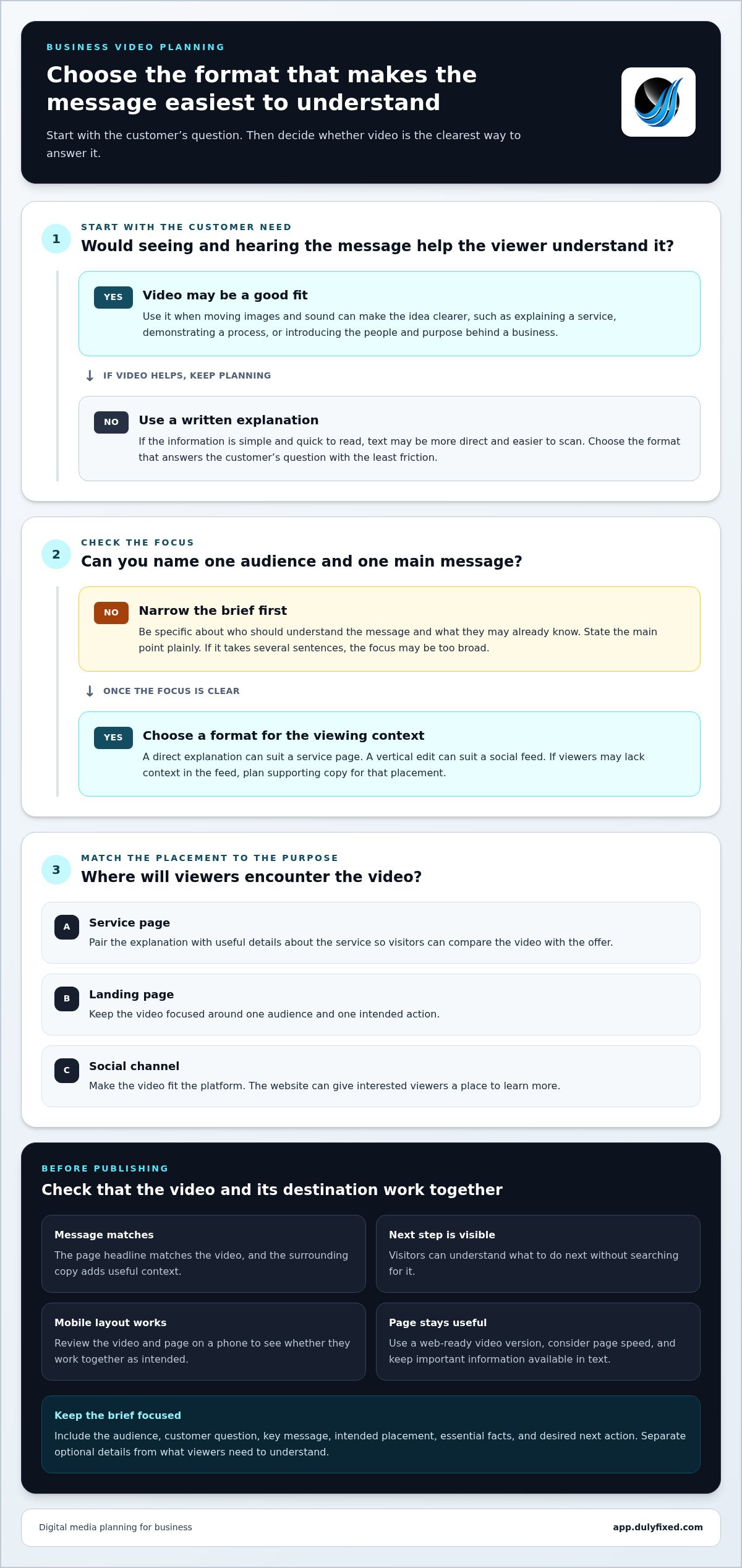
Business video production is one part of that larger category. It focuses on using moving images and sound to explain, demonstrate, or introduce something. Choosing video doesnât mean every message needs a video. A short written explanation may be easier to scan, while a visual demonstration may make a process clearer. Start with the customerâs question, then choose the format that answers it with the least friction.
For digital media production for business, the format should support the audience, message, and intended next action. If a viewer needs to understand a service before visiting its page, an explanatory video may help communicate the idea. If the information is simple and quick to read, text may be a more direct fit.
Which business messages are best suited to video?
Video can be useful for explaining what a service involves, demonstrating how a process works, or introducing the people and purpose behind a business. For example, a business could show the main steps in a customer process rather than relying on a long written description. These are use cases, not promises of particular marketing outcomes. Dulyfixed Small Business Solutions' educational video production supports clear explanations through video. Before choosing it, consider whether seeing and hearing the message would help your intended viewer understand it.
Plan Business Video: From Goal to Distribution
A brief keeps production decisions tied to the reason youâre making the video. Before recording or editing, collect approved brand language, essential facts, and the action you want viewers to take. Then map the work in sequence:
- Define the audience. Be specific about who should understand the message and what they may already know.
- Choose one message. State the main point plainly. If it takes several sentences, the focus may be too broad.
- Select a format. Choose an approach that suits the message and viewing context, such as a direct explanation for a service page or a vertical edit for a social feed.
- Plan distribution. Decide where the video will appear and what supporting text or page should accompany it.
- Review the draft. Check facts, tone, clarity, and whether the intended next action is easy to understand.
A focused video is generally easier to place because it serves a defined audience and purpose. Broader coverage can make one piece useful across more topics, but it calls for more planning and may blur the main point. If you need versions for different channels, decide that before production so the framing and supporting copy fit each placement.
What should a small-business video brief include?
Include the audience, customer question, key message, intended placement, and desired next action. Separate essential facts from optional details. For example, if a video explains a service, list the core steps or terms viewers need to understand, then leave secondary details for the page copy. For social distribution, note the channel and the context viewers may lack when they encounter the video in a feed.
Connect Business Video Production to a Useful Website Experience
A business video needs a destination that helps visitors understand what theyâve watched. Place it near the related service explanation, where viewers can compare the message with useful details about the offer. Avoid dropping a video onto a page where its purpose is unclear.
The page still has to work as a whole. Keep the copy clear, make the layout easy to use on a phone, and give visitors a visible next step. Consider page speed, too. A large video file may affect how quickly a page loads, so use a web-ready version and keep important information available in text. Video can support the message, but it doesnât replace useful page content or guarantee rankings, engagement, or conversions.
Where should a business place its video?
Match placement to purpose. A service page can pair an explanation with offer details. A landing page can focus the video around one audience and one action. A social channel may suit a video made for that platform, while the website gives interested viewers a place to learn more. Dulyfixedâs website design and landing page development can connect video messaging with a relevant page experience.
Treat the video and its destination as one communication path. Check that the page headline matches the video, the surrounding copy adds useful context, and visitors can find the next step without searching for it. A quick review on a phone can reveal whether the video and page work together as intended.
Give Your Next Video a Clear Job
Your first video can be a focused way to improve how customers understand your business. It doesnât need to answer every question. Choose one part of the customer experience where a clearer explanation would be useful, then consider how that content could fit the broader website experience.
If youâre ready to move from an idea to a project, Dulyfixed can help with business video production. Start a conversation about the communication need you want the video to address.
Discuss a business video project
A clear purpose is a strong place to begin.
Frequently Asked Questions
Can a small business start with just one video?
Yes. One video can address a single customer need, such as showing what happens after someone books a service. Starting with a focused piece lets you learn whether the message is clear and whether the chosen placement makes sense before planning more content. Treat the first video as a practical communication tool, not a commitment to a large video series.
Does digital media production guarantee more leads or sales?
No. Digital media production for business can help explain an offer, but it canât guarantee leads or sales. Results also depend on factors such as whether the right people see the content, whether the offer fits their needs, and how easy it is to take the next step. You can review plays, page visits, and inquiries to assess how the video is being used.
What should I prepare before starting a business video project?
Gather the current service details, approved claims, and any terms viewers need to understand. Note who can answer questions about the subject and where viewers should go next. If your business serves Soap Lake, Ephrata, Moses Lake, Wenatchee, Seattle, Coulee City, Hartline, Wilson Creek, or Marlin, clarify which audience the video is meant to reach.
Can a business video be used on both a website and social media?
Often, yes, but the same edit may not fit every placement. A website visitor may need more context, while a social viewer may encounter the video without knowing your business. Consider preparing versions with suitable framing, captions, and opening context for each use. Check that text remains readable and the main point is clear on a small screen.
Talk With Dulyfixed
If this article connects with something you are trying to improve, send a note about your website, marketing, search visibility, or AI discovery goals.