

Published November 5, 2026 Updated November 9, 2026
Small website security gaps can leave accounts or sites exposed. Common website security mistakes to avoid include delaying software updates, reusing weak passwords, skipping two-factor authentication, and giving users more access than they need. Each can create a different opening for an attacker.
A small business website can still be a target, and routine oversights can put accounts and site data at risk. This guide covers how update habits, password practices, two-factor authentication, and access permissions affect website security. Use the steps below to close common gaps and build safer routines without making security a full-time job.
Key Takeaways
- Install security updates promptly, and review update notes to spot fixes that affect your site.
- Use a unique password for each account and add two-factor authentication to reduce the risk of unauthorized access.
- Give each user only the permissions needed for their role, then remove access when itâs no longer required.
- Review your update, login, and access routines regularly to catch weak points before they become bigger problems.
1. How often should I update my website software?
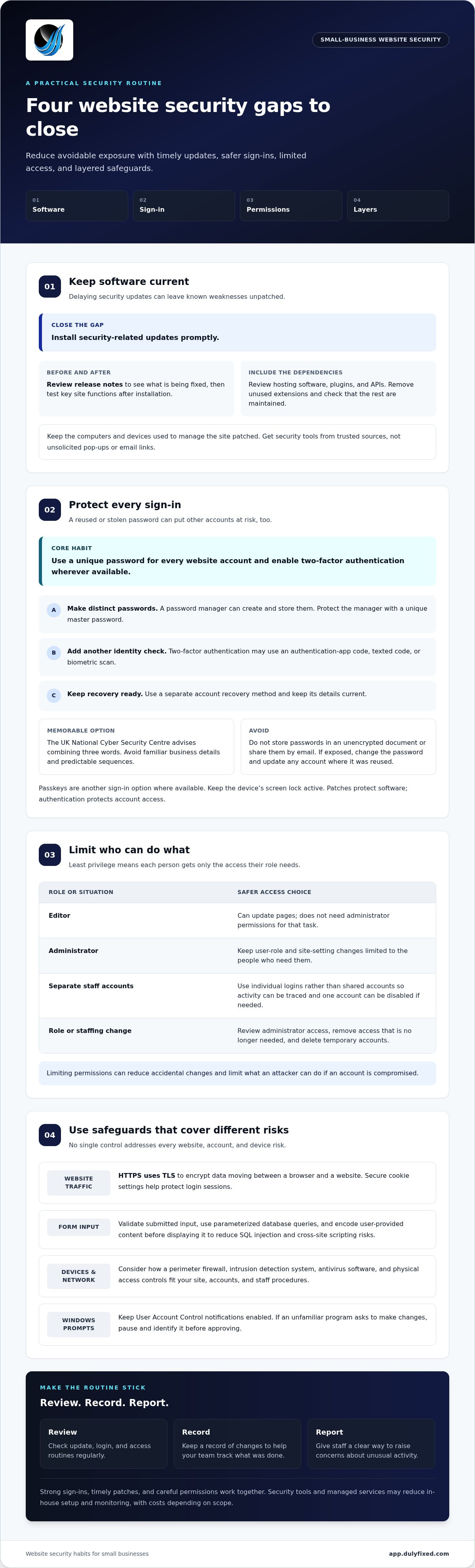
Common website security mistakes to avoid include delaying security updates and leaving known vulnerabilities unpatched. Install security-related updates promptly. Review release notes to understand what is being fixed, then test key site functions after installation. Attackers may exploit weaknesses that updates already address, so unnecessary delays can increase risk.
Regularly review hosting software, plugins, APIs, and staff procedures. Outdated third-party plugins can expose a site to attacks, particularly if they connect to sensitive data. Remove extensions you no longer use, and check that the rest are maintained. A familiar plugin is not automatically harmless: treating it that way can leave an overlooked entry point.
Donât download antivirus software from unsolicited pop-ups or emails. A phishing alert may lead to a malicious download, so avoid clicking its link. Get security tools from trusted sources, and keep the computers and devices used to manage your site patched.
U.S. privacy and breach-notification rules may depend on the information collected, affected peopleâs locations, and the operatorâs industry. Security tools and managed services trade setup and recurring expense for less in-house configuration and monitoring; costs depend on scope and are given after a quote request.
HTTPS uses TLS to encrypt data moving between a browser and a website. Secure cookie settings help protect login sessions. To reduce SQL injection and cross-site scripting risks, validate submitted input, use parameterized database queries, and encode user-provided content before displaying it.
2. Strong passwords and two-factor authentication
Use a strong, unique password for every website account. Reusing a password is risky: if attackers obtain it from a leak at one service, they may try it on your website, email, or hosting account. A password manager can create and store distinct passwords, so you donât have to memorize each one. Make its master password unique and protect access to the manager itself.
For a memorable password, the UK National Cyber Security Centre advises combining three words. Avoid familiar details such as your business name or a predictable sequence. Donât store passwords in an unencrypted document or share them by email. If a password is exposed, change it promptly and update any account where you reused it.
Enable two-factor authentication wherever itâs available. This type of multifactor authentication requires another proof of identity after the password, such as an authentication-app code, texted code, or biometric scan. A stolen password alone may then be insufficient to access the account. Use a separate account recovery method and keep its details current.
Some services also offer passkeys, which let you sign in without typing a password. Consider enabling one for important accounts when available, and keep your deviceâs screen lock active. Passwords still matter for accounts without passkeys, so protect them with two-factor authentication. Patches protect software; authentication protects account access. Both address different threats.
If youâre unsure which website accounts need stronger sign-in protection, review your website access setup with support.
3. Access controls and limiting permissions
Give each website account only the permissions its user needs. An editor may need to update pages, while an administrator should be the one to change user roles or site settings. This least-privilege approach limits what an attacker can do if an account is compromised. It also reduces accidental changes that could expose sensitive data or contribute to a breach.
Review account lists regularly. Remove access when a worker no longer needs it, and avoid shared logins that make activity difficult to trace. Give each person a separate account so you can identify unusual attempts and disable one user without disrupting everyone. Recheck administrator access after staff or role changes, and remove accounts created for temporary work.
On Windows devices, keep User Account Control notifications enabled. These alerts can show when a program tries to make changes, helping you spot unexpected activity. Donât approve a prompt just because it appears during normal work. If an unfamiliar program requests permission, pause and identify it before proceeding.
Use layered security controls instead of relying on a single safeguard. A perimeter firewall, intrusion detection system, antivirus software, and physical access controls address different risks. Antivirus tools can help detect malware on devices, while limited account permissions can reduce the damage a malicious program or user can cause. Consider how each control fits your site, accounts, and staff procedures.
Review your website access controls
Dulyfixed Small Business Solutions: Landing Page Development
Dulyfixed helps small businesses and organizations address website and digital needs. Its Landing Page Development service creates a dedicated page around your business goals, while Mobile-First Website Design supports a clear experience across phone and desktop screens. A well-structured site can also make content and routine maintenance easier to manage.
If website upkeep is taking time away from daily work, Dulyfixedâs Managed Web Hosting can support your business websiteâs hosting and maintenance needs. Pair it with a practical review of your update and access routines. These services complement good security habits; they donât replace strong passwords, timely patches, or careful permissions.
Explore Landing Page Development if youâre planning a new page or site refresh. Contact Dulyfixed Small Business Solutions to discuss your website needs.
Build a security routine your team can maintain
Make website security part of your teamâs routine digital work. Assign someone to lead regular reviews, keep a record of changes, and give staff a clear way to report concerns. That structure can help prevent common website security mistakes from becoming everyday habits.
For help planning a practical next step for your website, contact Dulyfixed and tell us what you need.
Contact Dulyfixed Small Business Solutions
A steady process gives your team a clearer path forward and keeps security on the agenda.
Frequently Asked Questions
What Are The Most Common Cyber Security Mistakes?
Common mistakes also include neglecting backups, trusting unexpected security alerts, and assuming compliance alone protects a business. Back up critical website data and store copies securely away from the main system. Treat unsolicited antivirus download prompts with suspicion, and show staff how to report suspicious messages. A backup can help you recover after data loss, but it wonât prevent an attack.
Are free SSL certificates secure?
Yes. A free SSL/TLS certificate can encrypt information sent between a visitorâs browser and your website when itâs valid and correctly installed. The certificateâs price does not determine whether the connection is encrypted. Check that it covers your siteâs domain and has not expired. HTTPS protects data in transit, but it does not secure website software, accounts, or stored information on its own.
How do I check if my website has security issues?
Start with an inventory of your hosting software, connected plugins and APIs, and the people with access. Look for unused extensions, unfamiliar accounts, and overdue security fixes. Review certificate status and security alerts, then determine whether monitoring or a web application firewall is in place. HTTPS confirms an encrypted connection, not that the entire site is free of security issues.
How often should I update my website software?
Install security updates promptly rather than waiting for a routine maintenance day. Schedule regular maintenance checks to review release notes, find new fixes, and identify software that no longer receives updates. Before a major change, plan a backup and test important site functions afterward. Routine checks support prompt updates, but shouldnât delay urgent patches.
What is the first thing I should do to improve security?
Secure the email account used to reset your website logins. If someone takes over that inbox, they may be able to reset other accounts. Confirm its recovery email or phone number is current, then enable an additional sign-in factor. Next, identify which website account has administrator access and protect its recovery method too.
Talk With Dulyfixed
If this article connects with something you are trying to improve, send a note about your website, marketing, search visibility, or AI discovery goals.