

Published October 15, 2026
The best first automation is often a small, steady task, not a complete overhaul. If youâre figuring out how to automate business processes, start with work that repeats the same way each time, such as transferring information between tools or sending routine updates. A clear workflow gives you a practical way to reduce manual steps without adding unnecessary complexity.
Be cautious about automating a process that is still unclear. Automation can make confusing steps harder to manage, so identify the workflow, its exceptions, and who reviews the results before choosing a tool. This guide covers how to spot a manageable opportunity, map the steps, test changes, and decide whether a built-in feature, system connection, or broader platform fits your needs.
Key Takeaways
- To learn how to automate business processes, choose a stable, repeatable workflow before connecting tools.
- Map the trigger, information, decision rules, owner, exceptions, and final confirmation for each step.
- Compare a built-in feature, a connection between existing systems, and a broader platform based on the change your workflow needs.
- Check data quality and clarify ownership before automating, so errors or unclear handoffs donât carry forward.
How to Automate Business Processes: Find the Right First Workflow
To understand how to automate business processes, start with the basic idea: use technology to handle defined, repeatable steps. A process may involve one task, such as copying approved information into a record, or a workflow that coordinates several steps across people or systems. The overview of business process automation explains how it relates to other forms of automation.
Automating a task handles one action. Coordinating a workflow manages how work moves from one step to the next, such as receiving a request, routing it for review, updating a record, and notifying the person responsible. Automation can reduce manual handoffs, but it does not guarantee fewer errors or better results. Incorrect information and unclear rules can still lead to poor outcomes, so keep human review where judgment matters.
Which business process is a good first candidate?
Look for work that happens often and follows rules staff can explain consistently. A strong first candidate has clear starting information, predictable steps, and exceptions that are manageable. Routine work that delays customer responses or pulls staff away from core tasks may be worth reviewing.
- Choose a process with stable inputs and steps, not one that changes with each case.
- Identify exceptions and decide who handles them before automating the routine path.
- Weigh the possible time savings and effect on customers or staff against setup effort and ongoing oversight.
Practical test: Document the process before automating it. If staff describe the steps differently, clarify them first. For example, a request might arrive through a form, need review when required details are missing, and then be routed to the person responsible. Write down what happens in each case. For repeat work that crosses business systems, back-office integrations and automation can help coordinate internal workflows.
How to Automate a Business Process: Map, Test, and Improve It
A clear map turns an automation idea into a workflow you can evaluate. Before choosing technology, document what happens now and where work slows down. This makes it easier to see whether the problem needs automation, a simpler process, or both.
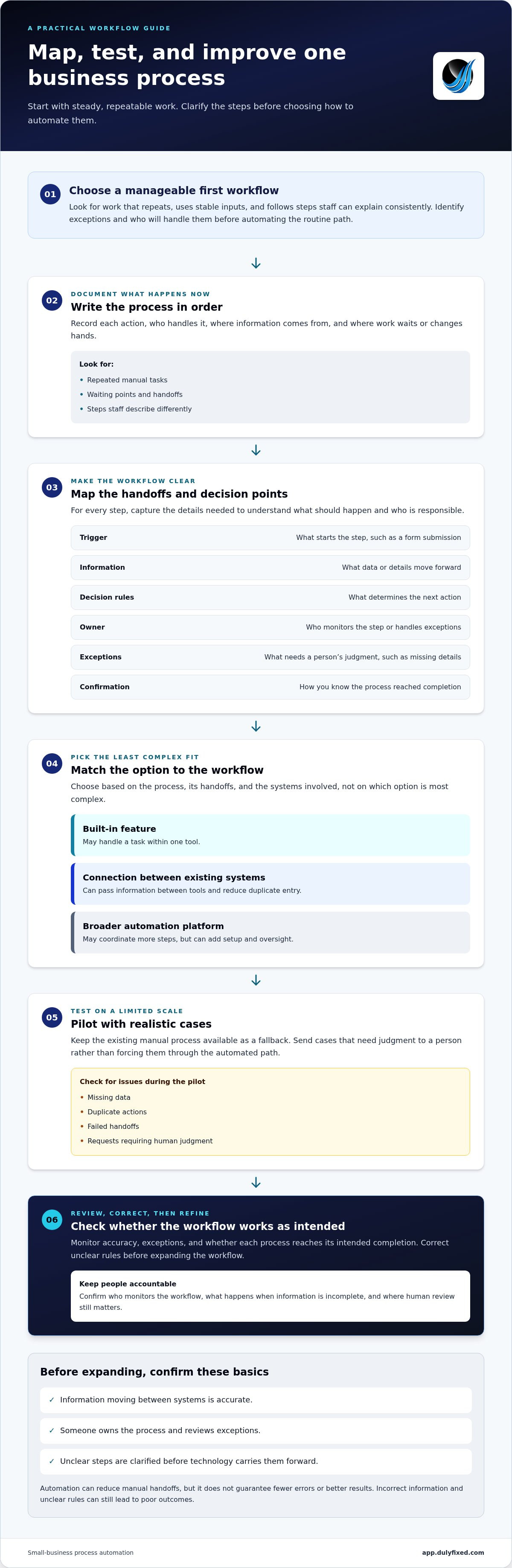
- Document the current process. Write down each action in order, including who handles it and where information comes from. Note repeated tasks, waiting points, and handoffs.
- Define the desired outcome. State what should change, such as reducing manual transfers or making it clear when a request has been handled. Choose an outcome you can check.
- Map tools and handoffs. For every step, record the trigger, information passed, decision rules, owner, exceptions, and final confirmation. A trigger might be a form submission; an exception might be missing details that need a personâs judgment.
Process redesign can mean changing the steps, not just adding technology. Harvard Business Reviewâs article on AI and Business Process Redesign explores that broader idea. For a small business, check whether a step can be removed or clarified before automating it.
How do you test automation without disrupting daily work?
Start with a limited pilot using realistic cases, and keep the existing manual process available as a fallback. Check for missing data, duplicate actions, failed handoffs, and requests that require human judgment. Send exceptions to a person rather than forcing every case through the automated path.
Monitor accuracy, exceptions, and whether each process reaches its intended completion. Review the results and correct unclear rules before expanding the workflow. If mapping and testing involve several business systems, back-office automation support can help coordinate the work.
Connect Business Systems Carefully and Choose a Practical Next Step
Once the workflow is clear, choose the least complex option that addresses its bottleneck. A built-in feature may handle a task within one tool. A connection between existing systems can pass information between them and reduce duplicate entry. A broader automation platform may coordinate more steps, but it can also add setup and oversight. A small business does not need a large platform to improve one focused process.
Integration works best when information moving between systems is accurate and someone owns the process. If a customer record starts with missing or inconsistent details, connecting tools can carry the problem forward. Unclear ownership creates another risk: errors may go unnoticed if nobody reviews exceptions or confirms completion. Decide who monitors the workflow and what happens when information is incomplete before expanding automation.
For processes that cross tools, back-office integrations and automation can help coordinate internal workflows. Choose an approach based on the process, its handoffs, and the systems involved, not on which option is most complex.
When should a small business get help with automation?
Consider support when a workflow spans several tools, exceptions are hard to manage, or staff are unsure who owns the next step. Dulyfixed Small Business Solutions provides back-office automation to integrate systems and streamline internal workflows. Keep the goal practical: make recurring work easier to manage while preserving clear ownership and human review where needed.
Make Your Next Automation Step Practical
The best next move isnât necessarily adding another tool. Decide what a clearer, more manageable process would look like, then map one recurring workflow and its handoffs. That gives you a practical starting point and keeps the project focused on a specific business need.
Whether your small business is in Soap Lake, Ephrata, Moses Lake, Wenatchee, Seattle, Coulee City, Hartline, Wilson Creek, or Marlin, start by identifying one process that repeats and where it gets stuck. Dulyfixed is based in Soap Lake and provides back-office automation to integrate systems and streamline internal workflows.
Discuss a back-office automation project by bringing one recurring workflow, including its handoffs and exceptions.
Frequently Asked Questions
Can a small business automate processes without replacing its existing software?
Yes. Start by checking whether the tools you already use have features that support the task. Before changing anything, identify which system holds the official version of each key detail, such as a customerâs current contact information. Clear data ownership helps prevent conflicting records. If existing tools cannot support the workflow, compare alternatives based on the specific gap.
Does business process automation remove the need for human review?
No. Automation can prepare information or move routine work forward, but people still need to make decisions they are responsible for. For example, a business might automate preparation of a purchase request while keeping approval with the person responsible for spending. Identify which decisions require authorization and make that approval point clear in the process.
How can a business tell whether an automated process is working?
Set a baseline before launch, then compare it with results after the change. Useful measures might include how long a request takes from start to finish, how often staff need to rework it, or how many manual steps it requires. Choose measures tied to the original problem, then review them after the workflow has handled enough routine work to reveal a pattern.
Is AI required to automate business processes?
No. Rule-based automation can handle tasks when the input and next action are predictable. For example, a system could send a scheduled reminder after a set period without interpreting language or making a judgment. AI may help with work involving unstructured information, but it is not required. Use it only if the workflow needs capabilities that simpler rules cannot provide.
Talk With Dulyfixed
If this article connects with something you are trying to improve, send a note about your website, marketing, search visibility, or AI discovery goals.