

Published October 19, 2026
Buying another app is often the wrong first move. If your staff enter the same details in multiple places or rely on manual handoffs, the bigger issue may be how your current systems work together. Business system automation services can help connect tools and streamline back-office workflows, but the process should start with a real bottleneck, not added complexity.
Itâs reasonable to wonder whether your software can integrate, what should stay under human review, and which process is worth improving first. This guide will help you spot a practical opportunity, assess how well your existing systems fit, and choose a manageable next step. Youâll also learn where integrations can reduce repetitive work and where a person should still check the information before it moves forward.
Key Takeaways
- Business system automation services can help address repeated data entry, routine handoffs, and fragmented records by connecting systems and simplifying workflows.
- Map a process from its starting trigger to completion before choosing tools or changing steps.
- Start with a frequent, repeatable task that has clear inputs and outputs, then look for avoidable handoffs.
- Dulyfixed focuses on back-office integrations and workflow streamlining from its base in Soap Lake, Washington, serving clients nationwide.
What business system automation services can simplify for a small business
Business system automation services focus on designing workflow changes and connecting systems so routine administrative steps donât need to be repeated by hand. The goal is to make information move through a process more clearly, not to add software for its own sake. This work can address familiar friction: staff entering the same details in separate systems, handoffs that depend on someone remembering the next step, or records spread across tools.
This is business process automation, or BPA: technology helps carry out business processes. A workflow can follow clear rules without using artificial intelligence. For a useful overview, see Business Process Automation (BPA). AI is a separate capability that may support tasks requiring interpretation; it isnât a requirement for every automated workflow. Dulyfixedâs back-office integrations and automation focuses on connecting systems and streamlining internal workflows.
Which everyday workflows are candidates for automation?
Look for repeatable steps where information is already approved and the next action is predictable. For example, an approved update might be moved from one business system to another, reducing the need to enter the same details again. Routine handoffs may also follow a defined rule, while unusual cases remain with a person.
- Good candidates: recurring tasks with clear inputs, outputs, and rules.
- Keep human review: exceptions, incomplete records, and decisions that rely on judgment.
Invoicing or onboarding may include repeatable administrative steps, but not every decision in those processes should be automated. Start by identifying which steps are routine and which need a personâs review. That distinction helps keep a workflow useful and manageable.
How to Choose Your First Business Workflow to Automate
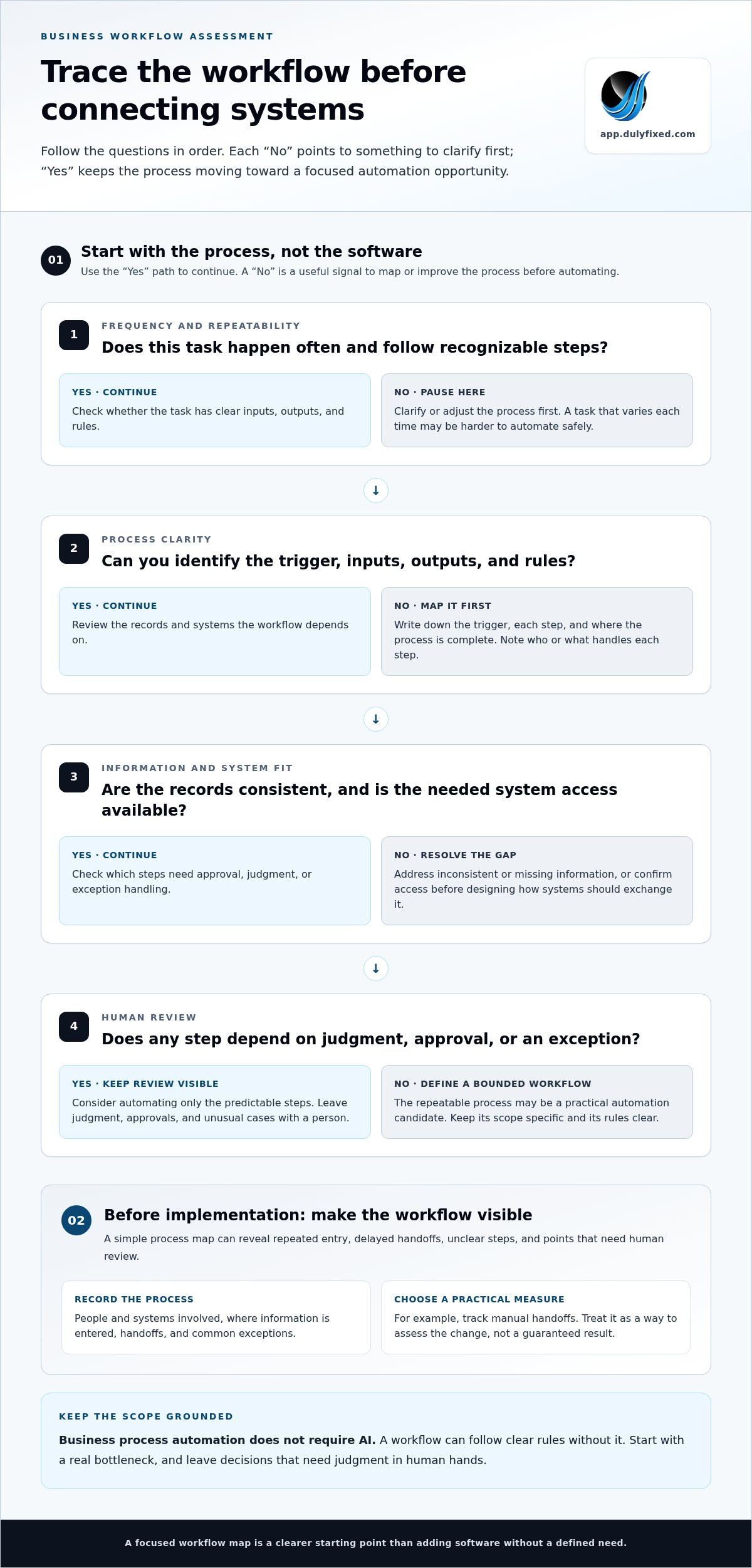
Start with the process, not the software. Choose a workflow that happens often, follows recognizable steps, and has clear inputs and outputs. A task that varies each time or depends on judgment may be harder to automate safely. Mapping the current process first helps reveal whether the main problem is repeated work, a delayed handoff, inconsistent information, or an unclear step.
That map also helps you assess value realistically. Consider how often the process runs, where information is re-entered, how often exceptions occur, and whether the systems involved allow the information to move as needed. Check data quality, too. Automation follows the information and rules it receives, so missing or inconsistent records can make a workflow less dependable. IBMâs overview of the benefits of business automation offers broader context on streamlining repetitive work.
A simple workflow assessment before implementation
Write down the trigger, each step, and the point where the process is complete. For every step, note who or what handles it, where information is entered, and what commonly goes wrong. Mark steps that require approval or judgment so they remain visible in the design. If the workflow involves connected tools, back-office integrations and automation can help address how systems exchange information.
- Map: Record the people, systems, repeated entry, handoffs, and exceptions.
- Assess: Check whether the records are consistent, access is available, and a person should review certain steps.
- Measure: Choose a practical indicator, such as fewer manual handoffs, without assuming the change will achieve it.
This simple review gives you a clearer starting point for discussing business system automation services. Bring your process map and one proposed measure to discuss your automation needs.
How Dulyfixed approaches business system automation services
A productive project discussion starts with a clear definition of the problem and the boundaries of the work. Identify the task you want to improve, who relies on it, and what a useful change would look like. That keeps the conversation focused on the day-to-day process rather than adding technology without a specific purpose.
Consider which details need to stay visible to staff, how errors should be handled, and who will review the workflow after a change. These decisions help shape a manageable scope. Dulyfixed Small Business Solutions’s back-office automation service is relevant when the process involves system connections and internal workflow improvements.
What to prepare before discussing an automation project
Bring notes that show how the task works in practice, not just how it is supposed to work. Include the systems involved, recurring friction, common exceptions, and the decisions that need a personâs judgment. You donât need a technical specification. A clear outline helps make the discussion concrete.
- Describe the issue: Note where work slows down or becomes unclear.
- Set a boundary: Identify which decisions should remain with a person.
- Define a useful change: Say what you want the process to make easier to manage.
Contact Dulyfixed Small Business Solutions to discuss your automation next step.
Make your next step a focused one
You donât need to automate an entire operation to make a useful start. Treat the first workflow as a bounded change: decide what step you want to improve, what should remain in a personâs hands, and how youâll judge whether the new process is working as intended. That gives you a clear basis for weighing business system automation services against the simpler option of adjusting the process manually.
Keep the first goal specific and leave room to learn. If a workflow depends on unclear rules or inconsistent information, clarifying those basics may be the best move before connecting systems. Set a review point to compare the new process with the way the work was handled before. Use what you learn to decide whether to refine this workflow or consider another one.
A focused starting point gives your team room to make thoughtful progress without taking on more change than it can manage.
Each improvement can build on what your team learns along the way.
Frequently Asked Questions
Does business system automation require artificial intelligence?
No. AI is optional. Whether it belongs in a project depends on how much uncertainty the task can tolerate and how much review its outputs need. For a process with customer or financial consequences, decide who checks uncertain results and what happens when they need correction. Add AI only when it serves a clear business need.
Can business automation work with software a small business already uses?
It can, depending on the tools and their setup. Before relying on a connection, test representative records. Check that the information arrives in the expected format, duplicates are handled as intended, and staff can spot a failed transfer. A test with common cases and one known exception can reveal gaps before the workflow is used more broadly.
How long does it take to automate a business process?
Thereâs no standard duration. Planning time for review matters too: decision-makers may need to assess test cases, settle open questions, and agree what counts as ready. Their availability can affect the schedule. Once review points are clear, set a realistic rollout plan that gives the team time to evaluate the process before relying on it.
Talk With Dulyfixed
If this article connects with something you are trying to improve, send a note about your website, marketing, search visibility, or AI discovery goals.